Indexes are data structures optimized for data retrieval operations - basically, they're faster to query than a database. An index consists of the following elements:
- Instances - data structures which can be queried for data
- An IndexBuilder - a piece of software which creates an instance, it can be configured using various builder settings (if they're implemented)
- Field mappings are instructions for which data from the source (typically the DW database) should be added to which fields on the instance and how the data should be stored and analyzed. You can create predefined sets of field mappings in a SchemaExtender.
DynamicWeb 10 ships with five standard IndexBuilders...
...and four standard SchemaExtenders:
- ContentIndexSchemaExtender
- ProductIndexSchemaExtender
- FileIndexSchemaExtender
- UserIndexSchemaExtender
So what are your options to extend upon this base? Well, you can:
- Extend a standard IndexBuilder
- Create a custom IndexBuilder
- Create a custom SchemaExtender
Extending an IndexBuilder
Three of our standard builders (Products, Content, Users) supports extending the build process with custom data via IndexBuilderExtenders. The process is as follows:
- Make sure the SkipExtenders-setting on the builder configuration is set to False
- Add a field to the index with a custom source
- Write the code which adds data to the field
Make sure IndexBuilderExtenders are activated
First, make sure SkipExtenders is not set to True on the IndexBuilder:
- Go to Settings > Repositories and open your index
- Open the build-definition
- Verify that Skip extenders is unchecked
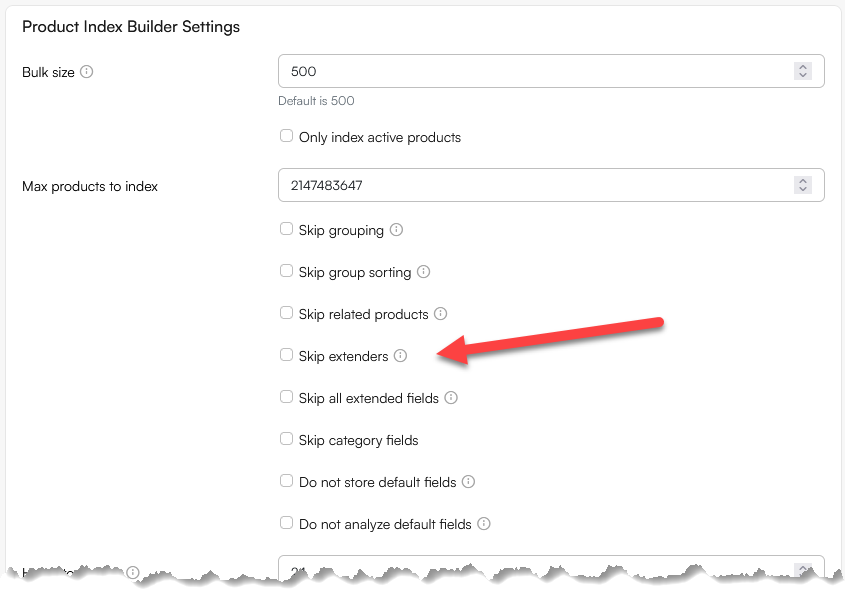
Create a field to put data into
Next, add a field with a custom source to the index to act as a data destination:
- On the index, open the index fields screen
- Click New index field and:
- Select a field or grouping field type field
- Provide a Name and a System name
- Select a data type appropriate for the source data
- Check stored and indexed
Adding data to the field
Finally, create the class that will implement the interface of the index builder you want to extend, in this example IIndexBuilderExtender<ProductIndexBuilder>:
using Dynamicweb.Ecommerce.Indexing;

namespace Dynamicweb.Indexing.Examples
{
    public class ProductIndexExtender : IIndexBuilderExtender<ProductIndexBuilder>
    {
        public void ExtendDocument(IndexDocument indexDocument)
        {
            string myCustomFieldValue = "sample value";

            if (!indexDocument.ContainsKey("MyCustomField"))
            {
                indexDocument.Add("MyCustomField", myCustomFieldValue);
            }
            else
            {
                indexDocument["MyCustomField"] = myCustomFieldValue;
            }
        }
    }
}
Don't forget to add references to Dynamicweb.Indexing and Dynamicweb.Ecommerce and any other dlls you need to use.
Creating a custom IndexBuilder
To implement a custom IndexBuilder you can implement the IndexBuilderBase.
- In the SupportedActions property you can define the builder actions the builder can handle, e.g. Full or Update
- In the DefaultSettings property you can define builder settings with default values that your builder supports – the user will be able to change them in GUI
- In the GetFields() method you can define the list of fields that you want to be saved in the index, usually it contains an instance of the SchemaExtender class that returns list of the fields
- In the Build() method you need to handle the actions and build your index data. In this example based on the start folder you can process the files from this folder and save them to the index
In the example below we're building a custom FileIndexer which extracts the contents of PDF-files and makes the text searchable. Please note that this example uses the open source iTextSharp PDF-library to read and parse from PDF-documents. You will have to add it as a reference to try the example out IRL.
using Dynamicweb.Diagnostics.Tracking;
using Dynamicweb.Indexing.Schemas;
using Dynamicweb.Configuration;
using Dynamicweb.Content.Files;
using System;
using System.IO;
using System.Linq;
using System.Collections.Generic;
using iTextSharp;

namespace Dynamicweb.Indexing
{
    public class CustomPDFIndexBuilder : IndexBuilderBase
    {
        // No http context available - getting domain from custom setting. Used for building complete link to file.
        private string Domain = SystemConfiguration.Instance.GetValue("/Globalsettings/Settings/CustomPDFFileIndexer/Domain"); // your-domain.com
        private string StartFolder = FilesAndFolders.GetFilesFolderName();

        /// <summary>
        /// List of supported actions
        /// </summary>
        public override IEnumerable<string> SupportedActions
        {
            get
            {
                return new string[] { "Full", "Update" };
            }
        }
        /// <summary>
        /// Gets default settings collection
        /// </summary>
        public override IDictionary<string, object> DefaultSettings
        {
            get { return new Dictionary<string, object> { { "StartFolder", StartFolder }, { "Domain", Domain } }; }
        }

        /// <summary>
        /// Default constructor
        /// </summary>
        public CustomPDFIndexBuilder()
        {
            Action = "Full";
            Settings = new Dictionary<string, string>();
        }

        /// <summary>
        /// Creates new object using settings data
        /// </summary>
        /// <param name="settings"></param>
        public CustomPDFIndexBuilder(IDictionary<string, string> settings)
        {
            Action = "Full";
            Settings = settings;
        }

        /// <summary>
        /// Gets index builder fields
        /// </summary>
        /// <returns>Set of key-value pairs</returns>
        public override IEnumerable<FieldDefinitionBase> GetFields()
        {
            FileIndexSchemaExtender extender = new FileIndexSchemaExtender();
            var schemaExtenderFields = extender.GetFields() as List<FieldDefinitionBase>;

            // Add your custom fields
            if (schemaExtenderFields != null)
            {
                schemaExtenderFields.Add(new FieldDefinition() { Name = "Text Content", SystemName = "TextContent", Source = "TextContent", TypeName = "System.String", Group = "PDF Specific", Indexed = true, Analyzed = false, Stored = true });
                schemaExtenderFields.Add(new FieldDefinition() { Name = "Link to file", SystemName = "LinktToFile", Source = "LinkToFile", TypeName = "System.String", Group = "PDF Specific", Indexed = true, Analyzed = false, Stored = true });
            }
            return schemaExtenderFields;
        }

        /// <summary>
        /// Builds current sql index
        /// </summary>
        /// <param name="writer"></param>
        /// <param name="tracker"></param>
        public override void Build(IIndexWriter writer, Tracker tracker)
        {
            string directory = string.Empty;
            tracker.LogInformation("{0} building using {1}", GetType().FullName, writer.GetType().FullName);
            try
            {
                tracker.LogInformation("Opening index writer.");
                writer.Open(false);
                tracker.LogInformation("Opened index writer to overwrite index");

                //load builder settings
                if (Settings.ContainsKey("StartFolder"))
                    StartFolder = Settings["StartFolder"];

                if (Settings.ContainsKey("Domain"))
                    Domain = Settings["Domain"];

                tracker.LogInformation("StartFolder: '{0}'", StartFolder);
                tracker.LogInformation("Domain: '{0}'", Domain);

                if (Action.Equals("Full"))
                {
                    //process files
                    tracker.LogInformation("Starting processing files.");
                    directory = Core.SystemInformation.MapPath("/Files/") + "\\" + StartFolder.Trim(new char[] { '/', '\\' });
                    if (Directory.Exists(directory))
                    {
                        List<string> fileList = FileList(directory, tracker);
                        tracker.Status.TotalCount = fileList.Count();

                        foreach (string file in fileList)
                        {
                            try
                            {
                                FileInfo fileInfo = new FileInfo(file);
                                IndexDocument document = new IndexDocument();
                                document["FileName"] = fileInfo.Name;
                                document["FileFullName"] = fileInfo.FullName;
                                document["LinkToFile"] = LinkToFile(fileInfo.FullName);
                                document["Extension"] = fileInfo.Extension;
                                document["TextContent"] = GetPdfText(fileInfo.FullName, tracker);
                                document["DirectoryFullName"] = fileInfo.DirectoryName;
                                WriteDocument(writer, tracker, document, fileInfo.FullName);
                            }
                            catch (Exception ex)
                            {
                                tracker.LogInformation(string.Format("Failed getting file-info from '{0}'. Failed with exception: {1}", file, ex.Message));
                            }
                        }
                    }
                    tracker.LogInformation("--- Finished processing files ---");
                }
                else
                {
                    //check other actions and handle them
                }
            }
            catch (Exception ex)
            {
                tracker.Fail("Custom index builder experienced a fatal error: ", ex);
            }
        }

        private void WriteDocument(IIndexWriter writer, Tracker tracker, IndexDocument document, string filePath)
        {
            //allow extenders to process the index document
            foreach (var extender in Extenders)
            {
                extender.ExtendDocument(document);
            }
            //write to index
            writer.AddDocument(document);

            tracker.Status.Meta["CurrentFile"] = filePath;
            tracker.IncrementCounter();
        }

        private List<string> FileList(string dir, Tracker tracker)
        {
            // Prepare the final list of PDF files
            string[] files = Directory.GetFiles(dir, "*.pdf", SearchOption.AllDirectories);
            List<string> returnList = new List<string>();

            for (int i = 0; i < files.Length; i++)
            {
                try
                {
                    if (files[i].Length > 260)
                    {
                        tracker.LogInformation(string.Format("Length of full path to file exceeded 260 characters. File ignored: '{0}'", files[i].ToString()));
                    }
                    else
                    {
                        FileInfo fileInfo = new FileInfo(files[i].ToString());
                        if (fileInfo != null)
                            returnList.Add(files[i].ToString());
                    }
                }
                catch (Exception ex)
                {
                    tracker.LogInformation(string.Format("Preparing file list failed with the exception: '{0}'", ex.Message));
                }
            }
            return returnList;
        }

         private string GetPdfText(string InputFile, Tracker tracker)
        {
            string sOut = string.Empty;
            try
            {
                iTextSharp.text.pdf.PdfReader reader = new iTextSharp.text.pdf.PdfReader(InputFile);
                for (int i = 1; i < reader.NumberOfPages; i++)
                {
                    iTextSharp.text.pdf.parser.SimpleTextExtractionStrategy tes = new iTextSharp.text.pdf.parser.SimpleTextExtractionStrategy();
                    sOut += iTextSharp.text.pdf.parser.PdfTextExtractor.GetTextFromPage(reader, i, tes);
                }
            }
            catch (Exception ex)
            {
                tracker.LogInformation(string.Format("iTextSharper failed parsing PDF: '{0}'. Failed with exception: {1}", InputFile, ex.Message));
            }
            return sOut;
        }

        private string LinkToFile(string File)
        {
            try
            {
                if (Domain == string.Empty)
                    return "";

                string file = File.Substring(File.IndexOf(@"\Files"));
                file = file.Replace(@"\", "/");
                string link = string.Format("https://{0}{1}", Domain, file);
                return link;
            }
            catch (Exception)
            {
                return "";
            }
        }
    }
}
Following the example above, you can write you own index builder and index any other data you need. Once the custom IndexBuilder has been built and uploaded to the bin folder for the solution, it will be available alongside all the standard IndexBuilders when creating a new build, with the actions and settings you created.
Remember that a builder retrieves data from a source and also handles the build process – but depends on field mappings to know where in the index the data should be placed. You can read about creating a custom SchemaExtender with predefined field mappings for your builder below.
Creating a custom SchemaExtender
SchemaExtenders are predefined sets of field mappings for an IndexBuilder. The Field-object contains the following basic properties:
- Name
- SystemName
- TypeName
- Source
When you define fields, you can also enable/disable the following storage instructions for each field:
- Stored - the source has its value stored as-is in the index. This does not affect indexing or searching – it simply controls whether you want the index to act as data store for value
- Indexed - the field is made searchable, and stored as a single value. This is appropriate for keyword or single-word fields, and for multi-word fields you want to retrieve and display as single values (e.g. for facets)
- Analyzed - the field is run through an analyzer before the tokens emitted are indexed
As a rule, fields should be indexed if you want to be able so search for them, and they should be analyzed if you want to be able to search for partial values or tokenized values. They should be stored if the data source comes from outside DynamicWeb or you have some other reason to store the value directly in the index.
To create the custom SchemaExtender you implement the IIndexSchemaExtender interface - in this example we've added two fields matching the IndexBuilder example from the previous section of this article:
using System.Collections.Generic;
using Dynamicweb.Indexing.Schemas;

namespace Dynamicweb.Indexing
{
    public class CustomIndexBuilderSchemaExtender : IIndexSchemaExtender
    {
        public IEnumerable<FieldDefinitionBase> GetFields()
        {
            List<FieldDefinitionBase> fields = new List<FieldDefinitionBase>();
            fields.Add(new FieldDefinition
            {
                Name = "File full name",
                SystemName = "FileFullName",
                Source = "FileFullName",
                TypeName = "System.String",
                Analyzed = false,
                Indexed = true,
                Stored = true
            });
            fields.Add(new FieldDefinition
            {
                Name = "Extension",
                SystemName = "Extension",
                Source = "Extension",
                TypeName = "System.String",
                Analyzed = false,
                Indexed = true,
                Stored = true
            });
            return fields;
        }
    }
}
When built and deployed, you should be able to select this SchemaExtender in the regular manner - i.e. when adding fields to an index. For debugging purposes consider using the Query Publisher app or an external tool like Luke.