A query is a request for data submitted to an index - e.g. Return all active products with a price below 100. Queries are created by stringing together a set of expressions which limit the data you receive - an empty query thus returns all data in the index.
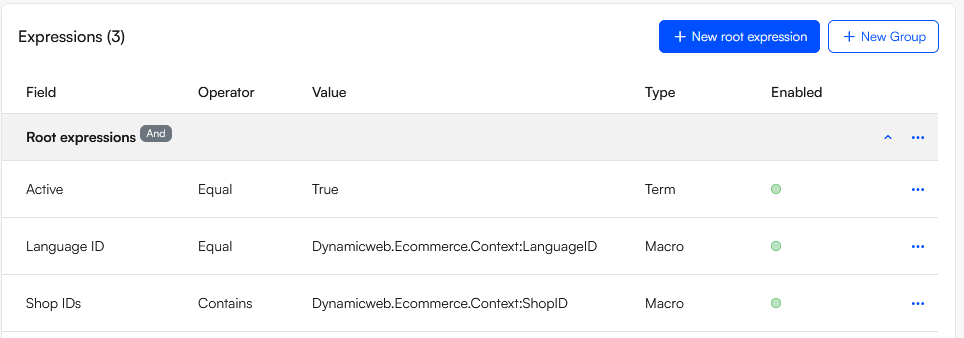
An expression is not particularly complicated; it consists of:
- An index field
- An operator - such as contains, equal, and in
- A test value
Test values can be either:
- Constants set manually
- Passed from a parameter
- Terms selected based on field values in the index
- Returned by a macro
- Calculated by a code provider
Since the index fields are supplied by the index, and operators are standard Lucene-operators, extensibility for this area means customizing test values by creating:
- Custom macros
- Custom code providers
- Custom value mappers
You can read about each of these options in the sections below.
Custom macros
Macros are dynamic values retrieved from the context - for example a PageID, a WebsiteID a LanguageID, etc. They are typically used in queries which are used across several websites and need to e.g. return products based on the context in some way.
To create a custom macro inherit from the Dynamicweb.Extensibility.Macros.Macro base class and override the Name and SupportedActions properties and the Evaluate-method, see this example which returns favorite products ids:
sing Dynamicweb.Core;
using Dynamicweb.Data;
using Dynamicweb.Extensibility.Macros;
using Dynamicweb.Logging;
using System;
using System.Collections.Generic;
using System.Data;

namespace Dynamicweb.Indexing.Examples
{
    public class FavoritesMacro : Macro
    {
        public override object Evaluate(string action)
        {
            try
            {
                if (action == "FavoritesByRequestUserId")
                {
                    return GetFavoritesByUserId();
                }
            }
            catch (Exception ex)
            {
                ILogger logger = LogManager.Current.GetLogger("FavoritesMacro");
                logger?.Error("FavoritesMacro error", ex);
            }
            return null;
        }

        private static object GetFavoritesByUserId()
        {
            int userid = Converter.ToInt32(Context.Current.Request["UserID"]);
            if (userid > 0)
            {
                List<string> ids = new List<string>();
                string sql = string.Format("SELECT favoritesProducts.ProductId FROM AccessUser users JOIN EcomCustomerFavoriteLists favoritesList ON users.AccessUserId = favoritesList.AccessUserId JOIN EcomCustomerFavoriteProducts favoritesProducts ON favoritesList.Id = favoritesProducts.FavoriteListId WHERE users.AccessUserId = {0}", userid);
                using (IDataReader reader = Database.CreateDataReader(sql))
                {
                    while (reader.Read())
                    {
                        ids.Add(reader.GetString(0));
                    }
                }
                return ids.ToArray();
            }

            return null;
        }

        public override string Name
        {
            get { return "Custom.Ecommerce.Favorites"; }
        }

        public override IEnumerable<string> SupportedActions
        {
            get
            {
                return new List<string>() { "FavoritesByRequestUserId" };
            }
        }
    }
}
Custom code providers
Like macros, code providers allow you to dynamically construct a test value for an expression - but a code provider allows you to define extra parameters and use them to calculate the test value whenever a query is being executed. For example, a code provider might match all products created in the past 7 days.
To create a custom code provider you inherit from the Dynamicweb.Extensibility.CodeProviders.CodeProviderBase class - here is an example from the standard DateTime code provider:
using System;
using System.Collections;
using Dynamicweb.Extensibility.AddIns;
using Dynamicweb.Extensibility.Editors;
using Dynamicweb.SystemTools;
using Dynamicweb.Extensibility;

namespace Extensibility.CodeProviders
{
    [AddInName("Dynamicweb.ICodeProvider"), AddInLabel("Custom Code Provider"), AddInActive(true), AddInGroup("System.DateTime")]
    public class CustomCodeProvider : CodeProviderBase, IDropDownOptions
    {

        [AddInParameter("Number"), AddInParameterEditor(typeof(IntegerNumberParameterEditor), "inputClass=inputControl")]
        public int Number { get; set; }

        [AddInParameter("Interval"), AddInParameterEditor(typeof(DropDownParameterEditor), "inputClass=inputControl")]
        public string Interval { get; set; }

        public override string BuildCodeString()
        {
            return string.Format("@Code(DateTime.Now.Add{0}({1}))", Interval, Number);
        }

        public override string BuildDisplayValue()
        {
            return string.Format("Today {0} {1} {2}", Number >= 0 ? "+" : "-", Math.Abs(Number), Interval);
        }

        public Hashtable GetOptions(string dropdownName)
        {
            Hashtable options = new Hashtable();

            options.Add("Minutes", Translate.Translate("Minutes"));
            options.Add("Hours", Translate.Translate("Hours"));
            options.Add("Days", Translate.Translate("Days"));
            options.Add("Months", Translate.Translate("Months"));
            options.Add("Years", Translate.Translate("Years"));

            return options;
        }
    }
}
This code provider evaluates the expression based on the parameters entered in the Interval and Number input controls, and the expression evaluation is then carried out in the BuildCodeString() method. The BuildDisplayValue() method calculates the value as shown in the UI based on the parameters, e.g. Today + 2 Hours.
Custom value mappers
A value mapper allows you to map a list of terms from an index to the appropriate object. For instance, the DateTimeValueMapper converts index terms to a date time object, the GroupIDsValueMapper gets the available product groups by term-values and returns the list of group IDs, and so on.
To create a custom value mapper you should implement the ValueMapperBase class. Here is a custom ProductType value mapper which maps from term values (Stock, GiftCard) to the values used by the system for the Dynamicweb.Ecommerce.Products.ProductType property.
using System;
using System.Collections.Generic;
using Dynamicweb.Extensibility.AddIns;
using Dynamicweb.Indexing.Querying;
using Dynamicweb.Ecommerce.Products;

[AddInName("ProductType"), AddInGroup("Dynamicweb.Ecommerce.Indexing.ProductIndexBuilder, Dynamicweb.Ecommerce"), AddInName("Type")]
public class CustomProductTypeValueMapper : ValueMapperBase
{
    public override IEnumerable<FieldValueMapping> MapValues(IEnumerable<string> terms)
    {
        List<FieldValueMapping> mappings = new List<FieldValueMapping>();

        foreach (string term in terms)
        {
            ProductType type;
            if(Enum.TryParse(term, out type))
            {
                mappings.Add(new FieldValueMapping
                {
                    Key = term,
                    Value = type.ToString()
                });
            }
        }

        return mappings;
    }
}