The DynamicWeb D365 Business Central Plugin-Unit is a component in an integration between a DynamicWeb solution and a Dynamics 365 Business Central installation.
In this article you will learn how to extend this plugin - which is, in fact, an extension app in itself - using the AL programming language.
Extending the plugin-unit in this manner empowers ERP partners to create customer and project-specific code, whilst ensuring that you can always run the latest version of DynamicWeb Plug-In Unit on the latest version of Dynamics 365 Business Central.
Events
There are 70+ events available in the standard plug-in unit to subscribe to - all placed into appropriate codeunits that have a prefix of Dynamicweb and a suffix of Publisher:
DynamicwebPublisher contains global events such as:
- OnBeforeExecuteRequest: Occurs before any request is processed
- OnAfterExecuteXmlRequest: Occurs after request that returns xml is processed
- OnAfterExecutePdfRequest: Occurs after request that returns pdf is processed
- OnBeforeSendXmlResponse: Occurs before sending response content
- DynamicwebUsersPublisher contains events for handling customers, contacts, sales persons, their addresses, impersonations, user groups, exporting users
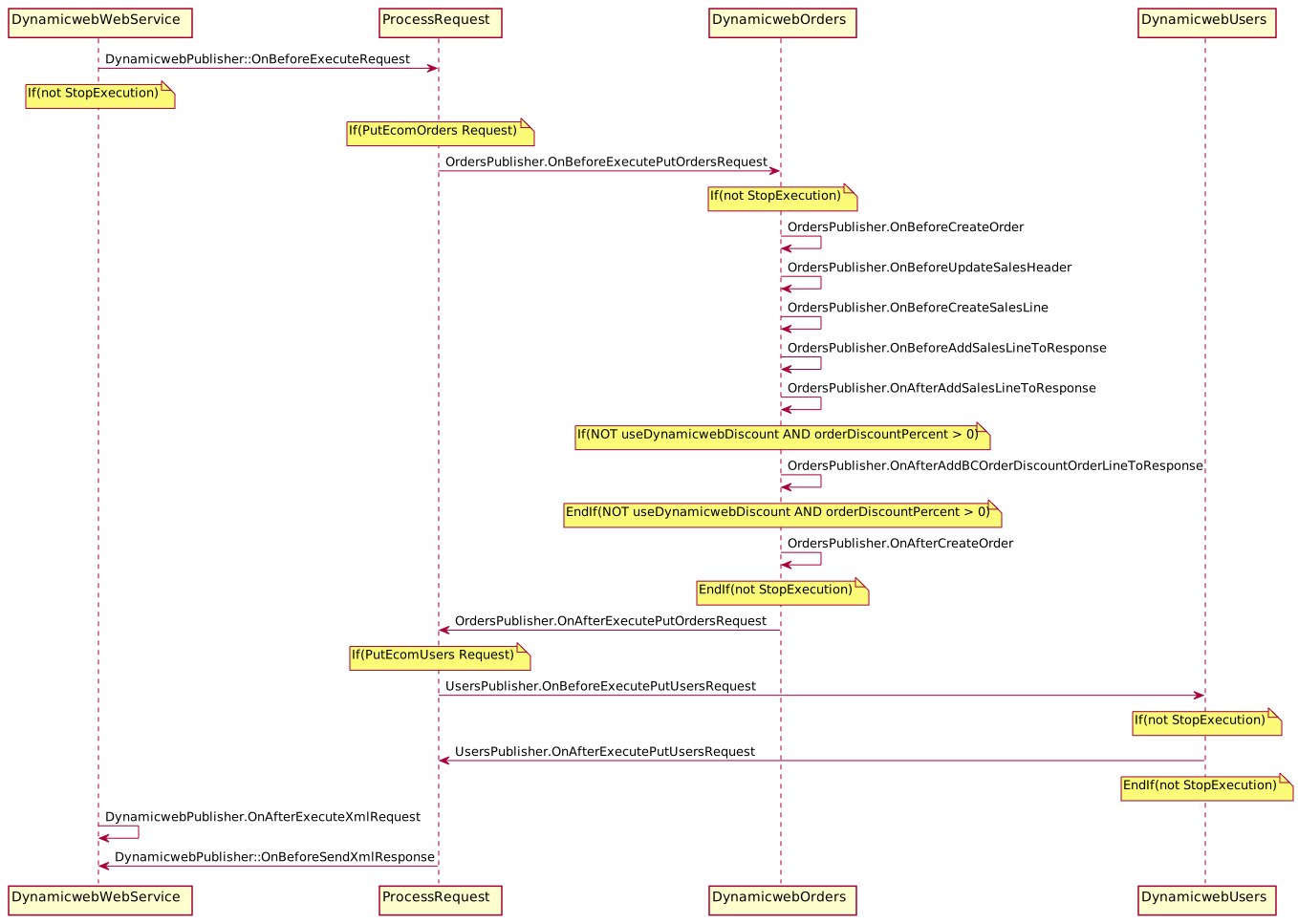
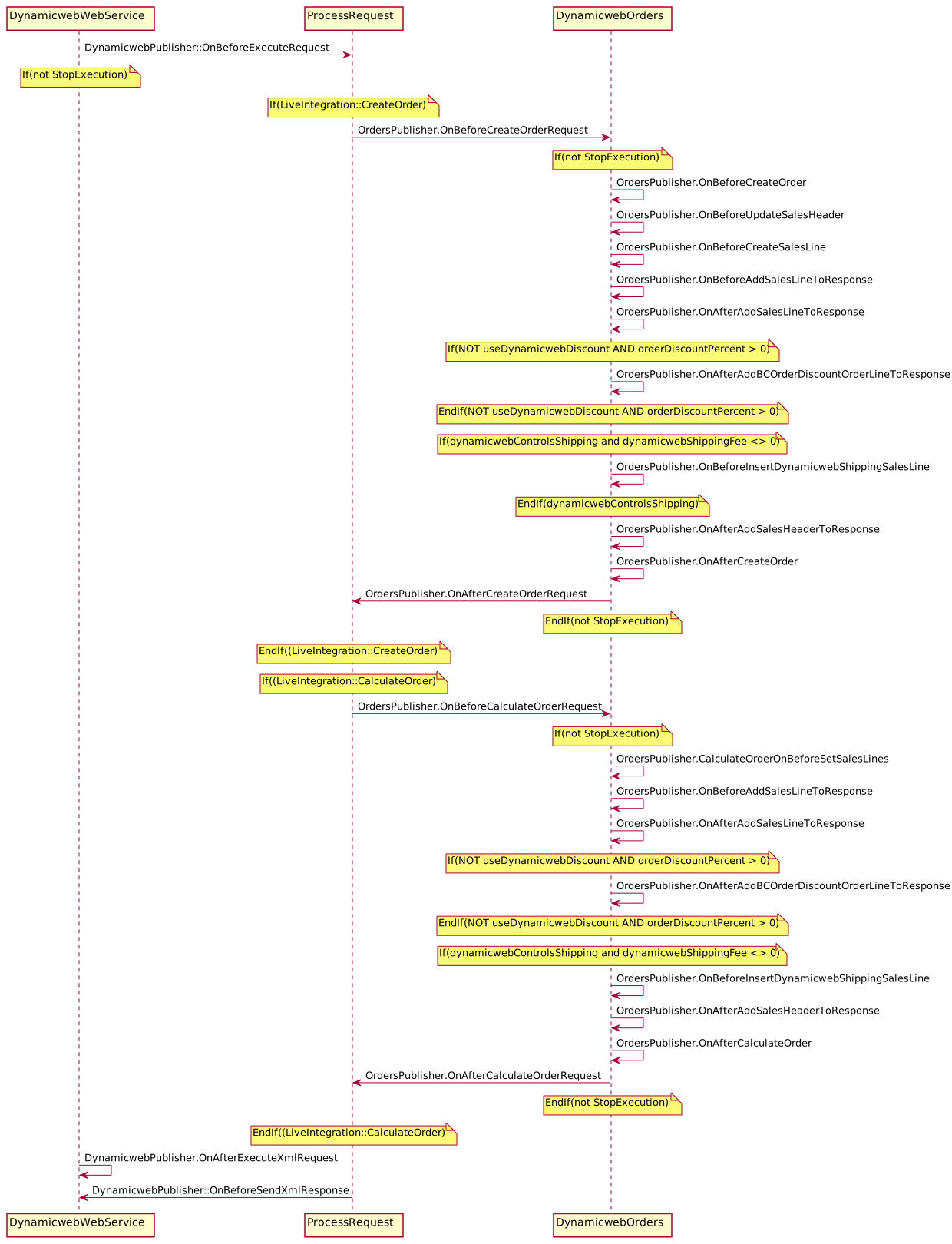
DynamicwebOrdersPublisher contains events for handling exporting orders, writing order notes, Live integration calculate order and create order requests, sales header and sales line objects extensibility, discounts, shipping fees, etc.
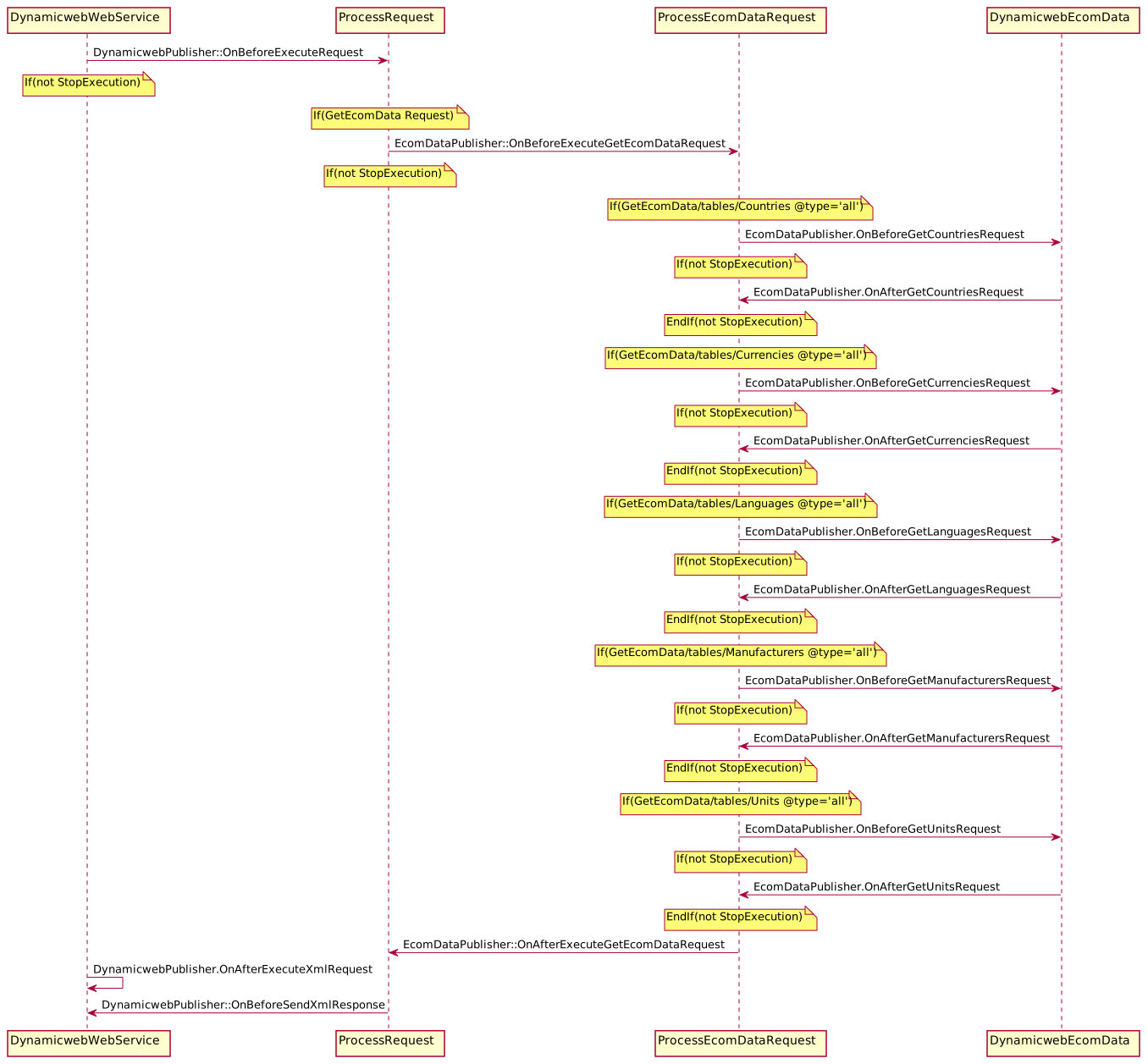
DynamicwebEcomDataPublisher contains events related to countries, currencies, manufacturers, languages, and units.
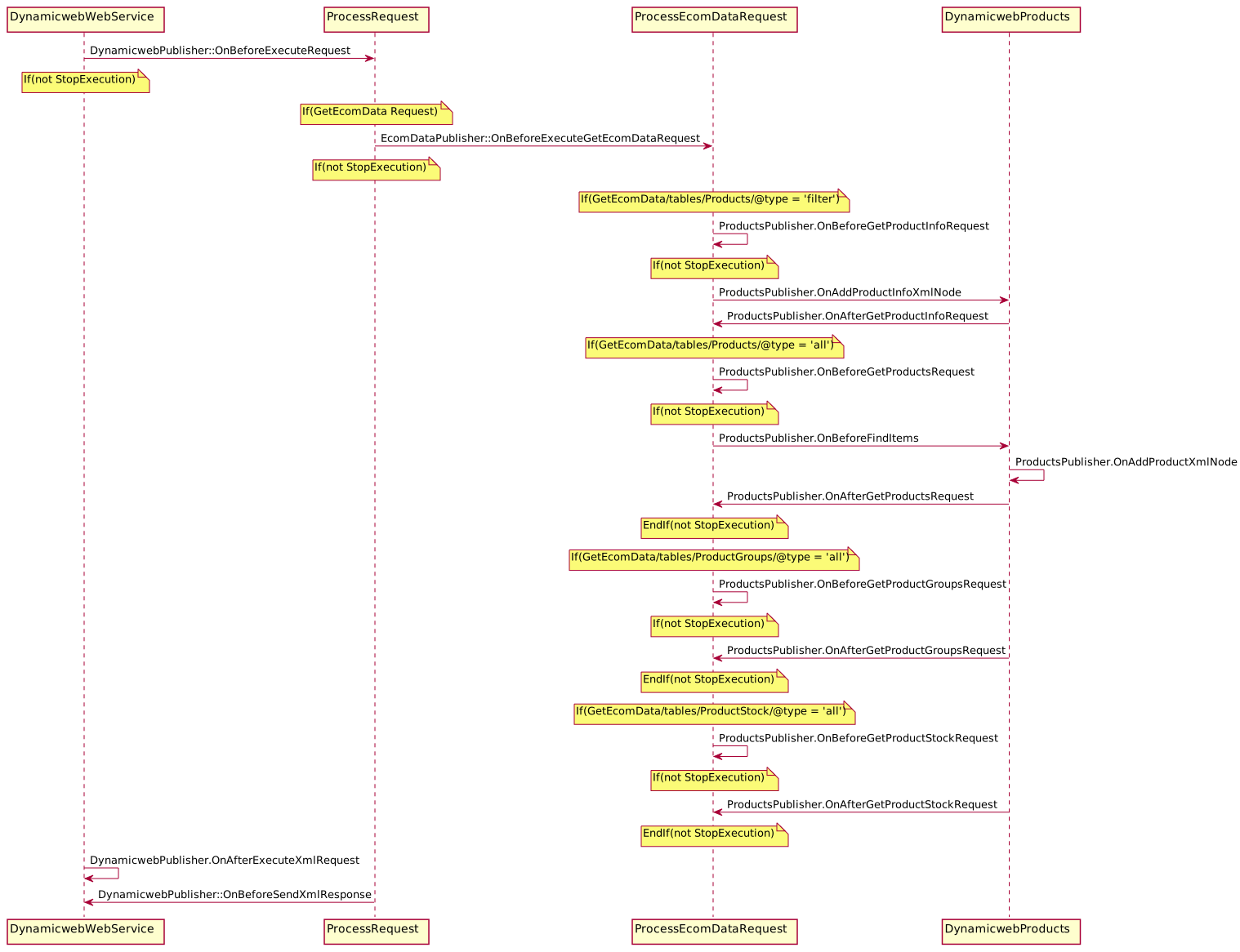
DynamicwebProductsPublisher contains events for handling products, product groups, stock, Live integration product info request, etc.
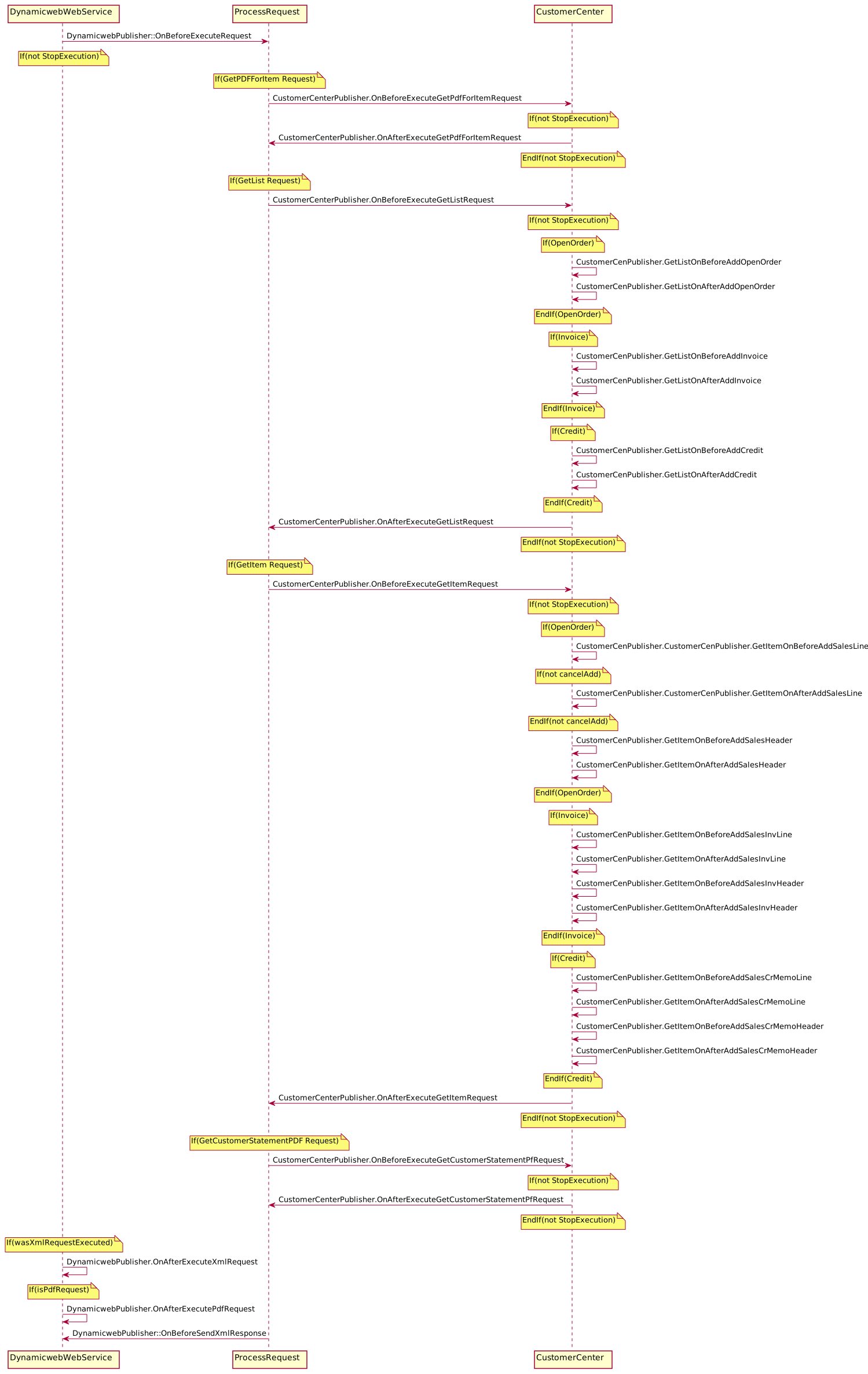
DynamicwebCustomerCenPublisher contains Customer Center related events for creating PDF-generation, orders lists, and order details To subscribe to these events choose the appropriate publisher and the events from it.
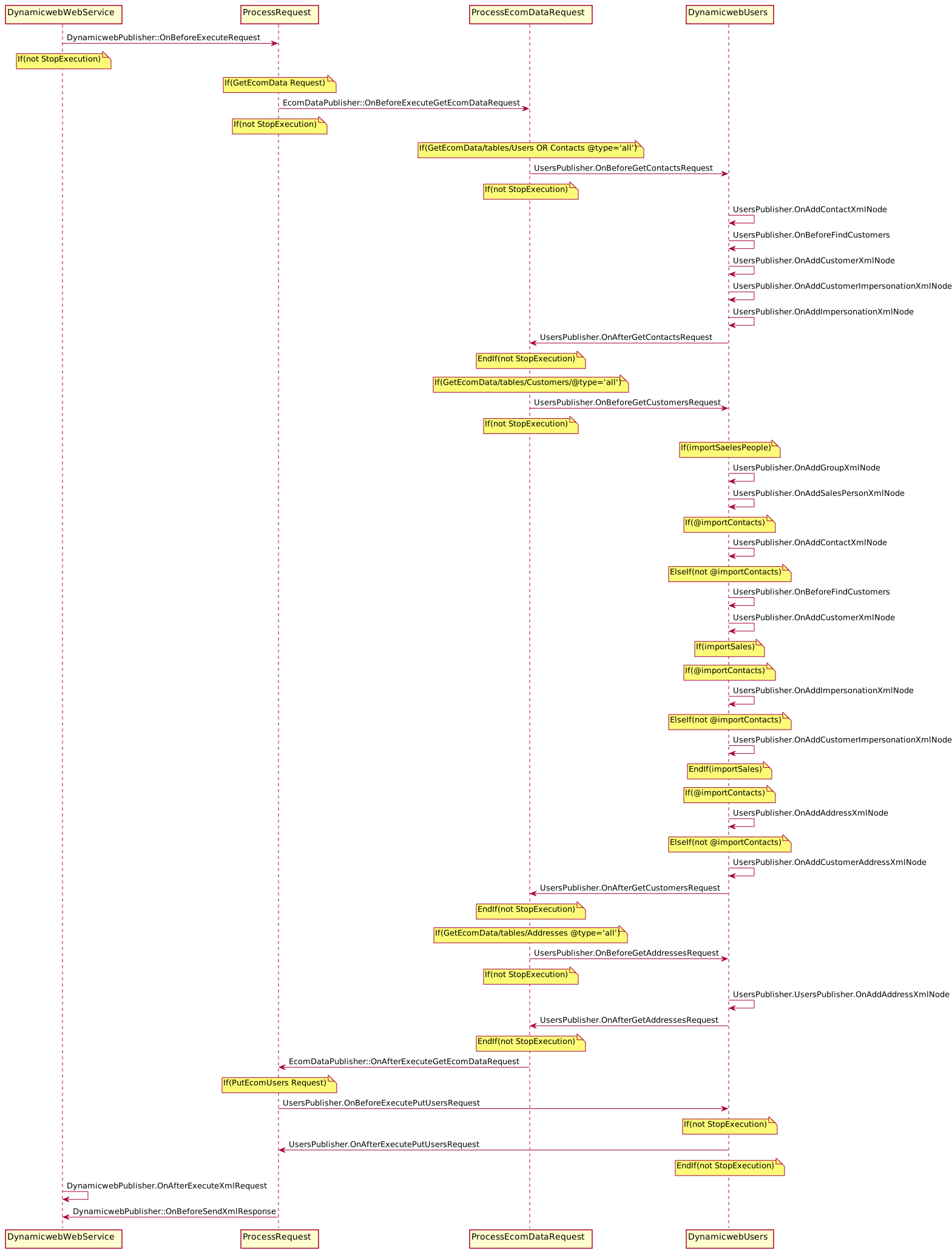
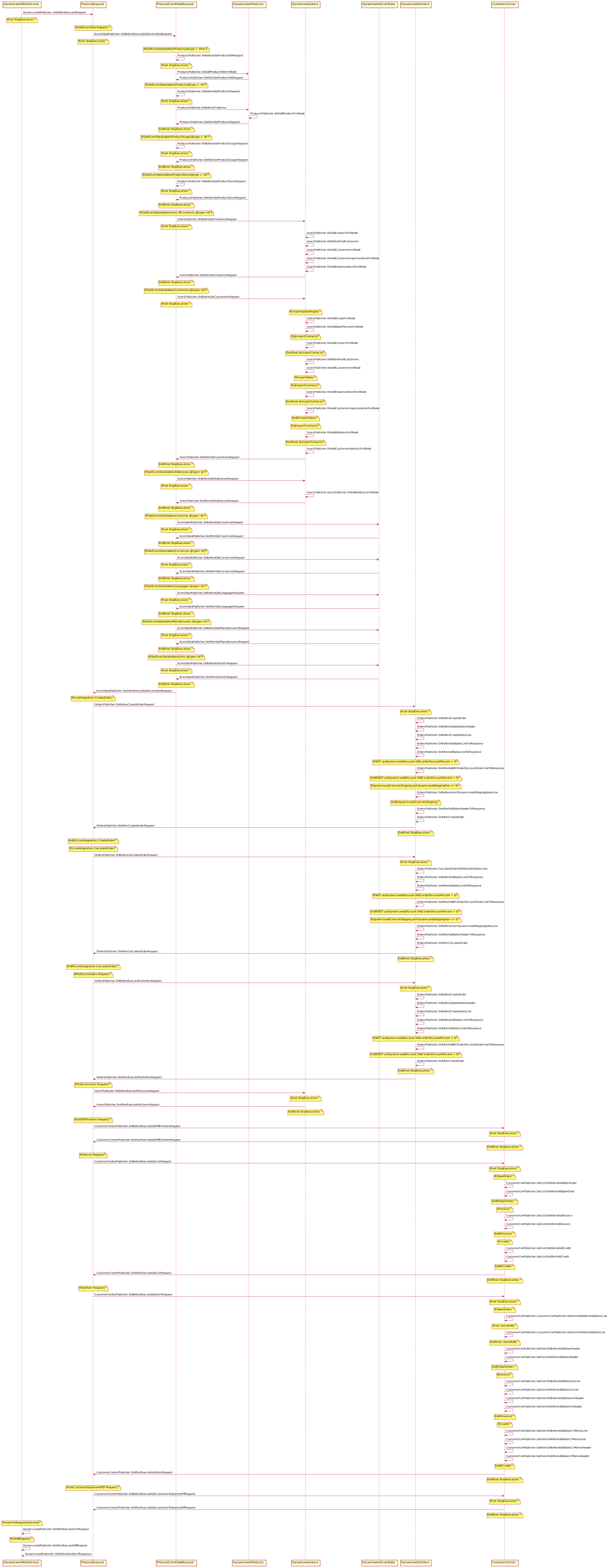
For a quick overview of the many extensibility events, check the UML diagram appendix at the bottom of the page.
Visual Studio Code Setup
This tutorial uses Microsoft Visual Studio Code to edit and publish extensions to the DynamicWeb Business Central Plug-in unit.
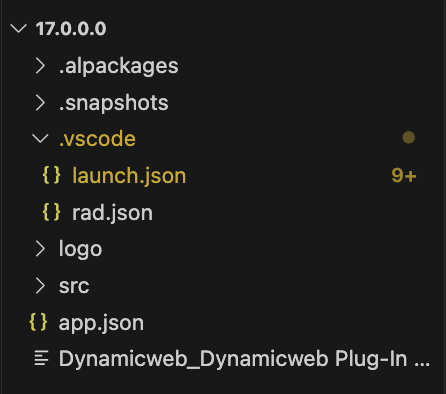
To get started open the example project folder in VS Code. The contents should look something like this depending on which version of the example project you have downloaded:
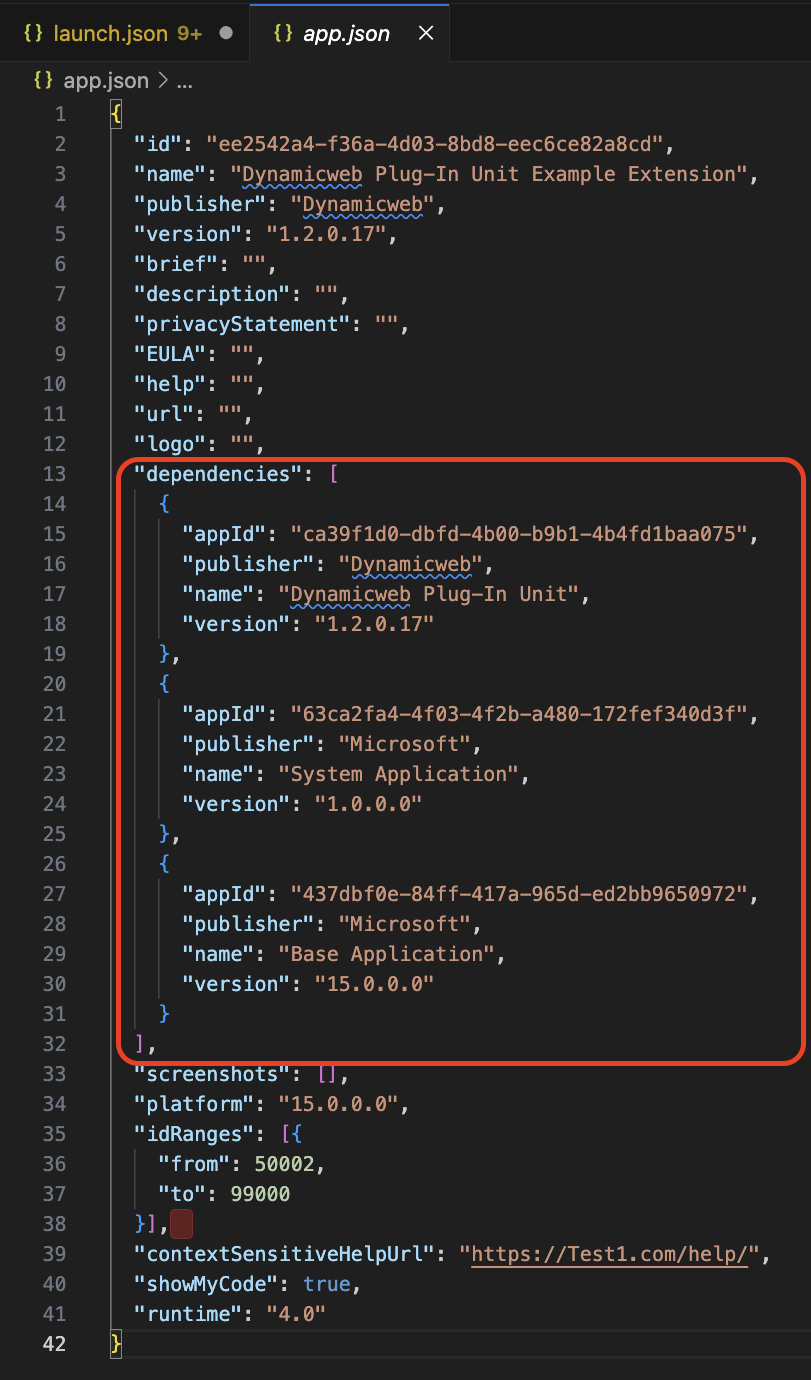
To extend the DynamicWeb Plug-In Unit you must first add a reference to the DynamicWeb base app in the app.json file. This file also needs references to the Microsoft System and Base application. The IDs and version numbers of each of these can be located in Extension Management in the Business Central web interface.
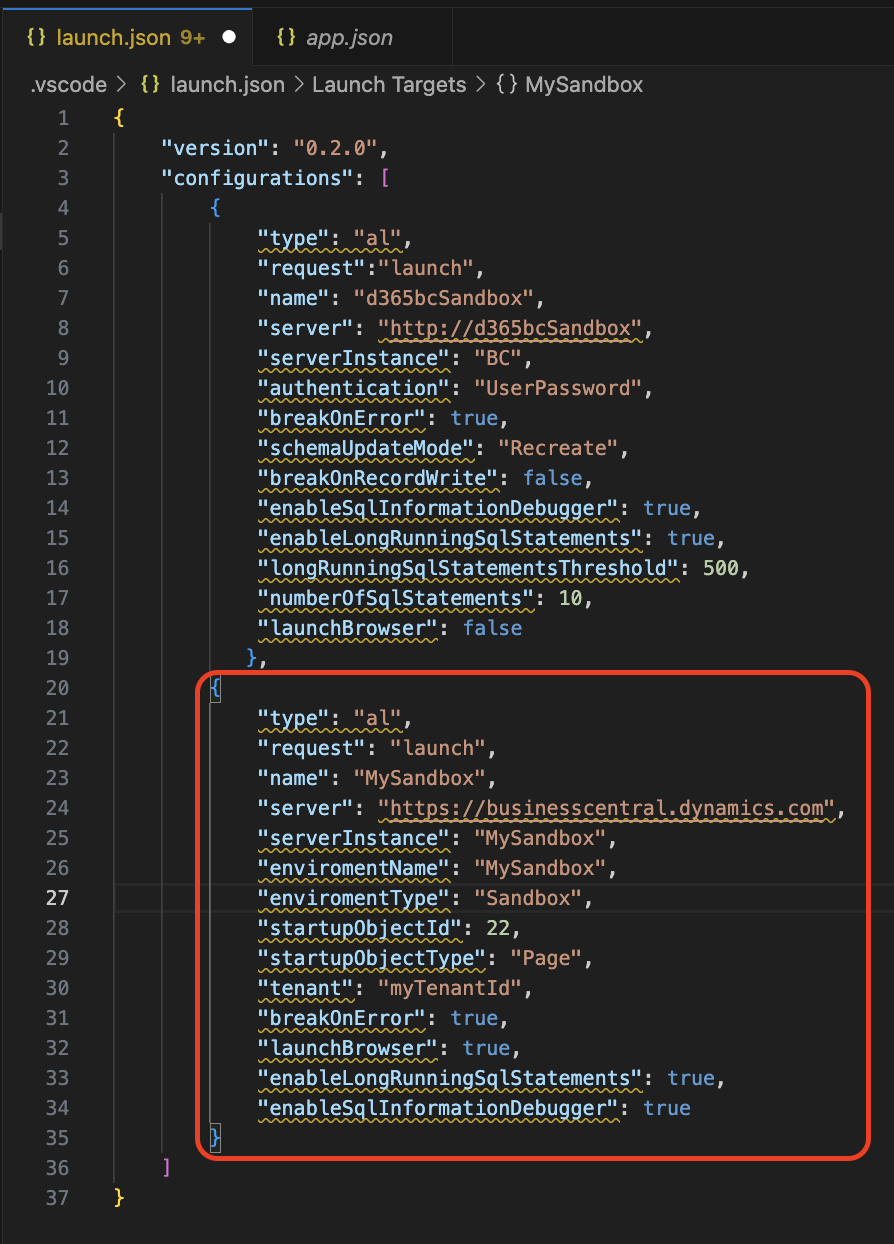
Next, you need to add a references in the launch.json file to the Business Central instance(s) on which you wish to publish the extension.
Next, install the AL Package Extension from the Visual Studio Code marketplace. This extension lets you download the symbols/packages of the specified Business Central instances. Hit Control-shift-P/Cmd-shift-P to open the command pallette and click AL: Download packages to do so.

Publishing the extension application
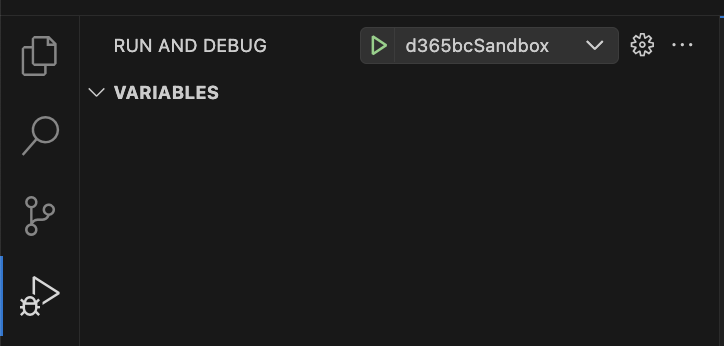
The extension application can be published directly from the Visual Studio Code interface by using the the RUN AND DEBUG feature. This requires the AL language extension to be installed.
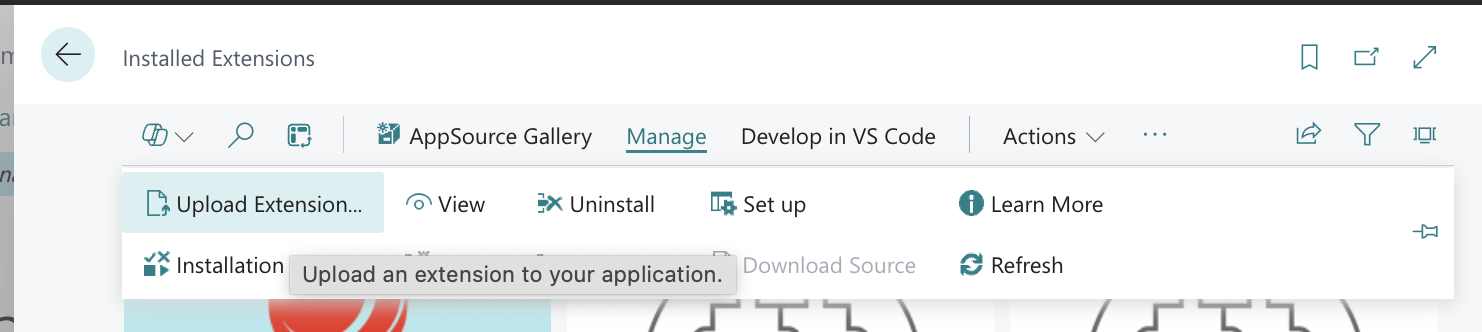
If you already have a compiled version of an extension, you can also upload it to your Business Central environment by using the "Upload extension" standard functionality in extension management.
Example Project
The example projects corresponding to each version of the D365 Business Central Plug-in unit can be downloaded from the downloads page of the old DynamicWeb documentation site. It contains the example code for a wide range of notifications.
You can use the example project as an inspiration and create a new app and use only the notifications subscribers that you need - or you can comment out/delete the examples subscribers from this project and use it.
For more information about Events and extending Microsoft Dynamics 365 Business Central apps you can read this Microsoft article
To subscribe to an event you need to use AL syntax like this to create a codeunit with a property EventSubscriberInstance = StaticAutomatic:
codeunit 50100 DynamicwebGlobalSubscriber
{
    EventSubscriberInstance = StaticAutomatic;
    [EventSubscriber(ObjectType::Codeunit, Codeunit::DynamicwebPublisher, 'OnBeforeExecuteRequest', '', true, true)]
    procedure OnBeforeExecuteRequest(var requestDoc: XmlDocument; var stopExecution: Boolean; var responseDoc: XmlDocument)
}
To subscribe to the event you need to type [EventSubscriber(ObjectType::Codeunit, Codeunit:: and then choose the needed code unit - the subscriber method could look like this:
[EventSubscriber(ObjectType::Codeunit, Codeunit::DynamicwebPublisher, 'OnBeforeExecuteRequest', '', true, true)]
procedure MyOnBeforeExecuteRequest(var requestDoc: XmlDocument; var stopExecution: Boolean; var responseDoc: XmlDocument)
Begin
//todo
End;
You can now add your code inside this method. Note that the parameters event, parameters types, and their order cannot be changed as it will give a compile error.
Example 1: Add fields to a contact
Subscribe to the OnAddContactXmlNode event:
[EventSubscriber(ObjectType::Codeunit, Codeunit::DynamicwebUsersPublisher,
'OnAddContactXmlNode', '', true, true)]
    procedure OnAddContactXmlNode(var contactNode: XmlNode; contact: Record Contact; contactCustomer: Record Customer);
    var
        XmlHelper: Codeunit XmlHelper;
    begin
        //Add custom field
        XmlHelper.AddField(contactNode, 'AccessUserEmail2', contact."E-Mail 2");
    end;
The code above will add the XML like this with contact Email2 value for each contact:
<column columnName="AccessUserEmail2"><![CDATA[email@gmail.com]]></column>
Example 2: Add fields to an address
Subscribe to the OnAddContactXmlNode event:
[EventSubscriber(ObjectType::Codeunit,
Codeunit::DynamicwebUsersPublisher, 'OnAddAddressXmlNode', '', true, true)]
procedure OnAddAddressXmlNode(var addressXmlNode: XmlNode;
contact: Record Contact);
    var
        XmlHelper: Codeunit XmlHelper;
    begin
        //Add custom field
        XmlHelper.AddField(addressXmlNode, 'AccessUserAddress3',
         contact.Address + ' ' + contact."Address 2");
   end;
The code above will add the XML like this for each contact address:
<column columnName="AccessUserAddress3"><![CDATA[Parkvej 44 ]]></column>
Example 3: Add fields to Sales Users
Subscribe to the OnAddSalesPersonXmlNode event:
[EventSubscriber(ObjectType::Codeunit,
 Codeunit::DynamicwebUsersPublisher, 'OnAddSalesPersonXmlNode', '', true, true)]
    procedure OnAddSalesPersonXmlNode(var salesPersonXmlNode: XmlNode;
salesPerson: Record "Salesperson/Purchaser");
    var
        XmlHelper: Codeunit XmlHelper;
    begin
        //Add custom field
        XmlHelper.AddField(salesPersonXmlNode, 'AccessUserPhonePriv',
'PhoneFromAnotherSystem');
    end;
The code above will add the XML like this to each sales person:
<column columnName="AccessUserPhonePriv"><![CDATA[PhoneFromAnotherSystem]]></column>
Example 4: Override user groups
Customers example:
Instead of creating one group 'Customers' and placing all users there, then create two groups 'Customers1' and 'Customers2'. Place users in these two groups with a function.
In our example this function just randomly assigns users to each of the two groups. In a real implementation you would add logic which segmented customers into different groups. It could be a grouping from external systems, but it could also be a segmentation based on a field/property of the users.
Sales example:
Instead of creating one group 'Sales' and placing all sales users there, then create two groups 'Senior Sales' and 'Junior Sales'. Place sales users in these two groups based on function.
Again, a real implementation would be more advanced. Either using a grouping from an external system or some kind of sorting/filtering function.
Subscribe to the OnAddGroupXmlNode event:
[EventSubscriber(ObjectType::Codeunit,
Codeunit::DynamicwebUsersPublisher, 'OnAddGroupXmlNode', '', true, true)]
    procedure OnAddGroupXmlNode(var groupNode: XmlNode; groupName: Text);
    var
        tableXmlElement: XmlElement;
    begin
        //Instead of creating one group 'Customers'
//create two groups 'Customers1' and 'Customers2'.
        if groupName = 'Customers' then begin
            groupNode.GetParent(tableXmlElement);//get <table> element
            groupNode.Remove(); //Remove 'Customers' <item table="AccessUserGroup"> node
            //Add Customers1
            AddGroupXmlNode(tableXmlElement, 'Customers1');
            //Add Customers2
            AddGroupXmlNode(tableXmlElement, 'Customers2');
        end;

        //Instead of creating one group 'Sales' create two groups 'Senior Sales' and 'Junior Sales'
        if groupName = 'Sales' then begin
            groupNode.GetParent(tableXmlElement);//get <table> element
            groupNode.Remove(); //Remove 'Sales' <item table="AccessUserGroup"> node
            AddGroupXmlNode(tableXmlElement, 'Senior Sales');
            AddGroupXmlNode(tableXmlElement, 'Junior Sales');
        end;
    end;
Here is the code for AddGroupXmlNode method:
/// <summary>
    /// Creates and adds AccessUserGroup <item> to the <table tableName="AccessUserGroup"> xml
    /// </summary>
    /// <param name="tableXmlElement">table xml element</param>
    /// <param name="groupName">group name</param>
    local procedure AddGroupXmlNode(var tableXmlElement: XmlElement; groupName: Text)
    var
        item: XmlElement;
        node: XmlNode;
        XmlHelper: Codeunit DynamicwebXmlHelper;
    begin
        //add <item> to the <table> xml structure that looks like that:
        //   <table tableName="AccessUserGroup">
        //     <item table="AccessUserGroup">
        //       <column columnName="AccessGroupName"><![CDATA[groupName]]></column>
        //       <column columnName="AccessGroupGroupName"><![CDATA[groupName]]></column>
        //     </item>
        //   </table>

        //<item>
        item := Xmlelement.Create('item');
        //<item table="AccessUserGroup">
        item.Attributes().Set('table', 'AccessUserGroup');
        node := item.AsXmlNode();
        //Add <column columnName="AccessGroupName"><![CDATA[groupName]]></column>
        XmlHelper.AddField(node, 'AccessGroupName', groupName);
        //Add <column columnName="AccessGroupGroupName"><![CDATA[groupName]]></column>
        XmlHelper.AddField(node, 'AccessGroupGroupName', groupName);
        //Add <item> to parent the <table> xml
        tableXmlElement.Add(item);
    end;
Then you need to change the contact and sales persons user groups association logic like this:
//Contacts
[EventSubscriber(ObjectType::Codeunit, Codeunit::DynamicwebUsersPublisher, 'OnAddContactXmlNode', '', true, true)]
    procedure OnAddContactXmlNode(var contactNode: XmlNode; contact: Record Contact; contactCustomer: Record Customer);
    var
        node: XmlNode;
        element: XmlElement;
    begin
        //Update user groups field with custom group name
        //Instead of placing user to 'Customers' group put it to 'Customers1' or 'Customers2'
        if contactNode.SelectSingleNode('column[@columnName=''AccessUserGroups'']', node) then begin
            element := node.AsXmlElement();
            if (element.InnerText = 'Customers') then begin
                element.RemoveNodes();
                element.Add(XmlCData.Create(GetContactGroup(contact)));
            end;
        end;
    end;

    //Get group name based on if contact name contains 'a' letter
    local procedure GetContactGroup(contact: Record Contact): Text
    begin
        if contact.Name.Contains('a') then
            exit('Customers1')
        else
            exit('Customers2');
    end;

//Sales People
[EventSubscriber(ObjectType::Codeunit,
Codeunit::DynamicwebUsersPublisher, 'OnAddSalesPersonXmlNode', '', true, true)]
    procedure OnAddSalesPersonXmlNode(var salesPersonXmlNode: XmlNode; salesPerson: Record "Salesperson/Purchaser");
    var
        node: XmlNode;
        element: XmlElement;
    begin
        //Update user groups field with custom group name
        //Instead of placing user to 'Sales' group put it to 'Senior Sales' or 'Junior Sales'
        if salesPersonXmlNode.SelectSingleNode('column[@columnName=''AccessUserGroups'']', node) then begin
            element := node.AsXmlElement();
            if (element.InnerText = 'Sales') then begin
                element.RemoveNodes();
                element.Add(XmlCData.Create(GetSalespersonGroup(salesPerson)));
            end;
        end;
    end;

    //Get group name based on "Commission %"
    local procedure GetSalespersonGroup(salesPerson: Record "Salesperson/Purchaser"): Text
    begin
        if salesPerson."Commission %" >= 5 then
            exit('Senior Sales')
        else
            exit('Junior Sales');
    end;
Example 5: Override which contacts a sales user can sign in as
In this example you want the relation between sales users and their customers/contacts to come from an external system.
Subscribe to the OnAddImpersonationXmlNode:
[EventSubscriber(ObjectType::Codeunit, Codeunit::DynamicwebUsersPublisher,
'OnAddImpersonationXmlNode', '', true, true)]
    procedure OnAddImpersonationXmlNode(var impersonationXmlNode: XmlNode; contact: Record Contact; salesPerson: Record "Salesperson/Purchaser");
    var
        XmlHelper: Codeunit XmlHelper;
        tableXmlElement: XmlElement;
        item: XmlElement;
        node: XmlNode;
        externalImpersonatorId: Text;
    begin
        //Override impersonations: salesPerson - customer contact relation comes from another system
        externalImpersonatorId := GetExternalContactImpersonator(contact);
        //if external Impersonator Id is found override salesPerson - customer contact relation
        if externalImpersonatorId <> '' then begin
            impersonationXmlNode.GetParent(tableXmlElement);//get <table> element
            impersonationXmlNode.Remove(); //Remove <item table="AccessUserSecondaryRelation"> node

            //<item>
            item := Xmlelement.Create('item');
            //<item table="AccessUserSecondaryRelation">
            item.Attributes().Set('table', 'AccessUserSecondaryRelation');
            node := item.AsXmlNode();
            //Add <column columnName="AccessUserSecondaryRelationUserId"><![CDATA[]]></column>
            XmlHelper.AddField(node, 'AccessUserSecondaryRelationUserId', externalImpersonatorId);
            //Add <column columnName="AccessUserSecondaryRelationSecondaryUserId"><![CDATA[]]></column>
            XmlHelper.AddField(node, 'AccessUserSecondaryRelationSecondaryUserId', Contact."No.");
            //Add <item> to parent the <table> xml
            tableXmlElement.Add(item);
        end;
    end;

    /// <summary>
    /// This function will return contact impersonator id from external system
    /// </summary>
    /// <param name="contact">contact</param>
    /// <returns>contact impersonator id if found, otherwise empty string</returns>
    local procedure GetExternalContactImpersonator(contact: Record Contact): Text
    begin
        if contact.Name.Contains('a') then
            exit('ExternalImpersonatorId')
        else
            exit('');
    end;
The code above will override the impersonations behavior: if contact name contains a letter ‘a’ in its name the impersonating user id will be set to ExternalImpersonatorId and the xml will look like this:
<item table="AccessUserSecondaryRelation">
      <column columnName="AccessUserSecondaryRelationUserId"><![CDATA[ExternalImpersonatorId]]></column>
      <column columnName="AccessUserSecondaryRelationSecondaryUserId"><![CDATA[E000004]]></column>
</item>
Example 6: Add custom fields to a product
Adding custom fields is the norm in any integration project, so it needs to be simple.
Subscribe to the OnAddProductXmlNode event:
    /// Add custom field to the products xml
    /// </summary>
    [EventSubscriber(ObjectType::Codeunit, Codeunit::DynamicwebProductsPublisher, 'OnAddProductXmlNode', '', true, true)]
    procedure OnAddProductXmlNode(var productNode: XmlNode; item: Record Item);
    begin
        //Adds custom field ProductProfitPercent to the product xml node:
        //<column columnName="ProductProfitPercent"><![CDATA[99]]></column>
        XmlHelper.AddField(productNode, 'ProductProfitPercent', Format(item."Profit %"));
    end;
The code above will add the xml like this for each product:
<column columnName="ProductProfitPercent"><![CDATA[22.06439]]></column>
Example 7: Custom Request-Response
It is also possible to extend the Plug-in unit with custom request/response capabilities. For this example let’s assume you want to implement a new Get method to get all companies from the D365BC Company list.
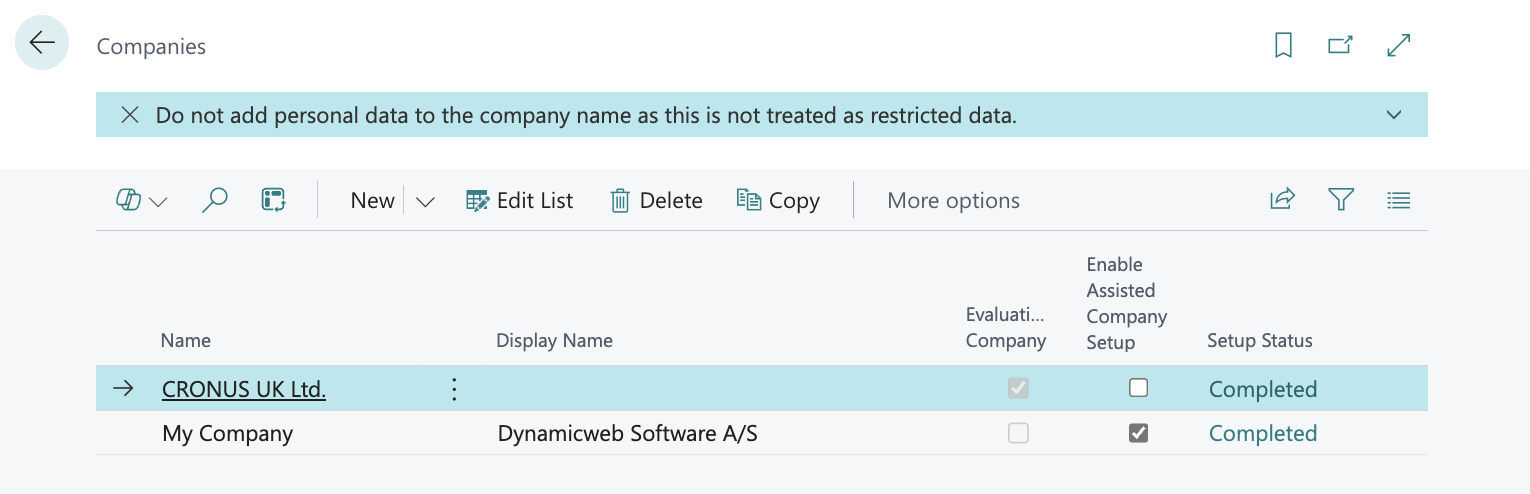
Lets define the new DynamicWeb request as <GetCompanies></GetCompanies>.
Next we need to add logic in the subscriber to handle that new request and fill the response XML with our Companies XML:
codeunit 6211220 DynamicwebGlobalSubscriber
{
    EventSubscriberInstance = StaticAutomatic;

    [EventSubscriber(ObjectType::Codeunit, Codeunit::DynamicwebPublisher,
'OnBeforeExecuteRequest', '', true, true)]
    procedure OnBeforeExecuteRequest(var requestDoc: XmlDocument; var stopExecution: Boolean; var responseDoc: XmlDocument)
    var
        XmlHelper: Codeunit DynamicwebXmlHelper;
        xmlRoot: XmlElement;
        xmlRootNode: XmlNode;
    begin
        //Example: Adding a new entity with new fields
        //Returning Companies on GetCompanies request
        //If request has the xml format of <GetCompanies> then process Companies
        XmlHelper.GetRootNode(requestDoc, xmlRootNode);
        if xmlrootnode.AsXmlElement().LocalName = 'GetCompanies' then begin
            // Set stopExecution to cancel base application processing the request
            // We will handle it by custom code
            stopExecution := true;
            ProcessCompaniesRequest(responseDoc);
        end;
    end;
And then add our XML to the response using private procedure like this:
local procedure ProcessCompaniesRequest(var responseDoc: XmlDocument)
    var
        company: Record Company;
        XmlHelper: Codeunit DynamicwebXmlHelper;
        pXmlElement: XmlElement;
        xmlRootNode: XmlNode;
        companyTableXmlNode: XmlNode;
        companyNode: XmlNode;
    begin
        //Create xml with root <tables> element
        XmlDocument.ReadFrom('<?xml version="1.0" encoding="utf-8" ?><tables/>', responseDoc);
        if (company.FINDSET(false, false)) then begin
            responseDoc.GetRoot(pXmlElement);
            //get root node
            xmlRootNode := pXmlElement.AsXmlNode();
            //add <table tableName='Company'> xml node
            XmlHelper.AddElement(xmlRootNode, 'table', '', '', companyTableXmlNode);
            XmlHelper.AddAttribute(companyTableXmlNode, 'tableName', 'Company');
            repeat
                //add company fields to xml
                XmlHelper.AddElement(companyTableXmlNode, 'item', '', '', companyNode);
                XmlHelper.AddAttribute(companyNode, 'table', 'Company');
                XmlHelper.AddField(companyNode, 'CompanyId', company.Id);
                XmlHelper.AddField(companyNode, 'CompanyName', company.Name);
                XmlHelper.AddField(companyNode, 'CompanyDisplayName', company."Display Name");
                if company."Evaluation Company" then
                    XmlHelper.AddField(companyNode, 'CompanyEvaluation', 'true')
                else
                    XmlHelper.AddField(companyNode, 'CompanyEvaluation', 'false');
            until company.NEXT = 0;
        end;
    end;
After publishing this code and requesting the data with <GetCompanies></GetCompanies> the response will look like this:
<?xml version="1.0" encoding="utf-16"?>
<tables version="1.2.0.0_NAV15.0.36510.0">
  <table tableName="Company">
    <item table="Company">
      <column columnName="CompanyId"><![CDATA[{B41F599A-0EEA-454F-907E-BF48B7C480E0}]]></column>
      <column columnName="CompanyName"><![CDATA[CRONUS Danmark A/S]]></column>
      <column columnName="CompanyDisplayName"><![CDATA[]]></column>
      <column columnName="CompanyEvaluation"><![CDATA[true]]></column>
    </item>
    <item table="Company">
      <column columnName="CompanyId"><![CDATA[{2C45C5E0-EC00-4F45-83F2-16FF7D19CA09}]]></column>
      <column columnName="CompanyName"><![CDATA[My Company]]></column>
      <column columnName="CompanyDisplayName"><![CDATA[]]></column>
      <column columnName="CompanyEvaluation"><![CDATA[false]]></column>
    </item>
  </table>
</tables>
Appendix: UML Diagrams
The following section contains UML diagrams of all extensibility events in the D365 BC Plug-in unit and of all subcategories of events.
- All extensibility events
- Batch integration extensibility events
- Ecom data extensibility events
- Integration customer center extensibility events
- Live integration orders extensibility events
- Products extensibility events
- Users extensibility events
All extensibility events
Batch integration extensibility events
Ecom data extensibility events
Integration customer center extensibility events
Live integration orders extensibility events
Products extensibility events
Users extensibility events