The Health section provides an at-a-glance overview of the structural and data integrity of a Dynamicweb solution.
Health checks are designed to detect unwanted, inconsistent, or broken data and settings that may not cause immediate errors—but can lead to:
- Unstable behavior
- Hard-to-explain bugs
- Repeating errors in the Event Viewer
- Unnecessary database growth
- Performance degradation over time
For example:
- Orphaned pages and paragraphs
- Products which don’t exist in the default language
- Circular or self-referencing structures
- Broken list item references
In short; think of health checks as a strucural integrity scan for a solution. They don't replace runtime validation, they don't fix data, and they don't replace logging and monitoring - but they do help you find problems before they turn into incidents.
Areas covered
Health checks are grouped into four areas, each covering a critical part of the system:
- User management: Orphaned users, broken relations, duplicate identities
- Security: Unsafe or unintended configuration settings
- Content: Pages, paragraphs, items, and site structure consistency
- Ecommerce: Products, variants, groups, languages, prices, and relations
Each area is maintained by dedicated health providers that inspect real production data — not assumptions. Click in either healtch check group to see an overview of all checks for the area:
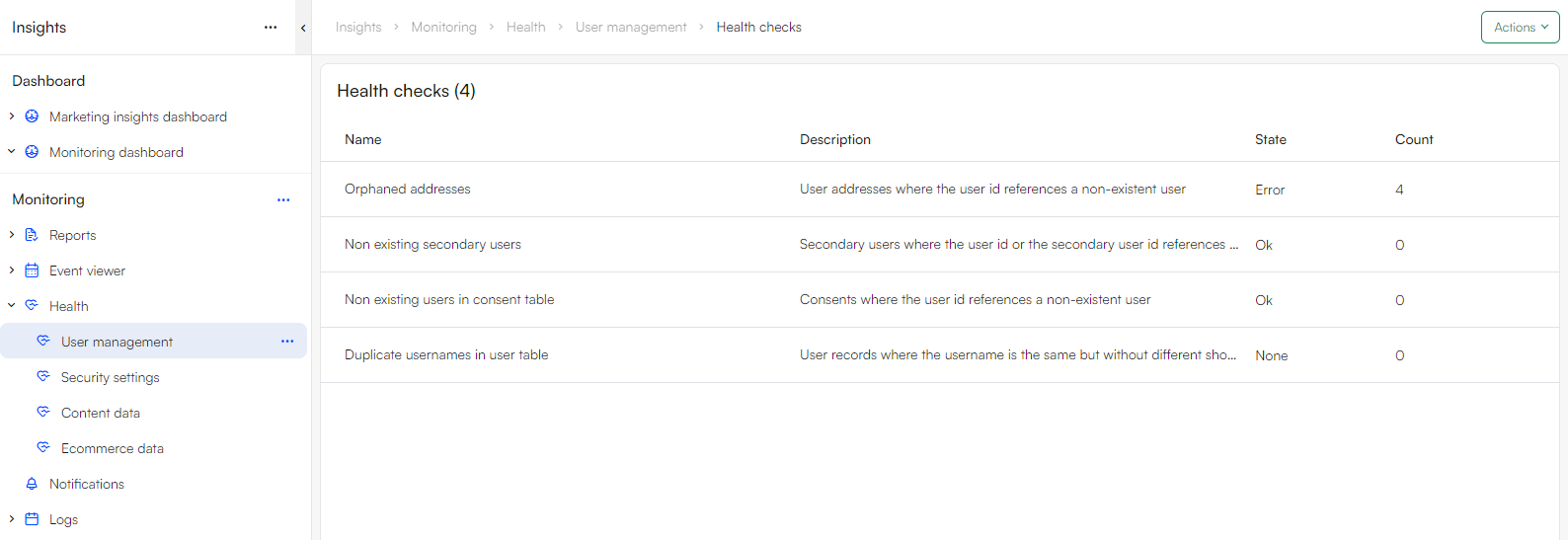
Each health check is listed with:
- Name – What is being checked
- Description – Why it matters
- State:
- OK - no issues detected
- Warning - potentially problematic configuration or data
- Error - Broken or invalid data detected
- Fatal - Critical issue requiring immediate attention
- Count – Number of affected records or findings
A non-zero count is usually a signal that something needs attention, even if the system “appears to work”.
Inspecting a health check in detail
Clicking a health check shows detailed information, which may include:
- A list of affected objects (IDs, references, values)
- The type of object involved (page, product, user, table, etc.)
- The underlying query or rule used to detect the issue
This detail view is intended for investigation and cleanup, not just observation - see performance debugging
Best practices
- Run health checks regularly
- After upgrades
- After large imports or integrations
- After major content or product refactors
- When unexplained behavior appears
- Treat warnings as early signals which indicate
- Misconfiguration
- Technical debt
- Edge cases that may break later
- Something to be fixed early to prevent future errors
- Keep data clean, not just working
- A system that "works" but contains broken references will:
- Be harder to maintain
- Be harder to debug
- Cost more to operate over time
- A system that "works" but contains broken references will:
- Combine with log retention settings
- Health checks reduce unnecessary errors
- Log retention settings ensure that unresolved issues don’t silently accumulate
- Used together, they keep the system quieter, faster, and easier to debug