DynamicWeb features two tools which allow you to edit multiple products at the same time:
- Bulk update is used to apply a new value to a single field on any number of products
- Grid edit is used to edit multiple products in a grid-view reminiscent of a spreadsheet-style interface
Bulk update
Bulk update is a feature which is used to apply a new value to a single field across any number of products. It makes it possible to modify many product records at once instead of editing each product individually, which can save you a lot of time and effort.
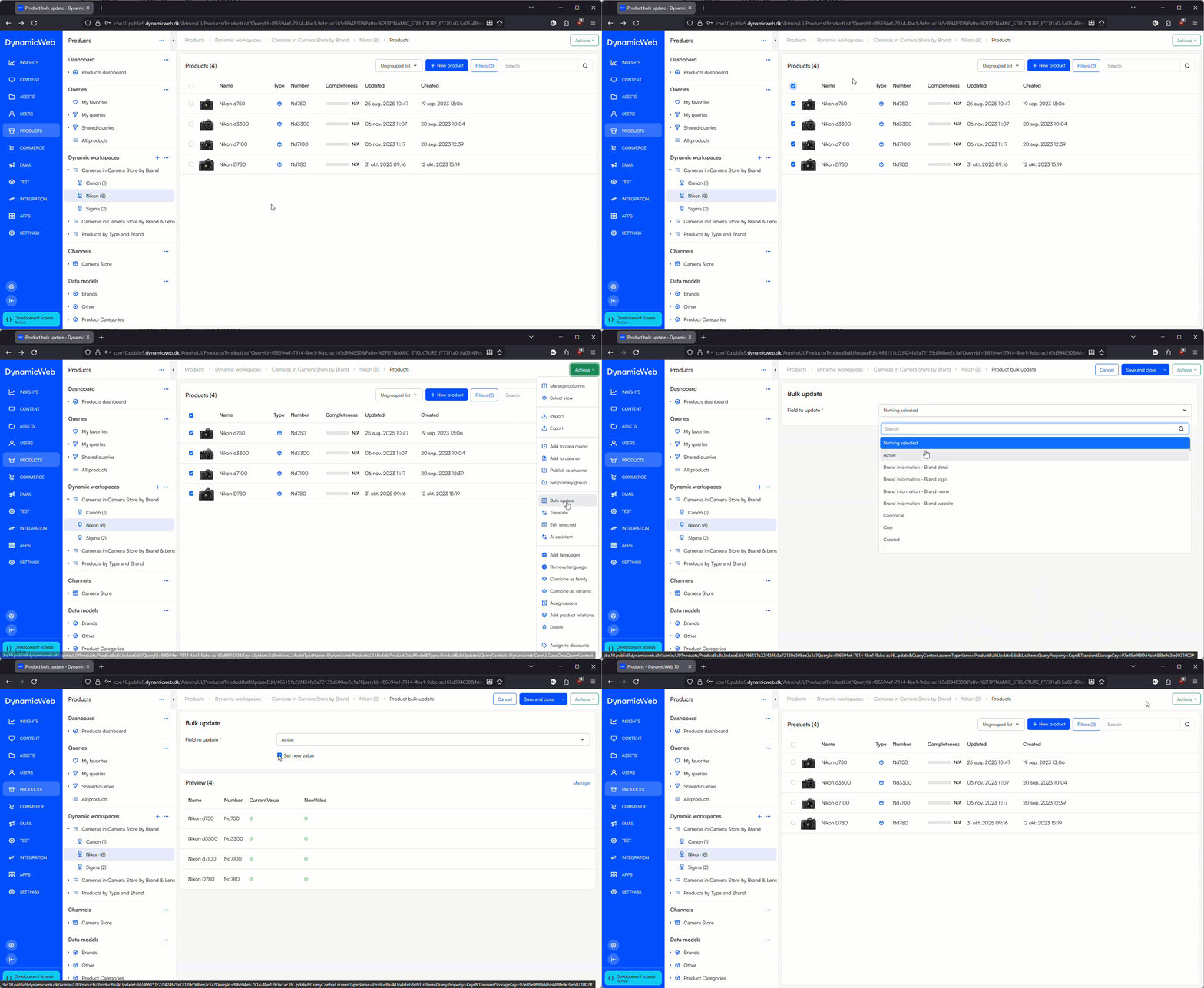
To use bulk update:
- Open a product list and select any number of products
- Use the action menu to select Bulk update
- Select a field to update and select or specify a new value
- Save
Please note, that if you select a field which is not present on all the selected products - e.g. a category field - you will not be able to set a new value.
Grid edit
Grid edit is a view mode for products which allows you to edit multiple products at the same time in a grid view reminiscent of a spreadsheet-style interface:
 This type of edit screen is commonly used on PIM systems and can help you save time on certain tasks.
To switch to the grid-edit view:
- Open a product list and select a number of products or the overview page of a product with variants
- In the action-menu select Edit selected
- Use the action menu > manage fields screen to choose which fields you want to see in the grid
- Use the grid edit column drop down menu to work with the product data
 What you can do on a column depends on the data type - not all operations are available on all types of data - but here are some of the options:
| Option | Function | Notes |
|---|---|---|
| Sort ascending | Sort from lowest to highest | |
| Sort descending | Sort from highest to lowest | |
| Find | Find a value – or find and replace a value | |
| Set value | Set the value of the field on all products | |
| Filters | Filter list | |
| Revert changes in column | Reverts all changes to a column | |
| Freeze/unfreeze Column | Locks/unlocks the column so no changes can be made |