The Login-settings are used to configure login-related settings.
Login type
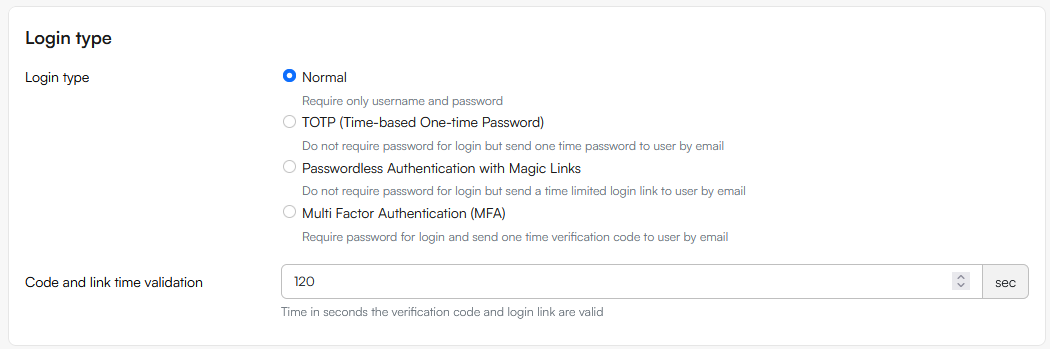
The Login type settings are used to select the fallback login type for the solution; the login type which is used unless a more specific login type is selected on the user.
- Normal - Require only username and password
- TOTP (Time-based One-time Password) - Do not require password for login but send one time password to user by email
- Passwordless Authentication with Magic Links - Do not require password for login but send a time limited login link to user by email
- Multi Factor Authentication (MFA) - Require password for login and send one time verification code to user by email
The Code and link time validation setting allows you to customize the time in seconds a code/link emailed to the user is valid. The default value is 120 seconds.
Extranet login limitations
The Extranet login limitations section is used to set and configure limitation on login attempts via the Extranet app
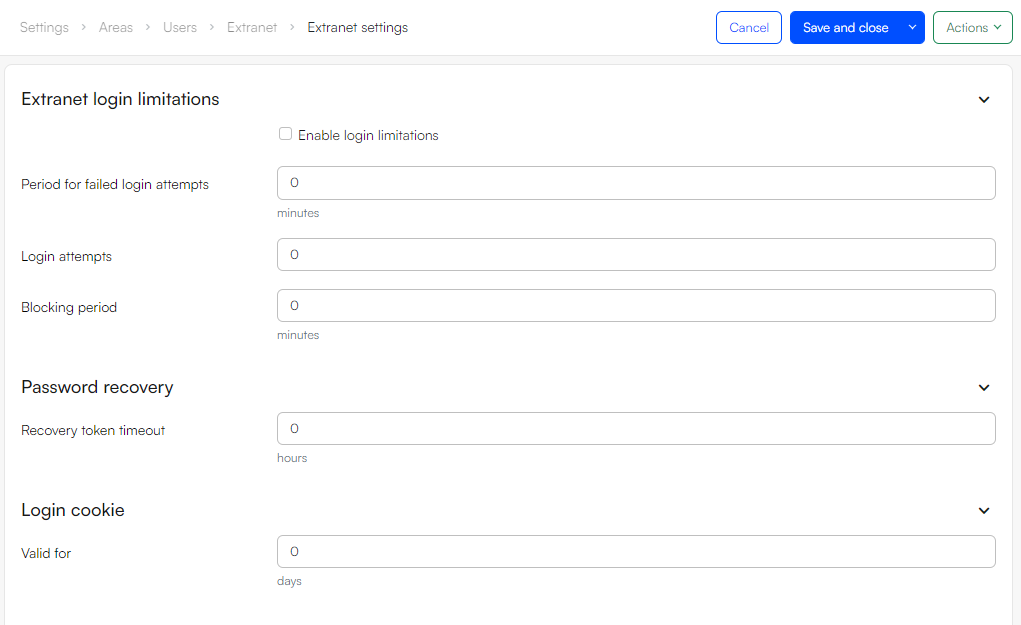 To use it:
- Check Enable login limitations
- Use Period for failed login attempts to set a time frame
- Use Login attempts to specify how many attempts are allowed in that time frame
- Use Blocking period to specify for how long the user is blocked after X failed attempts
Password recovery
The Recovery token timeout setting is used to customize how long a password recovery token works in hours.
Login cookie
The Login cookie section is used to specify how long a login cookie is valid for in days.