SEO is short for Search Engine Optimization, and covers ways to optimize websites to become more visible, relevant and popular towards user search queries, and as a consequence will be ranked better by search engines.
In this article we will cover some of the things you can do at the website level – some of them will be handled by us, others are up to you.
Lighthouse
Lighthouse is an open-source, automated tool developed by Google for improving the quality and performance of websites. It is very helpful for SEO purposes, because the reports it generates include several SEO-related checks which you can then either cross off or fix for any given page. You should, of course, use Lighthouse continuously during development to find and fix potential issues early.
Lighthouse can be run in a number of ways – e.g. as a Node module – but the easiest it to use Chrome Devtools (inspect in Chrome):
- Right-click the page and choose ‘Inspect’
- Select the Lighthouse tab.
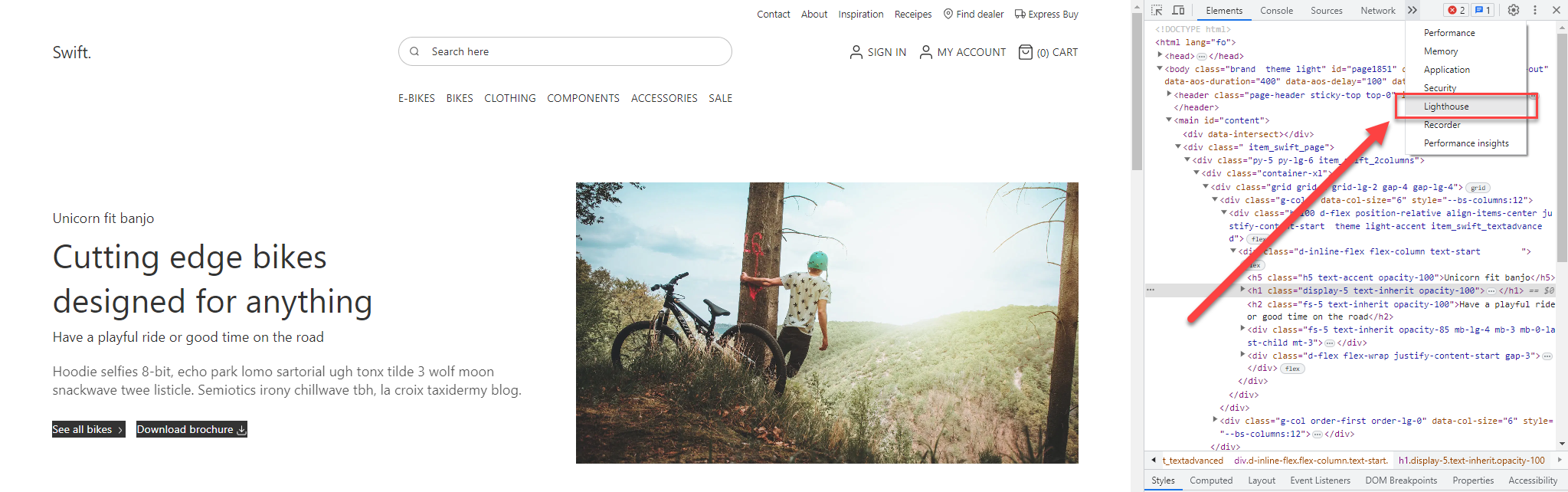
- On the lighthouse tab, cross off the categories you want to check and click ‘Analyze page load’
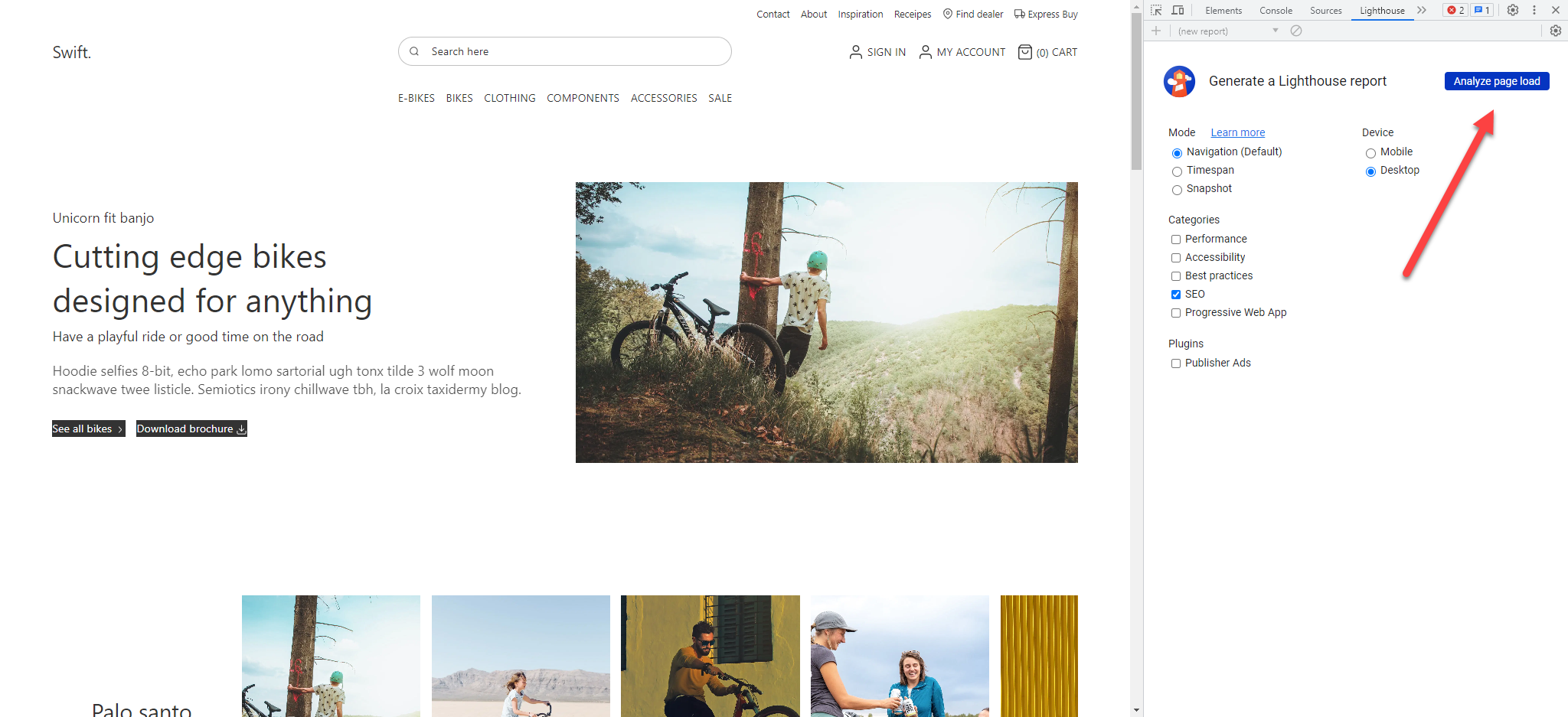
- Lighthouse will now run a series of tests and generate a report with a suggestion and a total SEO score for the website
At the time of writing, the following SEO audits are run:
| Audit | What it checks | Notes |
|---|---|---|
| Meta description | Checks that the document has a meta description <meta name="description"> | Meta descriptions may be included in search results to concisely summarize page content. |
| Valid rel=canonical | Checks that the page has a valid canonical link | Valid canonical links let you tell search engines which version of a page to crawl and display to users in search results. |
| HTTP status code | Checks that the page has a successful HTTP status code | Pages with unsuccessful HTTP status codes may not be indexed properly. |
| Descriptive text for links | Checks that links has a descriptive text | Descriptive link text helps search engines understand your content. |
| Valid robot.txt | Checks that the page have a valid robot.txt | If your robots.txt file is malformed, crawlers may not be able to understand how you want your website to be crawled or indexed |
| Alt-attributes for images | Checks that there are alt-attributes for images | Informative elements should aim for short, descriptive alternate text. Decorative elements can be ignored with an empty alt attribute |
| Valid hreflang | Checks that there is a valid hreflang | hreflang links tell search engines what version of a page they should list in search results for a given language or region |
| Document avoid plugins | Checks that documents avoid plugins | Search engines can't index plugin content, and many devices restrict plugins or don't support them |
| Legible font sizes | Checks that the document uses legible font sizes | Pages is often ranked based on how mobile-friendly they are. Font sizes smaller than 12 px are often difficult to read on mobile devices. |
| Tap targets on touch devices | Checks that the tap target is not smaller than 48 px by 48 px | Making sure tap targets are big enough and far enough apart from each other makes your page more mobile-friendly and accessible. |
| Valid structured data | Checks that your content is marked up with structured data | Structured data is used to understand what kind of content is on your page and makes it more likely to be included in rich search results. |
| Blocked webpages | Checks that page isn’t blocked for indexing | Search engines are unable to include your pages in search results if they don't have permission to crawl them |
| <title> element | Checks that the document has a <title> element | The title gives screen reader users an overview of the page, and search engine users rely on it heavily to determine if a page is relevant to their search. |
Some of the SEO audits are related to formal On-page SEO such as alt-attributes and meta-description. You will also notice that many of the SEO-related audits checked by Lighthouse are handled natively in DynamicWeb Swift – and as such you don’t have to worry about them unless you’re customizing your Swift-solution.
Apart from the SEO-related audits it also checks for performance, accessibility, and best practice issues – all of which will indirectly impact your search engine ranking. Read more in depth about Lighthouse here.
Google search console
Google Search Console is a free service which monitors, maintains, and troubleshoots a website in relation to search results. It is a very useful tool if you want to understand how Google sees a website – and use that knowledge to improve your SEO.
You can get started with Google Search Console here
Please note that one of the things you can do is submit a sitemap to google search console. DynamicWeb automatically generates a sitemap on all websites with a public URL.
Image optimization
How long it takes for a page to load has a definite impact on search engine rankings. You should therefore always make sure your website loads as quickly as possible – here is some general advice:
- Keep images below 500 KB with a width between 1500px to 2500px.
- Use the image format that best suite your image's purpose, have in mind speed and quality. JPEG, PNG, SVG and WebP are preferable image format types. Limit gifs or animations.
- If a page is larger than 5 MB, removing content or reducing the size of your images can help it load faster.
Images with large dimensions (width and height) can slow down the loading speed of pages the browser has to load the full image even if it’s bigger than the site's maximum display width. Most software has an image viewer with the ability to resize otherwise you can find numerous free web tools.