The Customer Experience Center is a paragraph app used to display and interact with commerce-related data in frontend, typically in list form and associated with a particular user - the logged in user. It is the successor to the old customer center app but has been simplified and built exclusively for ViewModel templates — template tags are not supported.
This app can list:
- Orders
- Carts
- Quotes
- Ledger entries
- Recurring orders (subscriptions)
When you add this app to a paragraph you'll see a list of settings controlling how the app works:
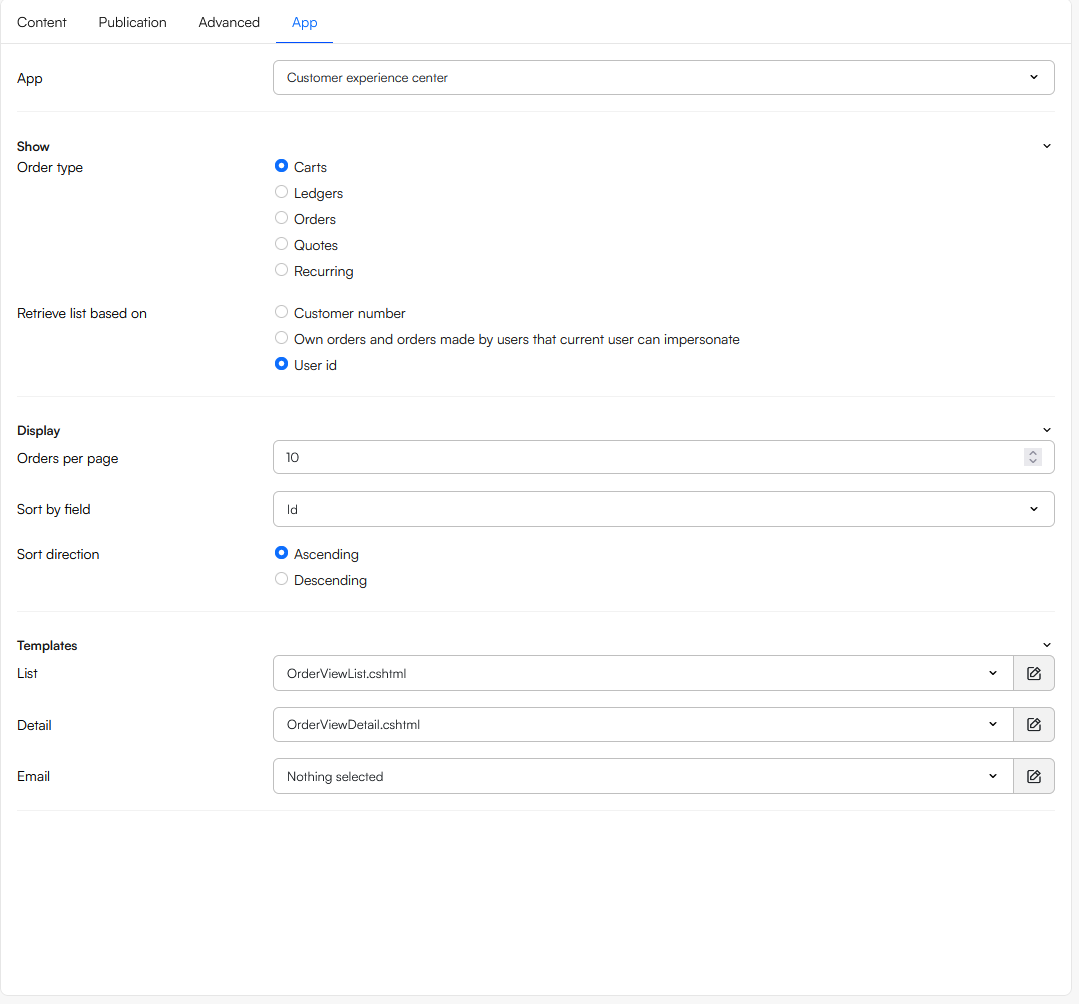 To configure the app:
- Select an order type to show - carts, ledger entries, orders, etc.
- Specify how you want to retrieve the items:
- Own orders
- Own orders and orders from users with same customer number
- Own orders and orders made by users that current user can impersonate
- Own orders and orders made while impersonating
- Use the Display-settings to set the orders per page. the sort by field and the sort direction
- Select the templates that control the layout in frontend:
- List
- Detail
- If relevant, select a page to shopping cart - you can then redirect customers to e.g. a product page when relevant
Templates
The templates you can select - List and Detail - are used to render a list of items and a detailed view of a single item, respectively. The app will show the details-template when an OrderId parameter is present in the query string, and the Email-template is
The templates use ViewModels for strongly-types Razor rendering:
List templates
@inherits ViewModelTemplate<OrderListViewModel>
<div class="container my-4">
  <form class="row g-2 mb-3" method="get">
    <div class="col-auto">
      <input type="text" name="FilterOrderId" class="form-control" placeholder="Order ID" />
    </div>
    <div class="col-auto">
      <select name="FilterOrderStateId" class="form-select" onchange="this.form.submit()">
        <option value="">All States</option>
        @foreach (var state in Dynamicweb.Ecommerce.Services.OrderStates.GetStatesByOrderType(Dynamicweb.Ecommerce.Orders.OrderType.Order))
        {
          <option value="@state.Id">@state.Name</option>
        }
      </select>
    </div>
    <div class="col-auto">
      <button type="submit" class="btn btn-primary">Search</button>
    </div>
  </form>

  <table class="table table-striped align-middle">
    <thead>
      <tr>
        <th>Placed</th>
        <th>Order ID</th>
        <th>Customer</th>
        <th class="text-end">Total</th>
        <th class="text-end">State</th>
        <th></th>
      </tr>
    </thead>
    <tbody>
      @foreach (var order in Model.Orders)
      {
        <tr>
          <td>@order.CreatedAt.ToString("yyyy-MM-dd")</td>
          <td>@order.Id</td>
          <td>@order.CustomerName</td>
          <td class="text-end">@order.Price.PriceFormatted</td>
          <td class="text-end"><span class="badge bg-secondary">@order.StateName</span></td>
          <td class="text-end">
            <form method="post" action="/Default.aspx?ID=@Pageview.ID">
              <input type="hidden" name="CustomerCenterCmd" value="reorder" />
              <input type="hidden" name="OrderId" value="@order.Id" />
              <button class="btn btn-sm btn-outline-primary">Reorder</button>
            </form>
          </td>
        </tr>
      }
    </tbody>
  </table>

  @if (Model.PageCount > 1)
  {
    <nav>
      <ul class="pagination">
        @for (int i = 1; i <= Model.PageCount; i++)
        {
          <li class="page-item @(i == Model.CurrentPage ? "active" : "")">
            <a class="page-link" href="?PageNum=@i">@i</a>
          </li>
        }
      </ul>
    </nav>
  }
</div>
Details templates
The Details-template is shown when an OrderID-parameter is present in the query string. It inherits the OrderViewModel and a simple details-template could look like this:
@using Dynamicweb.Rendering
@using Dynamicweb.Ecommerce.Frontend
@inherits ViewModelTemplate<OrderViewModel>

<div class="col-md-12">
    <h3>@Model.Id</h3>
    <p>Date: @Model.CompletedDate</p>

    <!--Orderlines etc.-->
    <table class="table">
        <thead>
            <tr>
                <th>@Translate("Product_name", "Product name")</th>
                <th>@Translate("Quantity", "Quantity")</th>
                <th>@Translate("Price", "Price")</th>
                <th></th>
            </tr>
        </thead>

        <tbody>
            @foreach (var line in Model.OrderLines)
            {
                <tr>
                    <td>
                        @line.ProductName
                        @if (line.ProductVariantName != "")
                        {
                            @: (@line.ProductVariantName)
                        }

                        @if (!string.IsNullOrWhiteSpace(@line.UnitId))
                        {
                            @: (@line.UnitId)
                        }
                        <!--Order line fields-->
                        @foreach (var field in line.OrderLineFields)
                        {
                            if (!string.IsNullOrWhiteSpace(@field.Value.ToString()))
                            {
                                <div style="font-size:12px;"><i>@field.Key.ToString()): @field.Value.ToString()</i></div>
                            }
                        }
                    </td>
                    <td>
                        @if (line.OrderLineType.ToString() == "1")
                        {
                            <span></span>
                        }
                        else
                        {
                            @line.Quantity
                        }
                    </td>
                    <td>@line.TotalPriceWithProductDiscounts.PriceWithVatFormatted</td>

                    <td>
                    </td>
                </tr>
            }
        </tbody>

        <tfoot>
            <tr>
                <td>Shipping (@Model.ShippingMethod.Name)</td>
                <td></td>
                <td>@Model.ShippingFee.PriceWithVatFormatted</td>
                <td></td>
            </tr>
            <tr>
                <td>Payment (@Model.PaymentMethod.Name)</td>
                <td></td>
                <td>@Model.PaymentFee.PriceWithVatFormatted</td>
                <td></td>
            </tr>

            <tr class="total">
                <th>Total</th>
                <th></th>
                <th>@Model.Price.PriceWithVatFormatted</th>
                <th></th>
            </tr>
        </tfoot>

    </table>

    <div class="row g-0">
        <div class="col-md-6 mb-4">
            <h4>Shipped To</h4>
            <div>@Model.CustomerFirstName @Model.CustomerSurname</div>
            <div>@Model.CustomerAddress</div>
            <div>@Model.CustomerZip @Model.CustomerCity</div>
            <div>@Model.CustomerCountry</div>
        </div>
        <div class="col-md-6 mb-4">
            <h4>Billed to</h4>
            <div>@Model.DeliveryFirstName @Model.DeliverySurname</div>
            <div>@Model.DeliveryAddress</div>
            <div>@Model.DeliveryZip @Model.DeliveryCity</div>
            <div>@Model.DeliveryCountry</div>
        </div>
    </div>

</div>
Customer Center commands
In your templates you can use Customer Center commands to post information to the app and perform actions. You can post commands:
- Via a URL with
CustomerCenterCmdand other parameters. - Via a form with
CustomerCenterCmdas a field.
You can see a list of commands and how to use them below.
Reorder
The Reorder-command adds products from a previous order to the current cart:
<a href="?CustomerCenterCmd=Reorder&OrderId=@Model.Id">Add order to cart</a>
AcceptQuote
The AcceptQuote-command allows a user to accept a quote:
<a href="?CustomerCenterCmd=AcceptQuote&QuoteId={QuoteId}">Accept quote</a>
Query string filtering
The Customer Experience Center app accepts the following query string parameters - they can be used to filter the list of items returned:
| Parameter | Example | Purpose |
|---|---|---|
PageNum |
?PageNum=2 |
Paging (1‑based). |
SortBy |
?SortBy=Price |
Overrides paragraph Sort by field. |
SortOrder |
?SortOrder=Desc |
Sort direction. |
PageSize |
?PageSize=50 |
Overrides paragraph page size. |
FilterOrderStateId |
?FilterOrderStateId=OS2 |
Filter by Order State ID. |
FilterFromDate |
?FilterFromDate=2025-08-01 |
Filter by OrderDate >=. |
FilterToDate |
?FilterToDate=2025-08-30 |
Filter by OrderDate <=. |
FilterOrderId |
?FilterOrderId=ORDER123 |
Exact order id search. |
FilterText |
?FilterText=abc |
Free text search. |
FilterCustomerNumber |
?FilterCustomerNumber=CUST-42 |
Exact customer number. |
FilterCustomerName |
?FilterCustomerName=Jane Doe |
Exact customer name. |
FilterProductId |
?FilterProductId=PROD1 |
Orders containing product id. |
FilterProductNumber |
?FilterProductNumber=SKU-1 |
Orders containing product number. |
FilterProductName |
?FilterProductName=Widget |
Orders containing product name. |
FilterPriceAmountFrom |
?FilterPriceAmountFrom=100 |
Minimum total price. |
FilterPriceAmountTo |
?FilterPriceAmountTo=500 |
Maximum total price. |
FilterOrderCurrencyCode |
?FilterOrderCurrencyCode=EUR,USD |
One or more currency codes. |
SwitchRetrieveBy |
?SwitchRetrieveBy=1 |
Toggles UseCustomerNumber. |
A couple of implicit filters are also used:
- Shop is auto‑set from current area (
Area.EcomShopId) - The Completed state is derived from the Order type setting