Workflow
The activities in the OData v4 blueprint work by importing and exporting data to and from standard Business Central entities exposed through pages via OData v4 web services. This means that while the OData v4 blueprint comes with an extensive set of pre-configurations on the DynamicWeb side—such as table and column mappings—some minor tasks need to be completed on the Business Central side.
To expose all the relevant entities in Business Central, a series of pages must be published as OData v4 web services in the Business Central environment. Since the activities rely on predefined mappings between DynamicWeb entities and Business Central-exposed tables, it is important that all web services adhere to the naming conventions outlined in the following section.
Exposing Business Central standard entities through pages via OData v4 web services, as opposed to relying solely on the default Business Central API, may naturally raise the question: Why?
The short answer is that the Business Central API has limitations—such as missing entities and lack of support for custom fields—and currently does not allow extensions to cover these gaps. Exposing each page as an OData v4 web service compensates for this by enabling access to custom fields and additional data structures.
Another key advantage of the OData v4 approach is that it enables DynamicWeb users to configure an ERP integration with minimal footprint on the Business Central environment, and without requiring AL development skills. The OData v4 blueprint is designed to be as non-intrusive as possible, offering a broad range of tables and fields ready to integrate with your DynamicWeb solution.
Important
Microsoft has announced that support for exposing a Microsoft UI page as a OData endpoint will be removed in 2027.
View Microsoft’s deprecation notice
While the current OData v4 blueprint remains fully functional and supported today, we recommend planning future integrations with this deprecation in mind. DynamicWeb is actively working on updated blueprint sets aligned with Microsoft's recommended approaches.
The DynamicWeb OData provider supports all OData-compliant JSON formats, including those used by custom API pages and OData queries. This allows partners and customers to begin adopting API pages and queries as part of their integrations. DynamicWeb is working on a new blueprint set to support this integration model going forward.
Business Central v4 entities - imports
The blueprint includes activities for importing the following list of Business Central entities:
| Object name | Business central object id | Web service name |
|---|---|---|
| Countries/Regions | 10 | DynamicwebCountries |
| Currencies | 5 | DynamicwebCurrencies |
| Salesperson/Purchaser card | 5116 | DynamicwebSalespersonPurchaserCard |
| Contact card | 5050 | DynamicwebContactCard |
| Customer card | 21 | DynamicwebCustomerCard |
| Contact alt. address card | 5056 | DynamicwebAltAddressCard |
| Ship-to address | 300 | DynamicwebShipToAddress |
| Vendor card | 26 | DynamicwebVendorCard |
| Locations | 15 | DynamicwebLocations |
| Item category card | 5733 | DynamicwebItemCategoryCard |
| Item card | 30 | DynamicwebItemCard |
| Item variants | 5401 | DynamicwebItemVariants |
| Units of measure | 209 | DynamicwebUnitsOfMeasure |
| Item units | 5404 | DynamicwebItemUnits |
| Item translations | 35 | DynamicwebItemTranslations |
| Unit of measure translation | 5402 | DynamicwebUnitOfMeasureTranslation |
| Stock-keeping unit card | 5700 | DynamicwebStockKeepingUnitCard |
| Resources | 77 | DynamicwebResources |
| AssemblyBOM | 36 | AssemblyBOM |
| Sales orders | 42 | DynamicwebSalesOrder |
| Prices | 7002 | DynamicwebSalesPrices |
| Discounts | 7004 | DynamicwebSalesLineDiscounts |
| Prices & discounts (new pricing experience) | 7016 | DynamicwebSalesPriceList |
Business Central v4 entities - exports
The template also includes a separate activity group for exporting the following list of entities.
| DynamicWeb object name | Business central object id | Web service name |
|---|---|---|
| Countries/Regions | 10 | DynamicwebCountries |
| Employees | 5116 | DynamicwebSalespersonPurchaserCard |
| Contacts | 5050 | DynamicwebContactCard |
| Customers | 21 | DynamicwebCustomerCard |
| User addresses | 5056 | DynamicwebAltAddressCard |
| Ship-to address | 300 | DynamicwebShipToAddress |
| Vendors | 26 | DynamicwebVendorCard |
| Item category card | 5733 | DynamicwebItemCategoryCard |
| Items | 30 | DynamicwebItemCard |
| Item variants | 5401 | DynamicwebItemVariants |
| Units of measure) | 209 | DynamicwebUnitsOfMeasure |
| Item units | 5404 | DynamicwebItemUnits |
| Item translations | 35 | DynamicwebItemTranslations |
| AssemblyBOM | 36 | AssemblyBOM |
| Orders | 42 | DynamicwebSalesOrder |
Exposing V4 pages in Business Central
To expose a Business Central page as an OData V4 web service open your Business Central web interface and search for the Web Services list.
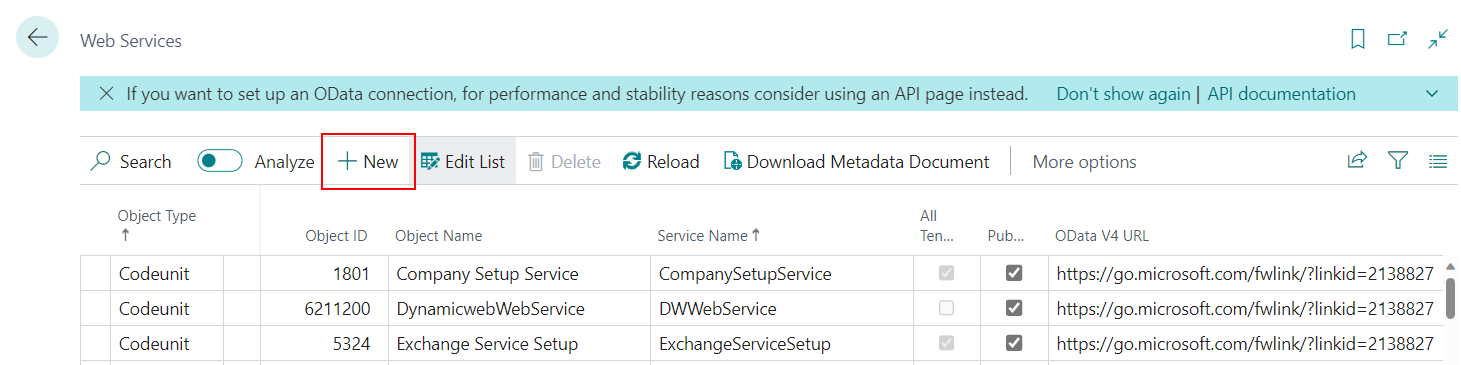
To add a Web service to the list follow these steps:
- Click New
- Select Page in the Object Type cell
- Enter the Object ID of the given page (as shown in the table above)
- Provide a Service Name that exactly matches the service names given in the above table (ie. DynamicwebItemCard, DynamicwebLocations etc.)
- Check the Published checkbox
Adding the exposed web services as endpoints in DynamicWeb
There are two ways of adding the Business Central web services to an endpoint collection in your DynamicWeb solution.
One way is to add a generic OData v4 URL in the following format:
The other way is to add separate endpoints for each entity in the same format as the general V4 web service followed by a '/' and the specific web service name. While this method implies a more cumbersome manual configuration it does however have the advantage of better testing possibilities within the DynamicWeb endpoint request interface.
The full OData V4 URL of the specific web services can also be copy-pasted from the Web services list in the Business Central web interface.
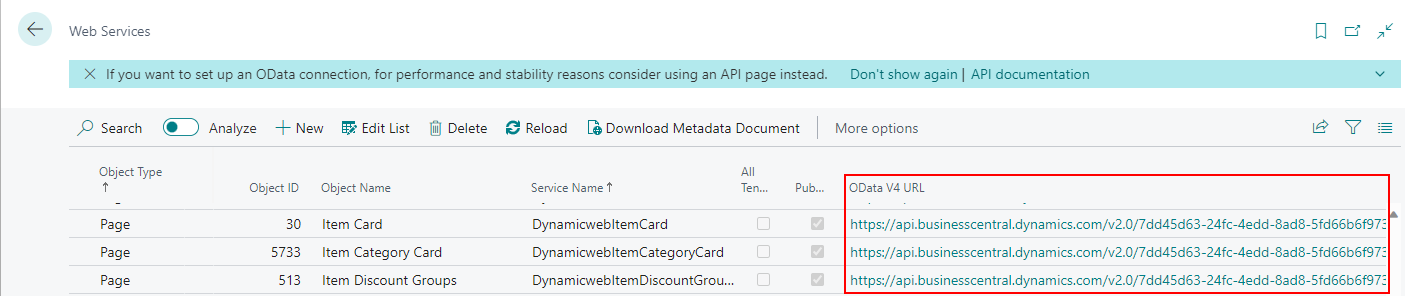
The OData provider automatically detects if the selected endpoint is a single - or multi entity endpoint when an activity is run. If the endpoint does not reference a specific entity the provider adds the name of the mapped source table as the entity name in the request URL.
Note
When an integration activity imports from or exports to multiple entities, such as Orders and Orderlines, the predefined endpoint used must be the generic v4 web service with no entity specified.
Regardless of how many unique endpoints you wish to work with, the recommended way to organize them is to use a single endpoint collection with an OAuth S2S authentication.
Activities and mappings - imports
The following section gives an overview of the mappings defined in each of the activities included in the blueprint. It also lists the needed manual configurations for each activity.
Import Countries
Description
The CountryCultureInfo field is explicitly set to an empty string to accommodate a nullable column in the database and prevent data validation issues.
Manual configuration
Source settings: Select Predefined endpoint (V4 generic web service or /DynamicwebCountries)
Predefined mappings for DynamicwebCountries → EcomCountries
| DynamicwebCountries | EcomCountries | Script |
|---|---|---|
| Code | CountryCode2 | |
| ISO_Numeric_Code | CountryNumber | |
| CountryCultureInfo | Constant=’’ |
Import Currencies
Description
The CurrencyLanguageId field is mapped using a constant and should be adjusted to match the default language of the DynamicWeb solution.
Manual configuration
Source settings: Select Predefined endpoint (V4 generic web service or /DynamicwebCurrencies)
Predefined mappings for DynamicwebCurrencies → EcomCurrencies
| DynamicwebCurrencies | EcomCurrencies | Script |
|---|---|---|
| Code | CurrencyCode | |
| Description | CurrencyName | |
| ExchangeRateAmt | CurrencyRate | |
| ISO_Numeric_Code | CurrencyPayGatewayCode | |
| CurrencyLanguageId | Constant=’LANG1’ |
Import Salespersons/Purchasers
Description
Relevant salesperson fields are mapped to enable basic user creation in DynamicWeb. If you want to associate imported users with specific user groups, you will need to add additional mappings or destination settings accordingly.
Manual configuration
Source settings: Select Predefined endpoint (V4 generic web service or /DynamicwebSalespersonPurchaserCard) Destination settings: Select Destination group (ie. the user group you wish to import to)
Predefined mappings for DynamicwebSalespersonPurchaserCard → AccessUser
| DynamicwebSalespersonPurchaserCard | AccessUser | Script |
|---|---|---|
| Code | AccessUserExternalId | |
| E_Mail | AccessUserEmail | |
| Job_Title | AccessUserJobTitle | |
| Name | AccessUserName | |
| Phone_No | AccessUserPhone | |
| E_Mail | AccessUserUserName |
Import Contacts
Description
A conditional filter has been added to import only contacts where type = Person, ensuring alignment with the default API mappings and excluding non-person entries. A second mapping is included to create impersonation entries. User group assignment must be configured manually if needed.
Manual configuration
Source settings: Select Predefined endpoint (V4 generic web service or DynamicwebContactCard) Destination settings: Select Destination group (ie. the user group you wish to import to)
Predefined mappings for DynamicwebContactCard → AccessUser
Conditionals:
- Salesperson_Code DifferentFrom ''
- Type EqualTo 'Person'
| DynamicwebContactCard | AccessUser | Script |
|---|---|---|
| Address | AccessUserAddress | |
| Address_2 | AccessUserAddress2 | |
| City | AccessUserCity | |
| Company_Name | AccessUserCompany | |
| Country_Region_Code | AccessUserCountryCode | |
| Currency_Code | AccessUserCurrencyCharacter | |
| E_Mail | AccessUserEmail | |
| Fax_No | AccessUserFax | |
| IntegrationCustomerNo | AccessUserCustomerNumber | |
| Mobile_Phone_No | AccessUserMobile | |
| Name | AccessUserName | |
| Phone_No | AccessUserPhone | |
| Post_Code | AccessUserZip | |
| E_Mail | AccessUserUserName | |
| No | AccessUserExternalId |
Predefined mappings for DynamicwebContactCard → AccessUserSecondaryRelation
Conditionals:
- Salesperson_Code DifferentFrom ''
- Type EqualTo 'Person'
| DynamicwebContactCard | AccessUserSecondaryRelation | Script |
|---|---|---|
| No | AccessUserSecondaryRelationSecondaryUserId | |
| Salesperson_Code | AccessUserSecondaryRelationUserId |
By default, the Contact import is filtered to import only import contacts of the type Person (conditional on the accessUser table mapping).
Import Customers
Description
The customer import part of the OData v4 blueprint package is split into 4 activities to handle Price and discount groups configured in Business Central. Make sure to run the activities in the order described in the following section.
If your integration setup does not entail user specific prices and discounts, simply running the DynamicWebCustomerCard - 2 activity (Customers, addresses and relations) will suffice.
This import is split into four separate jobs for clarity:
Creates user groups for Price and Discount segmentation.
Imports customer data (similar to the Default API approach).
Assigns customers to the Price groups created in job 1.
Assigns customers to the Discount groups created in job 1.
This separation improves the manageability and visibility of the import flow.
Manual configuration
Source settings: Select Predefined endpoint (V4 generic web service or /DynamicwebCustomerCard)
Predefined mappings for DynamicwebCustomerCard → AccessUserGroup
Conditionals:
- Customer_Price_Group DifferentFrom ''
| DynamicwebCustomerCard | AccessUserGroup | Script |
|---|---|---|
| Customer_Price_Group | AccessGroupName | Prepend=’Price_’ |
Predefined mappings for DynamicwebCustomerCard → AccessUserGroup
Conditionals:
- Customer_Disc_Group DifferentFrom ''
| DynamicwebCustomerCard | AccessUserGroup | Script |
|---|---|---|
| Customer_Disc_Group | AccessGroupName | Prepend=’Disc_’ |
Predefined mappings for DynamicwebCustomerCard → AccessUser
| DynamicwebCustomerCard | AccessUser | Script |
|---|---|---|
| Address | AccessUserAddress | |
| Address_2 | AccessUserAddress2 | |
| City | AccessUserCity | |
| Country_Region_Code | AccessUserCountryCode | |
| Currency_Code | AccessUserCurrencyCharacter | |
| E_Mail | AccessUserEmail | |
| Fax_No | AccessUserFax | |
| MobilePhoneNo | AccessUserMobile | |
| Name | AccessUserName | |
| No | AccessUserCustomerNumber | |
| Phone_No | AccessUserPhone | |
| Post_Code | AccessUserZip | |
| E_Mail | AccessUserUserName | |
| No | AccessUserExternalId |
Predefined mappings for DynamicwebCustomerCard → AccessUserAddress
| DynamicwebCustomerCard | AccessUserAddress | Script |
|---|---|---|
| Address | AccessUserAddressAddress | |
| AccessUserAddressType | Constant=False | |
| Address_2 | AccessUserAddressAddress2 | |
| No | AccessUserAddressCustomerNumber | |
| No | AccessUserAddressUserId | |
| City | AccessUserAddressCity | |
| Post_Code | AccessUserAddressZip | |
| Phone_No | AccessUserAddressPhone | |
| MobilePhoneNo | AccessUserAddressCell | |
| Fax_No | AccessUserAddressFax | |
| E_Mail | AccessUserAddressEmail | |
| Name | AccessUserAddressName | |
| Name | AccessUserAddressCallName | |
| Country_Region_Code | AccessUserAddressCountryCode | |
| AccessUserAddressIsDefault | Constant=True | |
| Location_Code | AccessUserAddressLocationCode | |
| Shipment_Method_Code | AccessUserAddressShipmentMethodCode | |
| Shipping_Agent_Code | AccessUserAddressShippingAgentCode | |
| Shipping_Agent_Service_Code | AccessUserAddressShippingAgentServiceCode |
Predefined mappings for DynamicwebCustomerCard → AccessUserSecondaryRelation
| DynamicwebCustomerCard | AccessUserSecondaryRelation | Script |
|---|---|---|
| No | AccessUserSecondaryRelationSecondaryUserId | |
| Salesperson_Code | AccessUserSecondaryRelationUserId |
Predefined mappings for DynamicwebCustomerCard → AccessUser
Conditionals:
- Customer_Price_Group DifferentFrom ''
| DynamicwebCustomerCard | AccessUser | Script |
|---|---|---|
| Address | AccessUserAddress | |
| Address_2 | AccessUserAddress2 | |
| City | AccessUserCity | |
| Country_Region_Code | AccessUserCountryCode | |
| Currency_Code | AccessUserCurrencyCharacter | |
| E_Mail | AccessUserEmail | |
| Fax_No | AccessUserFax | |
| MobilePhoneNo | AccessUserMobile | |
| Name | AccessUserName | |
| No | AccessUserCustomerNumber | |
| Phone_No | AccessUserPhone | |
| Post_Code | AccessUserZip | |
| E_Mail | AccessUserUserName | |
| No | AccessUserExternalId | |
| Customer_Price_Group | AccessUserGroups | Prepend=’Price_’ |
Predefined mappings for DynamicwebCustomerCard → AccessUser
Conditionals:
- Customer_Disc_Group DifferentFrom ''
| DynamicwebCustomerCard | AccessUser | Script |
|---|---|---|
| Address | AccessUserAddress | |
| Address_2 | AccessUserAddress2 | |
| City | AccessUserCity | |
| Country_Region_Code | AccessUserCountryCode | |
| Currency_Code | AccessUserCurrencyCharacter | |
| E_Mail | AccessUserEmail | |
| Fax_No | AccessUserFax | |
| MobilePhoneNo | AccessUserMobile | |
| Name | AccessUserName | |
| No | AccessUserCustomerNumber | |
| Phone_No | AccessUserPhone | |
| Post_Code | AccessUserZip | |
| E_Mail | AccessUserUserName | |
| No | AccessUserExternalId | |
| Customer_Disc_Group | AccessUserGroups | Prepend=’Disc_’ |
Import Contact alt. addresses
Description
The Company_Name field is mapped to AccessUserAddressUserId because the destination is configured to use AccessUserCompany as the key. This allows the User Provider to resolve and assign the correct DynamicWeb user based on company name.
Manual configuration
Source settings: Select Predefined endpoint (V4 generic web service or /DynamicwebAltAddressCard) Destination settings: Select Destination group (ie. the user group you wish to import to)
Predefined mappings for DynamicwebAltAddressCard → AccessUserAddress
Conditionals:
- Contact_No DifferentFrom ''
| DynamicwebAltAddressCard | AccessUserAddress | Script |
|---|---|---|
| Address | AccessUserAddressAddress | |
| Address_2 | AccessUserAddressAddress2 | |
| City | AccessUserAddressCity | |
| Code | AccessUserAddressName | |
| Company_Name | AccessUserAddressCompany | |
| Country_Region_Code | AccessUserAddressCountryCode | |
| E_Mail | AccessUserAddressEmail | |
| Fax_No | AccessUserAddressFax | |
| Mobile_Phone_No | AccessUserAddressCell | |
| Phone_No | AccessUserAddressPhone | |
| Post_Code | AccessUserAddressZip | |
| Code | AccessUserAddressCallName | |
| Company_Name | AccessUserAddressUserId | |
| AccessUserAddressIsDefault | Constant=False | |
| Code | AccessUserAddressExternalId |
Import Ship-to addresses
Description
Similar to the alternative address import, but instead maps Customer_No and uses AccessUserExternalId as the key field in the destination settings.
Manual configuration
Source settings: Select Predefined endpoint (V4 generic web service or /DynamicwebShipToAddress)
Predefined mappings for DynamicwebShipToAddress → AccessUserAddress
| DynamicwebShipToAddress | AccessUserAddress | Script |
|---|---|---|
| Address | AccessUserAddressAddress | |
| Address_2 | AccessUserAddressAddress2 | |
| City | AccessUserAddressCity | |
| Code | AccessUserAddressName | |
| Country_Region_Code | AccessUserAddressCountryCode | |
| E_Mail | AccessUserAddressEmail | |
| Fax_No | AccessUserAddressFax | |
| Name | AccessUserAddressCompany | |
| Phone_No | AccessUserAddressPhone | |
| Post_Code | AccessUserAddressZip | |
| Code | AccessUserAddressCallName | |
| Customer_No | AccessUserAddressUserId | |
| Code | AccessUserAddressExternalId | |
| Location_Code | AccessUserAddressLocationCode | |
| Shipment_Method_Code | AccessUserAddressShipmentMethodCode | |
| Shipping_Agent_Code | AccessUserAddressShippingAgentCode | |
| Shipping_Agent_Service_Code | AccessUserAddressShippingAgentServiceCode |
Import Vendors
Description
Manufacturer data is mapped using standard fields without custom conditions or transformations needed.
Manual configuration
Source settings: Select Predefined endpoint (V4 generic web service or /DynamicwebVendorCard)
Predefined mappings for DynamicwebVendorCard → EcomManufacturers
| DynamicwebVendorCard | EcomManufacturers | Script |
|---|---|---|
| Address | ManufacturerAddress | |
| Address_2 | ManufacturerAddress | |
| City | ManufacturerCity | |
| Country_Region_Code | ManufacturerCountry | |
| E_Mail | ManufacturerEmail | |
| Fax_No | ManufacturerFax | |
| Home_Page | ManufacturerWeb | |
| Name | ManufacturerName | |
| No | ManufacturerId | |
| Phone_No | ManufacturerPhone | |
| Post_Code | ManufacturerZipCode |
Import Locations
Description
Standard field mappings are applied to bring stock location data into DynamicWeb. No special configuration is required.
Manual configuration
Source settings: Select Predefined endpoint (V4 generic web service or /DynamicwebLocations) Default language: The stock location languageId is mapped to "LANG1" by default, if this does not match your default language, you should change the Constant value defined in the mappings.
Predefined mappings for DynamicwebLocations → EcomStockLocation
| DynamicwebLocations | EcomStockLocation | Script |
|---|---|---|
| Code | StockLocationName | |
| Name | StockLocationDescription | |
| StockLocationLanguageId | Constant=’LANG1’ |
Import Item categories
Description
Group-related flags such as GroupNavigationShowInMenu, GroupNavigationShowInSiteMap, GroupNavigationClickable, GroupInheritOrderLineFields, and GroupInheritCategoryFieldsFromParent are set to True by default, reflecting standard behavior in the data model. Ensure the Shops mapping is set to the appropriate target shop.
Manual configuration
Source settings: Select Predefined endpoint (V4 generic web service or /DynamicwebItemCategoryCard) Shop: The activity maps the imported item categories to "SHOP1" - if this does match the shop you wish to import categories into, you should manually change the Constant value defined in the Shops column.
Predefined mappings for DynamicwebItemCategoryCard → EcomGroups
| DynamicwebItemCategoryCard | EcomGroups | Script |
|---|---|---|
| Code | GroupId | |
| Description | GroupName | |
| Parent_Category | ParentGroups | |
| GroupNavigationShowInMenu | Constant=True | |
| GroupNavigationShowInSiteMap | Constant=True | |
| GroupNavigationClickable | Constant=True | |
| GroupInheritOrderLineFields | Constant=True | |
| GroupInheritCategoryFieldsFromParent | Constant=True | |
| Shops | Constant=’SHOP1’ |
Import Items
Description
Two table mappings are used:
The first handles BOM (Bill of Materials) products using a conditional where AssemblyBOM = True, and maps ProductType as a constant value of 2.
The second handles standard stock products using an inverse condition and ProductType = 0.
ProductVariantId is mapped as a constant empty string to match the data model. PrimaryGroup is mapped from the external category to indicate the product's main group. Additionally, a mapping from Item_Category_Code to Groups allows products to belong to multiple categories.
Manual configuration
Source settings: Select Predefined endpoint (V4 generic web service or /DynamicwebItemCard)
Predefined mappings for DynamicwebItemCard → EcomProducts (Assembly BOM)
Conditionals:
- AssemblyBOM EqualTo True
| DynamicwebItemCard | EcomProducts | Script |
|---|---|---|
| Base_Unit_of_Measure | ProductDefaultUnitId | |
| Description | ProductName | |
| Net_Weight | ProductWeight | |
| GTIN | ProductEAN | |
| Item_Category_Code | PrimaryGroup | |
| Minimum_Order_Quantity | ProductPurchaseMinimumQuantity | |
| No | ProductNumber | |
| Unit_Cost | ProductCost | |
| Unit_Price | ProductPrice | |
| Unit_Volume | ProductVolume | |
| Vendor_No | ProductManufacturerId | |
| ProductType | Constant=2 | |
| No | ProductId | |
| Item_Category_Code | Groups | |
| No | ProductExternalId | |
| ProductVariantId | Constant=’’ | |
| ProductExternalVariantId | Constant=’’ | |
| Inventory | ProductStock | |
| Blocked | ProductActive | Invert |
Predefined mappings for DynamicwebItemCard → EcomProducts (Non-Assembly BOM)
Conditionals:
- AssemblyBOM EqualTo False
| DynamicwebItemCard | EcomProducts | Script |
|---|---|---|
| Base_Unit_of_Measure | ProductDefaultUnitId | |
| Description | ProductName | |
| Net_Weight | ProductWeight | |
| GTIN | ProductEAN | |
| Item_Category_Code | PrimaryGroup | |
| Minimum_Order_Quantity | ProductPurchaseMinimumQuantity | |
| No | ProductNumber | |
| Unit_Cost | ProductCost | |
| Unit_Price | ProductPrice | |
| Unit_Volume | ProductVolume | |
| Vendor_No | ProductManufacturerId | |
| ProductType | Constant=0 | |
| No | ProductId | |
| Item_Category_Code | Groups | |
| No | ProductExternalId | |
| ProductVariantId | Constant=’’ | |
| ProductExternalVariantId | Constant=’’ | |
| Inventory | ProductStock | |
| Blocked | ProductActive | Invert |
Import Item variants
Description
The Item Variant import of the blueprint package includes four separate activities that each handle their part of import. Make sure to run the activities in the order described in the following section.
The variant import is divided into four steps:
Creates variant groups.
Imports available variant options per group.
Imports the variant products themselves.
Establishes relationships between variants and their options.
ProductVariantId is created as a combination of Item_No and Code, which are stored as ProductExternalId and ProductExternalVariantId respectively.
Activity 1 - Variant groups
Manual configuration
Source settings: Select Predefined endpoint (V4 generic web service or /DynamicwebItemVariants)
Predefined mappings for DynamicwebItemVariants → EcomVariantGroups
| DynamicwebItemVariants | EcomVariantGroups | Script |
|---|---|---|
| Item_No | VariantGroupId | |
| VariantGroupFamily | Constant=True | |
| Item_No | VariantGroupName | |
| VariantGroupLabel | Constant=’ERP Variant’ |
Activity 2 - Variant options
Manual configuration
Source settings: Select Predefined endpoint (V4 generic web service or /DynamicwebItemVariants)
Predefined mappings for DynamicwebItemVariants → EcomVariantOptions
| DynamicwebItemVariants | EcomVariantOptions | Script |
|---|---|---|
| Item_No | VariantOptionId | |
| Code | VariantOptionId | |
| Item_No | VariantOptionGroupId | |
| Code | VariantOptionName |
Activity 3 - Variant product information
Manual configuration
Source settings: Select Predefined endpoint (V4 generic web service or /DynamicwebItemVariants)
Predefined mappings for DynamicwebItemVariants → EcomProducts
| DynamicwebItemVariants | EcomProducts | Script |
|---|---|---|
| Item_No | ProductVariantId | |
| Code | ProductVariantId | |
| Item_No | VariantGroups | |
| Item_No | VariantOptions | |
| Code | VariantOptions | |
| Item_No | ProductNumber | |
| Item_No | ProductId | |
| Description | ProductName | |
| Item_No | ProductExternalId | |
| Code | ProductExternalVariantId | |
| Blocked | ProductActive | Invert |
Activity 4 - Variant product relations
Manual configuration
Source settings: Select Predefined endpoint (V4 generic web service or /DynamicwebItemVariants)
Predefined mappings for DynamicwebItemVariants → EcomVariantOptionsProductRelation
| DynamicwebItemVariants | EcomVariantOptionsProductRelation | Script |
|---|---|---|
| Item_No | VariantOptionsProductRelationProductId | |
| Item_No | VariantOptionsProductRelationVariantId | |
| Code | VariantOptionsProductRelationVariantId |
Import Units of Measure
Description
Unit data is imported using basic mappings. No special logic is applied.
Manual configuration
Source settings: Select Predefined endpoint (V4 generic web service or /DynamicwebUnitsOfMeasure)
Predefined mappings for DynamicwebUnitsOfMeasure → EcomUnits
| DynamicwebUnitsOfMeasure | EcomUnits | Script |
|---|---|---|
| Code | UnitId | |
| Code | UnitExternalId |
Import Item units
Description
Stock unit data for non-variant products is imported using straightforward mappings. No specific adjustments are made.
Manual configuration
Source settings: Select Predefined endpoint (V4 generic web service or /DynamicwebItemUnits)
Predefined mappings for DynamicwebItemUnits → EcomStockUnit
| DynamicwebItemUnits | EcomStockUnit | Script |
|---|---|---|
| Code | StockUnitId | |
| Height | StockUnitHeight | |
| Item_No | StockUnitProductId | |
| Length | StockUnitDepth | |
| Qty_per_Unit_of_Measure | StockUnitQuantity | |
| Weight | StockUnitWeight | |
| Width | StockUnitWidth | |
| Item_No | StockUnitProductNumber | |
| StockUnitVariantId | Constant=’’ |
Import Item translations
Description
Two table mappings are included:
One for standard (non-variant) products.
One for variant products.
No advanced logic is applied beyond separating translations by product type.
Manual configuration
Source settings: Select Predefined endpoint (V4 generic web service or /DynamicwebItemTranslations)
Predefined mappings for DynamicwebItemTranslations → EcomProducts (Non-variants)
Conditionals:
- Variant_Code EqualTo ''
| DynamicwebItemTranslations | EcomProducts | Script |
|---|---|---|
| Description | ProductShortDescription | |
| Item_No | ProductNumber | |
| Language_Code | ProductLanguageId | |
| ProductVariantId | Constant=’’ | |
| Item_No | ProductExternalId | |
| ProductExternalVariantId | Constant=’’ | |
| Item_No | ProductId |
Predefined mappings for DynamicwebItemTranslations → EcomProducts (Variants)
Conditionals:
- Variant_Code DifferentFrom ''
| DynamicwebItemTranslations | EcomProducts | Script |
|---|---|---|
| Description | ProductName | |
| Item_No | ProductNumber | |
| Language_Code | ProductLanguageId | |
| Item_No | ProductVariantId | |
| Variant_Code | ProductVariantId | |
| Item_No | ProductExternalId | |
| Variant_Code | ProductExternalVariantId | |
| Item_No | ProductId |
Import Unit of measure translations
Description
Basic mappings are used to import unit translations. No custom logic is involved.
Manual configuration
Source settings: Select Predefined endpoint (V4 generic web service or /DynamicwebUnitOfMeasureTranslation)
Predefined mappings for DynamicwebUnitOfMeasureTranslation → EcomUnitTranslations
| DynamicwebUnitOfMeasureTranslation | EcomUnitTranslations | Script |
|---|---|---|
| Code | UnitTranslationUnitId | |
| Description | UnitTranslationName | |
| Language_Code | UnitTranslationLanguageId |
Import Stock
Description
Stock data for variant products is mapped using standard fields. No special handling is required.
Manual configuration
Source settings: Select Predefined endpoint (V4 generic web service or /DynamicwebStockKeepingUnitCard)
Predefined mappings for DynamicwebStockKeepingUnitCard → EcomStockUnit
| DynamicwebStockKeepingUnitCard | EcomStockUnit | Script |
|---|---|---|
| Inventory | StockUnitQuantity | |
| Item_No | StockUnitProductId | |
| Item_No | StockUnitProductNumber | |
| Location_Code | StockUnitStockLocationId | |
| Item_No | StockUnitVariantId | |
| Variant_Code | StockUnitVariantId | |
| Description | StockUnitDescription |
Import Resources
Description
A constant mapping sets ProductType = 1 to classify the imported products as service items in DynamicWeb.
Manual configuration
Source settings: Select Predefined endpoint (V4 generic web service or /DynamicwebResources)
Predefined mappings for DynamicwebResources → EcomProducts
| DynamicwebResources | EcomProducts | Script |
|---|---|---|
| Base_Unit_of_Measure | ProductDefaultUnitId | |
| Name | ProductName | |
| No | ProductNumber | |
| Unit_Cost | ProductCost | |
| Unit_Price | ProductPrice | |
| ProductType | Constant=1 | |
| No | ProductExternalId | |
| No | ProductId |
Import Assembly BOM
Description
BOM items are mapped using standard field assignments. No special logic is applied.
Manual configuration
Source settings: Select Predefined endpoint (V4 generic web service or /AssemblyBOM)
Destination settings: Select Default Language and Shop
Predefined mappings for AssemblyBOM → EcomProductItems
| AssemblyBOM | EcomProductItems | Script |
|---|---|---|
| Parent_Item_No | ProductItemProductId | |
| No | ProductItemBomProductId | |
| Description | ProductItemName | |
| Quantity_per | ProductItemQuantity | |
| Variant_Code | ProductItemBomVariantId | |
| Parent_Item_No | ProductItemId | |
| No | ProductItemId | |
| Variant_Code | ProductItemId | |
| Unit_of_Measure_Code | ProductItemBomUnitId |
Import Orders
Description
Multiple table mappings are used:
Two mappings handle orders, using conditionals based on whether Ship_to_Code is empty or not.
Two additional mappings are used for PaymentFee and ShippingFee lines. Make sure conditionals are set to fetch the correct order lines.
The last three mappings cover standard order lines.
This structure ensures all parts of an order are imported correctly and flexibly.
Manual configuration
Source settings: Select endpoint (V4 generic web service)
Note
The Import Orders activity maps data from two distinct entities DynamicwebSalesOrder and DynamicwebSalesOrderSalesLines. The predefined endpoint must therefore be the generic v4 web service with no entity specified.
Predefined mappings for DynamicwebSalesOrder → EcomOrders
| DynamicwebSalesOrder | EcomOrders | Script |
|---|---|---|
| Bill_to_Address | OrderCustomerAddress | |
| Bill_to_Address_2 | OrderCustomerAddress2 | |
| Bill_to_City | OrderCustomerCity | |
| Bill_to_Country_Region_Code | OrderCustomerCountryCode | |
| Bill_to_Post_Code | OrderCustomerZip | |
| Currency_Code | OrderCurrencyCode | |
| Language_Code | OrderLanguageId | |
| No | OrderIntegrationOrderId | |
| Order_Date | OrderCompletedDate | |
| Sell_to_Address | OrderDeliveryAddress | |
| Sell_to_Address_2 | OrderDeliveryAddress2 | |
| Sell_to_City | OrderDeliveryCity | |
| Sell_to_Country_Region_Code | OrderDeliveryCountryCode | |
| Sell_to_Customer_No | OrderCustomerAccessUserId | |
| Sell_to_Customer_Name | OrderDeliveryName | |
| No | OrderId | |
| Sell_to_Customer_No | OrderCustomerAccessUserExternalId | |
| Sell_to_E_Mail | OrderCustomerEmail | |
| Sell_to_Phone_No | OrderCustomerPhone | |
| Sell_to_Post_Code | OrderDeliveryZip | |
| SellToMobilePhoneNo | OrderCustomerCell | |
| Sell_to_Customer_Name | OrderCustomerName | |
| Order_Date | OrderDate |
Predefined mappings for DynamicwebSalesOrderSalesLines → EcomOrders (Payment fee)
Conditionals:
- Type EqualTo 'Charge (Item)'
- No EqualTo 'DW-PAY'
| DynamicwebSalesOrderSalesLines | EcomOrders | Script |
|---|---|---|
| Document_No | OrderIntegrationOrderId | |
| Line_Amount | OrderPaymentFeeWithoutVAT |
Predefined mappings for DynamicwebSalesOrderSalesLines → EcomOrders (Shipping fee)
Conditionals:
- Type EqualTo 'Charge (Item)'
- No EqualTo 'DW-SHIP'
| DynamicwebSalesOrderSalesLines | EcomOrders | Script |
|---|---|---|
| Document_No | OrderIntegrationOrderId | |
| Line_Amount | OrderShippingFeeWithoutVAT |
Predefined mappings for DynamicwebSalesOrderSalesLines → EcomOrderLines (Tax)
Conditionals:
- No NotContains 'DW-PAY,DW-SHIP'
- Type EqualTo 'Charge (Item)'
| DynamicwebSalesOrderSalesLines | EcomOrderLines | Script |
|---|---|---|
| OrderLineType | Constant=4 | |
| Line_Amount | OrderLinePriceWithoutVAT | |
| No | OrderLineProductNumber | |
| Quantity | OrderLineQuantity | |
| Unit_of_Measure | OrderLineUnitId | |
| Unit_Price | OrderLineUnitPriceWithoutVAT | |
| Variant_Code | OrderLineProductVariantId | |
| Document_No | OrderIntegrationOrderId | |
| Document_No | OrderLineId | |
| Line_No | OrderLineId |
Predefined mappings for DynamicwebSalesOrderSalesLines → EcomOrderLines (Fixed price)
Conditionals:
- Type EqualTo 'Resource'
| DynamicwebSalesOrderSalesLines | EcomOrderLines | Script |
|---|---|---|
| OrderLineType | Constant=2 | |
| Document_No | OrderIntegrationOrderId | |
| Line_Discount_Amount | OrderLineTotalDiscountWithoutVAT | |
| No | OrderLineProductNumber | |
| Quantity | OrderLineQuantity | |
| Unit_of_Measure | OrderLineUnitId | |
| Unit_Price | OrderLineUnitPriceWithoutVAT | |
| Variant_Code | OrderLineProductVariantId | |
| Document_No | OrderLineId | |
| Line_No | OrderLineId |
Predefined mappings for DynamicwebSalesOrderSalesLines → EcomOrderLines (Item)
Conditionals:
- Type EqualTo 'Item'
| DynamicwebSalesOrderSalesLines | EcomOrderLines | Script |
|---|---|---|
| Document_No | OrderIntegrationOrderId | |
| Line_Discount_Amount | OrderLineTotalDiscountWithoutVAT | |
| No | OrderLineProductNumber | |
| Quantity | OrderLineQuantity | |
| Unit_of_Measure | OrderLineUnitId | |
| Unit_Price | OrderLineUnitPriceWithoutVAT | |
| Variant_Code | OrderLineProductVariantId | |
| OrderLineType | Constant=0 | |
| Document_No | OrderLineId | |
| Line_No | OrderLineId |
Import Prices ('Old' price experience in Business Central)
Description
This import is split into three jobs: “All Customers”, “Customer Price Group”, and “Customer”.
While the mappings themselves are standard, you must ensure consistency in how variantId and price group values are structured (e.g., prefix/suffix conventions) to align with your product import logic.
Activity 1 - All customers
Manual configuration
Source settings: Select Predefined endpoint (V4 generic web service or /DynamicwebSalesPrices)
Predefined mappings for DynamicwebSalesPrices → EcomPrices
Conditionals:
- Sales_Type EqualTo 'All Customers'
| DynamicwebSalesPrices | EcomPrices | Script |
|---|---|---|
| Variant_Code | PriceProductVariantId | |
| Starting_Date | PriceValidFrom | |
| Ending_Date | PriceValidTo | |
| Unit_of_Measure_Code | PriceUnitId | |
| Unit_Price | PriceAmount | |
| Minimum_Quantity | PriceQuantity | |
| Price_Includes_VAT | PriceIsWithVat | |
| Item_No | PriceProductId | |
| Currency_Code | PriceCurrency | |
| Sales_Code | PriceExternalId | |
| SystemId | PriceId | |
| Allow_Line_Disc | PriceAllowOrderLineDiscounts | |
| Allow_Invoice_Disc | PriceAllowOrderDiscounts |
Activity 2 - Customer
Manual configuration
Source settings: Select Predefined endpoint (V4 generic web service or /DynamicwebSalesPrices)
Predefined mappings for DynamicwebSalesPrices → EcomPrices
Conditionals:
- Sales_Type EqualTo 'Customer'
| DynamicwebSalesPrices | EcomPrices | Script |
|---|---|---|
| Variant_Code | PriceProductVariantId | |
| Starting_Date | PriceValidFrom | |
| Ending_Date | PriceValidTo | |
| Unit_of_Measure_Code | PriceUnitId | |
| Unit_Price | PriceAmount | |
| Minimum_Quantity | PriceQuantity | |
| Price_Includes_VAT | PriceIsWithVat | |
| Item_No | PriceProductId | |
| Sales_Code | PriceUserCustomerNumber | |
| Currency_Code | PriceCurrency | |
| Sales_Code | PriceExternalId | |
| Sales_Code | PriceUserId | |
| SystemId | PriceId | |
| Allow_Line_Disc | PriceAllowOrderLineDiscounts | |
| Allow_Invoice_Disc | PriceAllowOrderDiscounts |
Activity 3 - Customer price group
Manual configuration
Source settings: Select Predefined endpoint (V4 generic web service or /DynamicwebSalesPrices)
Predefined mappings for DynamicwebSalesPrices → EcomPrices
Conditionals:
- Sales_Type EqualTo 'Customer Price Group'
| DynamicwebSalesPrices | EcomPrices | Script |
|---|---|---|
| Variant_Code | PriceProductVariantId | |
| Starting_Date | PriceValidFrom | |
| Ending_Date | PriceValidTo | |
| Unit_of_Measure_Code | PriceUnitId | |
| Unit_Price | PriceAmount | |
| Minimum_Quantity | PriceQuantity | |
| Price_Includes_VAT | PriceIsWithVat | |
| Item_No | PriceProductId | |
| Sales_Code | PriceUserGroupId | Prepend=’Price_’ |
| Currency_Code | PriceCurrency | |
| Sales_Code | PriceExternalId | |
| SystemId | PriceId | |
| Allow_Line_Disc | PriceAllowOrderLineDiscounts | |
| Allow_Invoice_Disc | PriceAllowOrderDiscounts |
Import Discounts ('Old' price experience in Business Central)
Description
Follows the same principles as the old pricing import. The DiscountProductsAndGroups mapping is notable for its use of specific syntax:
For products: [some][p:{productId},{variantId}]
For product groups: [some][g:{groupId}]
This format ensures correct targeting of discounts within DynamicWeb.
Activity 1 - All customers
Manual configuration
Source settings: Select Predefined endpoint (V4 generic web service or /DynamicwebSalesLineDiscounts)
Predefined mappings for DynamicwebSalesLineDiscounts → EcomDiscount
Conditionals:
- SalesType EqualTo 'All Customers'
| DynamicwebSalesLineDiscounts | EcomDiscount | Script | ||
|---|---|---|---|---|
| Variant_Code | DiscountProductVariantId | |||
| Starting_Date | DiscountValidFrom | |||
| Ending_Date | DiscountValidTo | |||
| Line_Discount_Percent | DiscountPercentage | |||
| Minimum_Quantity | DiscountProductQuantity | |||
| DiscountType | Constant=2 | |||
| DiscountDiscountType | Constant=2 | |||
| DiscountProductQuantification | Constant=2 | |||
| DiscountApplyToProduct | Constant=1 | |||
| DiscountExcludedProductsAndGroups | Constant=’[some]’ | |||
| DiscountDescription | Constant=’All Customers’ | |||
| Code | DiscountProductsAndGroups | Prepend=’[some][p:’ | ||
| Variant_Code | DiscountProductsAndGroups | Append=’]’ | ||
| Currency_Code | DiscountCurrencyCode | |||
| DiscountExternalId | Constant=’ERP Import’ | |||
| Code | DiscountProductId |
Activity 2 - Customer discount groups
Manual configuration
Source settings: Select Predefined endpoint (V4 generic web service or /DynamicwebSalesLineDiscounts)
Predefined mappings for DynamicwebSalesLineDiscounts → EcomDiscount
Conditionals:
- salesType EqualTo 'Customer Disc. Group'
| DynamicwebSalesLineDiscounts | EcomDiscount | Script | ||
|---|---|---|---|---|
| Variant_Code | DiscountProductVariantId | |||
| Starting_Date | DiscountValidFrom | |||
| Ending_Date | DiscountValidTo | |||
| Line_Discount_Percent | DiscountPercentage | |||
| Minimum_Quantity | DiscountProductQuantity | |||
| SalesCode | DiscountAccessUserGroup | Prepend=’Disc_’ | ||
| DiscountType | Constant=2 | |||
| DiscountDiscountType | Constant=2 | |||
| DiscountProductQuantification | Constant=2 | |||
| DiscountApplyToProduct | Constant=1 | |||
| DiscountExcludedProductsAndGroups | Constant=’[some]’ | |||
| DiscountDescription | Constant=’Customer Disc. Group’ | |||
| Code | DiscountProductsAndGroups | Prepend=’[some][p:’ | ||
| Variant_Code | DiscountProductsAndGroups | Append=’]’ | ||
| Currency_Code | DiscountCurrencyCode | |||
| DiscountExternalId | Constant=’ERP Import’ | |||
| Code | DiscountProductId |
Activity 3 - Customer
Manual configuration
Source settings: Select Predefined endpoint (V4 generic web service or /DynamicwebSalesLineDiscounts)
Predefined mappings for DynamicwebSalesLineDiscounts → EcomDiscount
Conditionals:
- SalesType EqualTo 'Customer'
| DynamicwebSalesLineDiscounts | EcomDiscount | Script | ||
|---|---|---|---|---|
| Variant_Code | DiscountProductVariantId | |||
| Starting_Date | DiscountValidFrom | |||
| Ending_Date | DiscountValidTo | |||
| Line_Discount_Percent | DiscountPercentage | |||
| Minimum_Quantity | DiscountProductQuantity | |||
| SalesCode | DiscountAccessUser | |||
| DiscountType | Constant=2 | |||
| DiscountDiscountType | Constant=2 | |||
| DiscountProductQuantification | Constant=2 | |||
| DiscountApplyToProduct | Constant=1 | |||
| DiscountExcludedProductsAndGroups | Constant=’[some]’ | |||
| DiscountDescription | Constant=’Customer’ | |||
| Code | DiscountProductsAndGroups | Prepend=’[some][p:’ | ||
| Variant_Code | DiscountProductsAndGroups | Append=’]’ | ||
| Currency_Code | DiscountCurrencyCode | |||
| DiscountExternalId | Constant=’ERP Import’ | |||
| Code | DiscountProductId | |||
| SalesCode | DiscountAccessUserCustomerNumber |
Import Prices & discounts (new pricing experience)
Description
With both prices and discounts now handled in the same endpoint, only one import job is required. The configuration is slightly special, as conditional filters are set up using the Amount_Type field:
- When importing prices, the condition includes records where
Amount_Typeequals Price or Price & Discount. - When importing discounts, the condition includes records where
Amount_Typeequals Price & Discount or Discount.
Additional conditionals are applied to the StartingDate and EndingDate fields because Business Central does not store NULL values for these fields — instead, date values default to 1901-01-01. These filters ensure that date handling aligns with SQL Server’s supported date range and that only relevant records are imported.
Manual configuration
Destination settings: Select Destination endpoint (V4 generic web service or /DynamicwebSalesPriceList)
Predefined mappings for DynamicwebSalesPriceListLines → EcomPrices
The predefined mappings for the Prices & Discounts activity contains a total of 16 table mappings: 8 for prices and 8 for discounts. The table mappings each contain conditionals that filter the source according to the AmountType, StartingDate, and EndingDate. The Business Central data does not contain NULL values in the date fields for records with no dates - instead Price and Discount records are equipped with a default date of 0001-01-01, but as the SQL server used by DynamicWeb does not support dates earlier than the year 1753, the source data is filtered to handle the PriceValidFrom and PriceValidTo fields accordingly.
Table 1 - Price type with valid StartingDates and EndingDates
Conditionals:
- Amount_Type EqualTo 'Price'
- StartingDate GreatherThan '1901-01-01'
- EndingDate GreatherThan '1901-01-01'
| DynamicwebSalesPriceListLines | EcomPrices | Script |
|---|---|---|
| Variant_Code | PriceProductVariantId | |
| StartingDate | PriceValidFrom | |
| EndingDate | PriceValidTo | |
| Unit_of_Measure_Code | PriceUnitId | |
| CurrencyCode | PriceCurrency | |
| Minimum_Quantity | PriceQuantity | |
| PriceIncludesVAT | PriceIsWithVat | |
| Product_No | PriceProductId | |
| Unit_Price | PriceAmount | |
| AssignToNo | PriceAccessUserGroup | Prepend=’Price_’ |
| AssignToNo | PriceAccessUser | |
| AssignToNo | PriceExternalId | |
| Price_List_Code | PriceId | |
| Line_No | PriceId | |
| Allow_Line_Disc | PriceAllowOrderLineDiscounts | |
| Allow_Invoice_Disc | PriceAllowOrderDiscounts |
Table 2 - Price and discount type with valid StartingDates and EndingDates
Conditionals:
- Amount_Type EqualTo 'Price & Discount'
- StartingDate GreatherThan '1901-01-01'
- EndingDate GreatherThan '1901-01-01'
| DynamicwebSalesPriceListLines | EcomPrices | Script |
|---|---|---|
| Variant_Code | PriceProductVariantId | |
| StartingDate | PriceValidFrom | |
| EndingDate | PriceValidTo | |
| Unit_of_Measure_Code | PriceUnitId | |
| CurrencyCode | PriceCurrency | |
| Minimum_Quantity | PriceQuantity | |
| PriceIncludesVAT | PriceIsWithVat | |
| Product_No | PriceProductId | |
| Unit_Price | PriceAmount | |
| AssignToNo | PriceAccessUserGroup | Prepend=’Price_’ |
| AssignToNo | PriceAccessUser | |
| AssignToNo | PriceExternalId | |
| Price_List_Code | PriceId | |
| Line_No | PriceId | |
| Allow_Line_Disc | PriceAllowOrderLineDiscounts | |
| Allow_Invoice_Disc | PriceAllowOrderDiscounts |
Table 3 - Price type with invalid StartingDates and EndingDates
Conditionals:
- Amount_Type EqualTo 'Price'
- StartingDate EqualTo '0001-01-01'
- EndingDate EqualTo '0001-01-01'
| DynamicwebSalesPriceListLines | EcomPrices | Script |
|---|---|---|
| Variant_Code | PriceProductVariantId | |
| Unit_of_Measure_Code | PriceUnitId | |
| CurrencyCode | PriceCurrency | |
| Minimum_Quantity | PriceQuantity | |
| PriceIncludesVAT | PriceIsWithVat | |
| Product_No | PriceProductId | |
| Unit_Price | PriceAmount | |
| AssignToNo | PriceAccessUserGroup | Prepend=’Price_’ |
| AssignToNo | PriceAccessUser | |
| AssignToNo | PriceExternalId | |
| Price_List_Code | PriceId | |
| Allow_Line_Disc | PriceAllowOrderLineDiscounts | |
| Line_No | PriceId | |
| Allow_Invoice_Disc | PriceAllowOrderDiscounts |
Table 4 - Price and discount type with invalid StartingDates an EndingDates
Conditionals:
- Amount_Type EqualTo 'Price & Discount'
- StartingDate EqualTo '0001-01-01'
- EndingDate EqualTo '0001-01-01'
| DynamicwebSalesPriceListLines | EcomPrices | Script |
|---|---|---|
| Variant_Code | PriceProductVariantId | |
| Unit_of_Measure_Code | PriceUnitId | |
| CurrencyCode | PriceCurrency | |
| Minimum_Quantity | PriceQuantity | |
| PriceIncludesVAT | PriceIsWithVat | |
| Product_No | PriceProductId | |
| Unit_Price | PriceAmount | |
| AssignToNo | PriceAccessUserGroup | Prepend=’Price_’ |
| AssignToNo | PriceAccessUser | |
| AssignToNo | PriceExternalId | |
| Price_List_Code | PriceId | |
| Allow_Line_Disc | PriceAllowOrderLineDiscounts | |
| Line_No | PriceId | |
| Allow_Invoice_Disc | PriceAllowOrderDiscounts |
Table 5 - Price type with valid StartingDate
Conditionals:
- Amount_Type EqualTo 'Price'
- StartingDate GreatherThan '1901-01-01'
| DynamicwebSalesPriceListLines | EcomPrices | Script |
|---|---|---|
| Variant_Code | PriceProductVariantId | |
| StartingDate | PriceValidFrom | |
| Unit_of_Measure_Code | PriceUnitId | |
| CurrencyCode | PriceCurrency | |
| Minimum_Quantity | PriceQuantity | |
| PriceIncludesVAT | PriceIsWithVat | |
| Product_No | PriceProductId | |
| Unit_Price | PriceAmount | |
| AssignToNo | PriceAccessUserGroup | Prepend=’Price_’ |
| AssignToNo | PriceAccessUser | |
| AssignToNo | PriceExternalId | |
| Price_List_Code | PriceId | |
| Line_No | PriceId | |
| Allow_Line_Disc | PriceAllowOrderLineDiscounts | |
| Allow_Invoice_Disc | PriceAllowOrderDiscounts |
Table 6 - Price and discount type with valid StartingDate
Conditionals:
- Amount_Type EqualTo 'Price & Discount'
- StartingDate GreatherThan '1901-01-01'
| DynamicwebSalesPriceListLines | EcomPrices | Script |
|---|---|---|
| Variant_Code | PriceProductVariantId | |
| StartingDate | PriceValidFrom | |
| Unit_of_Measure_Code | PriceUnitId | |
| CurrencyCode | PriceCurrency | |
| Minimum_Quantity | PriceQuantity | |
| PriceIncludesVAT | PriceIsWithVat | |
| Product_No | PriceProductId | |
| Unit_Price | PriceAmount | |
| AssignToNo | PriceAccessUserGroup | Prepend=’Price_’ |
| AssignToNo | PriceAccessUser | |
| AssignToNo | PriceExternalId | |
| Price_List_Code | PriceId | |
| Line_No | PriceId | |
| Allow_Line_Disc | PriceAllowOrderLineDiscounts | |
| Allow_Invoice_Disc | PriceAllowOrderDiscounts |
Table 7 - Price type with valid EndingDate
Conditionals:
- Amount_Type EqualTo 'Price'
- EndingDate GreatherThan '1901-01-01'
| DynamicwebSalesPriceListLines | EcomPrices | Script |
|---|---|---|
| Variant_Code | PriceProductVariantId | |
| EndingDate | PriceValidTo | |
| Unit_of_Measure_Code | PriceUnitId | |
| CurrencyCode | PriceCurrency | |
| Minimum_Quantity | PriceQuantity | |
| PriceIncludesVAT | PriceIsWithVat | |
| Product_No | PriceProductId | |
| Unit_Price | PriceAmount | |
| AssignToNo | PriceAccessUserGroup | Prepend=’Price_’ |
| AssignToNo | PriceAccessUser | |
| AssignToNo | PriceExternalId | |
| Price_List_Code | PriceId | |
| Line_No | PriceId | |
| Allow_Line_Disc | PriceAllowOrderLineDiscounts | |
| Allow_Invoice_Disc | PriceAllowOrderDiscounts |
Table 8 - Price and discount type with valid endingDate
Conditionals:
- Amount_Type EqualTo 'Price & Discount'
- EndingDate GreatherThan '1901-01-01'
| DynamicwebSalesPriceListLines | EcomPrices | Script |
|---|---|---|
| Variant_Code | PriceProductVariantId | |
| EndingDate | PriceValidTo | |
| Unit_of_Measure_Code | PriceUnitId | |
| CurrencyCode | PriceCurrency | |
| Minimum_Quantity | PriceQuantity | |
| PriceIncludesVAT | PriceIsWithVat | |
| Product_No | PriceProductId | |
| Unit_Price | PriceAmount | |
| AssignToNo | PriceAccessUserGroup | Prepend=’Price_’ |
| AssignToNo | PriceAccessUser | |
| AssignToNo | PriceExternalId | |
| Price_List_Code | PriceId | |
| Line_No | PriceId | |
| Allow_Line_Disc | PriceAllowOrderLineDiscounts | |
| Allow_Invoice_Disc | PriceAllowOrderDiscounts |
Predefined mappings for DynamicwebSalesPriceListLines → EcomDiscount
Table 9 - Discount type with valid Starting and EndingDate
Conditionals:
- Amount_Type EqualTo 'Discount'
- StartingDate GreatherThan '1901-01-01'
- EndingDate GreatherThan '1901-01-01'
| DynamicwebSalesPriceListLines | EcomDiscount | Script | ||
|---|---|---|---|---|
| Variant_Code | DiscountProductVariantId | |||
| StartingDate | DiscountValidFrom | |||
| EndingDate | DiscountValidTo | |||
| Line_Discount_Percent | DiscountPercentage | |||
| Minimum_Quantity | DiscountProductQuantity | |||
| Product_No | DiscountProductsAndGroups | Prepend=’[some][p:’ | ||
| Variant_Code | DiscountProductsAndGroups | Prepend=’,’ | ||
| DiscountProductsAndGroups | Constant=’]’ | |||
| CurrencyCode | DiscountCurrencyCode | |||
| Product_No | DiscountProductId | |||
| DiscountType | Constant=2 | |||
| DiscountDiscountType | Constant=2 | |||
| DiscountProductQuantification | Constant=2 | |||
| DiscountApplyToProduct | Constant=1 | |||
| DiscountExcludedProductsAndGroups | Constant=’[some]’ | |||
| Description | DiscountDescription | |||
| AssignToNo | DiscountExternalId | |||
| AssignToNo | DiscountAccessUserGroup | Prepend=’Disc_’ | ||
| AssignToNo | DiscountAccessUser | |||
| PriceIncludesVAT | DiscountAmountIncludesVat | |||
| Description | DiscountName |
Table 10 - Price & discount type with valid StartingDate and EndingDate
Conditionals:
- Amount_Type EqualTo 'Price & Discount'
- StartingDate GreatherThan '1901-01-01'
- EndingDate GreatherThan '1901-01-01'
| DynamicwebSalesPriceListLines | EcomDiscount | Script | ||
|---|---|---|---|---|
| Variant_Code | DiscountProductVariantId | |||
| StartingDate | DiscountValidFrom | |||
| EndingDate | DiscountValidTo | |||
| Line_Discount_Percent | DiscountPercentage | |||
| Minimum_Quantity | DiscountProductQuantity | |||
| Product_No | DiscountProductsAndGroups | Prepend=’[some][p:’ | ||
| Variant_Code | DiscountProductsAndGroups | Prepend=’,’ | ||
| DiscountProductsAndGroups | Constant=’]’ | |||
| CurrencyCode | DiscountCurrencyCode | |||
| Product_No | DiscountProductId | |||
| DiscountType | Constant=2 | |||
| DiscountDiscountType | Constant=2 | |||
| DiscountProductQuantification | Constant=2 | |||
| DiscountApplyToProduct | Constant=1 | |||
| DiscountExcludedProductsAndGroups | Constant=’[some]’ | |||
| Description | DiscountDescription | |||
| AssignToNo | DiscountExternalId | |||
| AssignToNo | DiscountAccessUserGroup | Prepend=’Disc_’ | ||
| AssignToNo | DiscountAccessUser | |||
| PriceIncludesVAT | DiscountAmountIncludesVat | |||
| Description | DiscountName |
Table 11 - Discount type with invalid StartingDate and EndingDate
Conditionals:
- Amount_Type EqualTo 'Discount'
- StartingDate EqualTo '0001-01-01'
- EndingDate EqualTo '0001-01-01'
| DynamicwebSalesPriceListLines | EcomDiscount | Script | ||
|---|---|---|---|---|
| Variant_Code | DiscountProductVariantId | |||
| Line_Discount_Percent | DiscountPercentage | |||
| Minimum_Quantity | DiscountProductQuantity | |||
| Product_No | DiscountProductsAndGroups | Prepend=’[some][p:’ | ||
| Variant_Code | DiscountProductsAndGroups | Prepend=’,’ | ||
| DiscountProductsAndGroups | Constant=’]’ | |||
| CurrencyCode | DiscountCurrencyCode | |||
| Product_No | DiscountProductId | |||
| DiscountType | Constant=2 | |||
| DiscountDiscountType | Constant=2 | |||
| DiscountProductQuantification | Constant=2 | |||
| DiscountApplyToProduct | Constant=1 | |||
| DiscountExcludedProductsAndGroups | Constant=’[some]’ | |||
| Description | DiscountDescription | |||
| AssignToNo | DiscountExternalId | |||
| AssignToNo | DiscountAccessUserGroup | Prepend=’Disc_’ | ||
| AssignToNo | DiscountAccessUser | |||
| PriceIncludesVAT | DiscountAmountIncludesVat | |||
| Description | DiscountName |
Table 12 - Price & discount type with invalid StartingDate and EndingDate
Conditionals:
- Amount_Type EqualTo 'Price & Discount'
- StartingDate EqualTo '0001-01-01'
- EndingDate EqualTo '0001-01-01'
| DynamicwebSalesPriceListLines | EcomDiscount | Script | ||
|---|---|---|---|---|
| Variant_Code | DiscountProductVariantId | |||
| Line_Discount_Percent | DiscountPercentage | |||
| Minimum_Quantity | DiscountProductQuantity | |||
| Product_No | DiscountProductsAndGroups | Prepend=’[some][p:’ | ||
| Variant_Code | DiscountProductsAndGroups | Prepend=’,’ | ||
| DiscountProductsAndGroups | Constant=’]’ | |||
| CurrencyCode | DiscountCurrencyCode | |||
| Product_No | DiscountProductId | |||
| DiscountType | Constant=2 | |||
| DiscountDiscountType | Constant=2 | |||
| DiscountProductQuantification | Constant=2 | |||
| DiscountApplyToProduct | Constant=1 | |||
| DiscountExcludedProductsAndGroups | Constant=’[some]’ | |||
| Description | DiscountDescription | |||
| AssignToNo | DiscountExternalId | |||
| AssignToNo | DiscountAccessUserGroup | Prepend=’Disc_’ | ||
| AssignToNo | DiscountAccessUser | |||
| PriceIncludesVAT | DiscountAmountIncludesVat | |||
| Description | DiscountName |
Table 13 - Discount type with valid StartingDate
Conditionals:
- Amount_Type EqualTo 'Discount'
- StartingDate GreatherThan '1901-01-01'
| DynamicwebSalesPriceListLines | EcomDiscount | Script | ||
|---|---|---|---|---|
| Variant_Code | DiscountProductVariantId | |||
| StartingDate | DiscountValidFrom | |||
| Line_Discount_Percent | DiscountPercentage | |||
| Minimum_Quantity | DiscountProductQuantity | |||
| Product_No | DiscountProductsAndGroups | Prepend=’[some][p:’ | ||
| Variant_Code | DiscountProductsAndGroups | Prepend=’,’ | ||
| DiscountProductsAndGroups | Constant=’]’ | |||
| CurrencyCode | DiscountCurrencyCode | |||
| Product_No | DiscountProductId | |||
| DiscountType | Constant=2 | |||
| DiscountDiscountType | Constant=2 | |||
| DiscountProductQuantification | Constant=2 | |||
| DiscountApplyToProduct | Constant=1 | |||
| DiscountExcludedProductsAndGroups | Constant=’[some]’ | |||
| Description | DiscountDescription | |||
| AssignToNo | DiscountExternalId | |||
| AssignToNo | DiscountAccessUserGroup | Prepend=’Disc_’ | ||
| AssignToNo | DiscountAccessUser | |||
| PriceIncludesVAT | DiscountAmountIncludesVat | |||
| Description | DiscountName |
Table 14 - Price & discount type with valid StartingDate
Conditionals:
- Amount_Type EqualTo 'Price & Discount'
- StartingDate GreatherThan '1901-01-01'
| DynamicwebSalesPriceListLines | EcomDiscount | Script | ||
|---|---|---|---|---|
| Variant_Code | DiscountProductVariantId | |||
| StartingDate | DiscountValidFrom | |||
| Line_Discount_Percent | DiscountPercentage | |||
| Minimum_Quantity | DiscountProductQuantity | |||
| Product_No | DiscountProductsAndGroups | Prepend=’[some][p:’ | ||
| Variant_Code | DiscountProductsAndGroups | Prepend=’,’ | ||
| DiscountProductsAndGroups | Constant=’]’ | |||
| CurrencyCode | DiscountCurrencyCode | |||
| Product_No | DiscountProductId | |||
| DiscountType | Constant=2 | |||
| DiscountDiscountType | Constant=2 | |||
| DiscountProductQuantification | Constant=2 | |||
| DiscountApplyToProduct | Constant=1 | |||
| DiscountExcludedProductsAndGroups | Constant=’[some]’ | |||
| Description | DiscountDescription | |||
| AssignToNo | DiscountExternalId | |||
| AssignToNo | DiscountAccessUserGroup | Prepend=’Disc_’ | ||
| AssignToNo | DiscountAccessUser | |||
| PriceIncludesVAT | DiscountAmountIncludesVat | |||
| Description | DiscountName |
Table 15 - Discount type with valid EndingDate
Conditionals:
- Amount_Type EqualTo 'Discount'
- EndingDate GreatherThan '1901-01-01'
| DynamicwebSalesPriceListLines | EcomDiscount | Script | ||
|---|---|---|---|---|
| Variant_Code | DiscountProductVariantId | |||
| EndingDate | DiscountValidTo | |||
| Line_Discount_Percent | DiscountPercentage | |||
| Minimum_Quantity | DiscountProductQuantity | |||
| Product_No | DiscountProductsAndGroups | Prepend=’[some][p:’ | ||
| Variant_Code | DiscountProductsAndGroups | Prepend=’,’ | ||
| DiscountProductsAndGroups | Constant=’]’ | |||
| CurrencyCode | DiscountCurrencyCode | |||
| Product_No | DiscountProductId | |||
| DiscountType | Constant=2 | |||
| DiscountDiscountType | Constant=2 | |||
| DiscountProductQuantification | Constant=2 | |||
| DiscountApplyToProduct | Constant=1 | |||
| DiscountExcludedProductsAndGroups | Constant=’[some]’ | |||
| Description | DiscountDescription | |||
| AssignToNo | DiscountExternalId | |||
| AssignToNo | DiscountAccessUserGroup | Prepend=’Disc_’ | ||
| AssignToNo | DiscountAccessUser | |||
| PriceIncludesVAT | DiscountAmountIncludesVat | |||
| Description | DiscountName |
Table 16 - Price & discount type with valid EndingDate
Conditionals:
- Amount_Type EqualTo 'Price & Discount'
- EndingDate GreatherThan '1901-01-01'
| DynamicwebSalesPriceListLines | EcomDiscount | Script | ||
|---|---|---|---|---|
| Variant_Code | DiscountProductVariantId | |||
| EndingDate | DiscountValidTo | |||
| Line_Discount_Percent | DiscountPercentage | |||
| Minimum_Quantity | DiscountProductQuantity | |||
| Product_No | DiscountProductsAndGroups | Prepend=’[some][p:’ | ||
| Variant_Code | DiscountProductsAndGroups | Prepend=’,’ | ||
| DiscountProductsAndGroups | Constant=’]’ | |||
| CurrencyCode | DiscountCurrencyCode | |||
| Product_No | DiscountProductId | |||
| DiscountType | Constant=2 | |||
| DiscountDiscountType | Constant=2 | |||
| DiscountProductQuantification | Constant=2 | |||
| DiscountApplyToProduct | Constant=1 | |||
| DiscountExcludedProductsAndGroups | Constant=’[some]’ | |||
| Description | DiscountDescription | |||
| AssignToNo | DiscountExternalId | |||
| AssignToNo | DiscountAccessUserGroup | Prepend=’Disc_’ | ||
| AssignToNo | DiscountAccessUser | |||
| PriceIncludesVAT | DiscountAmountIncludesVat | |||
| Description | DiscountName |
Activities and mappings - exports
Overall description
The majority of the export jobs include a table mapping with a Conditional that checks whether the externalId field is empty.
If it is, a Response mapping is executed, writing the returned externalId from Business Central back into DynamicWeb’s database (externalId field in the source table).
This ensures that exported records are correctly linked between the two systems and prevents duplicate exports.
Export Countries
Description
This export maps CountryCode2 to Code and CountryNumber to ISO_Numeric_Code.
Although exporting countries is rarely required in a live setup, this activity serves as a clear example of how such a mapping could be configured if needed.
Manual configuration
Destination settings: Select Destination endpoint (V4 generic web service or /DynamicwebCountries)
Predefined mappings for EcomCountries → DynamicwebCountries
| EcomCountries | DynamicwebCountries | Script |
|---|---|---|
| CountryCode2 | Code | |
| CountryNumber | ISO_Numeric_Code |
Export AccessUsers - Employees
Description
This export contains two nearly identical table mappings.
The first includes a Conditional that checks whether AccessUserExternalId is empty — identifying users created in DynamicWeb.
A Response mapping then writes the returned No from Business Central back into AccessUserExternalId to ensure proper synchronization between systems.
Manual configuration
Destination settings: Select Destination endpoint (V4 generic web service or /DynamicwebSalespersonPuchaserCard)
Predefined mappings for AccessUser → DynamicwebSalespersonPurchaserCard
Conditionals:
- AccessUserExternalId EqualTo ''
| AccessUser | DynamicwebSalespersonPurchaserCard |
|---|---|
| AccessUserId | Code |
| AccessUserEmail | E_Mail |
| AccessUserJobTitle | Job_Title |
| AccessUserName | Name |
| AccessUserPhone | Phone_No |
Predefined mappings for AccessUser → DynamicwebSalespersonPurchaserCard
Conditionals:
- AccessUserExternalId DifferentFrom ''
| AccessUser | DynamicwebSalespersonPurchaserCard |
|---|---|
| AccessUserExternalId | Code |
| AccessUserEmail | E_Mail |
| AccessUserJobTitle | Job_Title |
| AccessUserName | Name |
| AccessUserPhone | Phone_No |
Export AccessUsers - Contacts
Description
This export follows the same principle as the Salesperson export, using a conditional check for empty AccessUserExternalId values and mapping the response value back to ensure consistent synchronization.
Manual configuration
Destination settings: Select Destination endpoint (V4 generic web service or /DynamicwebContactCard)
Predefined mappings for AccessUser → DynamicwebContactCard
Conditionals:
- AccessUserExternalId EqualTo ''
| AccessUser | DynamicwebContactCard | Script |
|---|---|---|
| AccessUserAddress | Address | |
| AccessUserAddress2 | Address_2 | |
| AccessUserCity | City | |
| AccessUserCompany | Company_Name | |
| AccessUserCountryCode | Country_Region_Code | |
| AccessUserCurrencyCharacter | Currency_Code | |
| AccessUserCustomerNumber | IntegrationCustomerNo | |
| AccessUserEmail | E_Mail | |
| AccessUserId | No | |
| AccessUserFax | Fax_No | |
| AccessUserMobile | Mobile_Phone_No | |
| AccessUserName | Name | |
| AccessUserPhone | Phone_No | |
| AccessUserZip | Post_Code |
Predefined mappings for AccessUser → DynamicwebContactCard
Conditionals:
- AccessUserExternalId DifferentFrom ''
| AccessUser | DynamicwebContactCard | Script |
|---|---|---|
| AccessUserAddress | Address | |
| AccessUserAddress2 | Address_2 | |
| AccessUserCity | City | |
| AccessUserCompany | Company_Name | |
| AccessUserCountryCode | Country_Region_Code | |
| AccessUserCurrencyCharacter | Currency_Code | |
| AccessUserCustomerNumber | IntegrationCustomerNo | |
| AccessUserEmail | E_Mail | |
| AccessUserExternalId | No | |
| AccessUserFax | Fax_No | |
| AccessUserMobile | Mobile_Phone_No | |
| AccessUserName | Name | |
| AccessUserPhone | Phone_No | |
| AccessUserZip | Post_Code |
Export AccessUsers - Customers
Description
This export uses the same logic as the Salesperson export. A conditional checks if AccessUserExternalId is empty, and the response mapping ensures the external ID is written back for proper tracking between systems.
Manual configuration
Destination settings: Select Destination endpoint (V4 generic web service or /DynamicwebCustomerCard)
Predefined mappings for AccessUser → DynamicwebCustomerCard
Conditionals:
- AccessUserExternalId EqualTo ''
| AccessUser | DynamicwebCustomerCard | Script |
|---|---|---|
| AccessUserAddress | Address | |
| AccessUserAddress2 | Address_2 | |
| AccessUserCity | City | |
| AccessUserCountryCode | Country_Region_Code | |
| AccessUserCurrencyCharacter | Currency_Code | |
| AccessUserEmail | E_Mail | |
| AccessUserId | No | |
| AccessUserFax | Fax_No | |
| AccessUserMobile | MobilePhoneNo | |
| AccessUserName | Name | |
| AccessUserPhone | Phone_No | |
| AccessUserZip | Post_Code |
Predefined mappings for AccessUser → DynamicwebCustomerCard
Conditionals:
- AccessUserExternalId DifferentFrom ''
| AccessUser | DynamicwebCustomerCard | Script |
|---|---|---|
| AccessUserAddress | Address | |
| AccessUserAddress2 | Address_2 | |
| AccessUserCity | City | |
| AccessUserCountryCode | Country_Region_Code | |
| AccessUserCurrencyCharacter | Currency_Code | |
| AccessUserEmail | E_Mail | |
| AccessUserExternalId | No | |
| AccessUserFax | Fax_No | |
| AccessUserMobile | MobilePhoneNo | |
| AccessUserName | Name | |
| AccessUserPhone | Phone_No | |
| AccessUserZip | Post_Code |
Export User addresses
Description
This export includes two similar table mappings with conditionals on AccessUserAddressExternalId. The mappings write the Code value back to DynamicWeb to maintain address consistency. When both alternative and ship-to addresses are used, an additional conditional filter may be added to separate them clearly.
Manual configuration
Destination settings: Select Destination endpoint (V4 generic web service or /DynamicwebAltAddressCard)
Predefined mappings for AccessUserAddress → DynamicwebAltAddressCard
Conditionals:
- AccessUserAddressExternalId EqualTo ''
| AccessUserAddress | DynamicwebAltAddressCard | Script |
|---|---|---|
| AccessUserAddressAddress | Address | |
| AccessUserAddressAddress2 | Address_2 | |
| AccessUserAddressCell | Mobile_Phone_No | |
| AccessUserAddressCity | City | |
| AccessUserAddressCompany | Company_Name | |
| AccessUserAddressCountryCode | Country_Region_Code | |
| AccessUserAddressEmail | E_Mail | |
| AccessUserAddressFax | Fax_No | |
| AccessUserAddressId | Code | |
| AccessUserAddressPhone | Phone_No | |
| AccessUserAddressZip | Post_Code |
Predefined mappings for AccessUserAddress → DynamicwebAltAddressCard
Conditionals:
- AccessUserAddressExternalId DifferentFrom ''
| AccessUserAddress | DynamicwebAltAddressCard | Script |
|---|---|---|
| AccessUserAddressAddress | Address | |
| AccessUserAddressAddress2 | Address_2 | |
| AccessUserAddressCell | Mobile_Phone_No | |
| AccessUserAddressCity | City | |
| AccessUserAddressCompany | Company_Name | |
| AccessUserAddressCountryCode | Country_Region_Code | |
| AccessUserAddressEmail | E_Mail | |
| AccessUserAddressFax | Fax_No | |
| AccessUserAddressExternalId | Code | |
| AccessUserAddressPhone | Phone_No | |
| AccessUserAddressZip | Post_Code |
Export Ship-to addresses
Description
This export follows the same principle as the Alternative addresses export. If both address types are imported in the same solution, it is recommended to add an additional mapping and include it in the conditional setup for the table mapping. This makes it possible to distinguish between Alternative and Ship-to addresses during export.
Manual configuration
Destination settings: Select Destination endpoint (V4 generic web service or /DynamicwebShipToAddress)
Predefined mappings for AccessUserAddress → DynamicwebShipToAddress
Conditionals:
- AccessUserAddressExternalId EqualTo ''
| AccessUserAddress | DynamicwebShipToAddress | Script |
|---|---|---|
| AccessUserAddressAddress | Address | |
| AccessUserAddressAddress2 | Address_2 | |
| AccessUserAddressCity | City | |
| AccessUserAddressCompany | Name | |
| AccessUserAddressCountryCode | Country_Region_Code | |
| AccessUserAddressEmail | E_Mail | |
| AccessUserAddressFax | Fax_No | |
| AccessUserAddressName | Code | |
| AccessUserAddressPhone | Phone_No | |
| AccessUserAddressCustomerNumber | Customer_No | |
| AccessUserAddressZip | Post_Code |
Predefined mappings for AccessUserAddress → DynamicwebShipToAddress
Conditionals:
- AccessUserAddressExternalId DifferentFrom ''
| AccessUserAddress | DynamicwebShipToAddress | Script |
|---|---|---|
| AccessUserAddressAddress | Address | |
| AccessUserAddressAddress2 | Address_2 | |
| AccessUserAddressCity | City | |
| AccessUserAddressCompany | Name | |
| AccessUserAddressCountryCode | Country_Region_Code | |
| AccessUserAddressEmail | E_Mail | |
| AccessUserAddressFax | Fax_No | |
| AccessUserAddressName | Code | |
| AccessUserAddressPhone | Phone_No | |
| AccessUserAddressExternalId | Customer_No | |
| AccessUserAddressZip | Post_Code |
Export Vendors
Description
This export contains a single table mapping. The mapping logic follows a straightforward setup where No is mapped to ManufacturerId, ensuring vendor data is consistently linked across systems.
Manual configuration
Destination settings: Select Destination endpoint (V4 generic web service or /DynamicwebVendorCard)
Predefined mappings for EcomManufacturers → DynamicwebVendorCard
| EcomManufacturers | DynamicwebVendorCard | Script |
|---|---|---|
| ManufacturerAddress | Address | |
| ManufacturerCity | City | |
| ManufacturerCountry | Country_Region_Code | |
| ManufacturerEmail | E_Mail | |
| ManufacturerFax | Fax_No | |
| ManufacturerId | No | |
| ManufacturerName | Name | |
| ManufacturerPhone | Phone_No | |
| ManufacturerWeb | Home_Page | |
| ManufacturerZipCode | Post_Code |
Export Item categories
Description
This export combines data from two different source tables to create a complete item category structure. The first mapping retrieves group IDs and names, while the second handles category relationships, linking parent and child categories.
Manual configuration
Destination settings: Select Destination endpoint (V4 generic web service or /DynamicwebItemCategoryCard)
Predefined mappings for EcomGroups → DynamicwebItemCategoryCard
| EcomGroups | DynamicwebItemCategoryCard | Script |
|---|---|---|
| GroupId | Code | |
| GroupName | Description |
Predefined mappings for EcomGroupRelations → DynamicwebItemCategoryCard
| EcomGroupRelations | DynamicwebItemCategoryCard | Script |
|---|---|---|
| GroupRelationsGroupId | Code | |
| GroupRelationsParentId | Parent_Category |
Export Items
Description
This export filters out variant products and only includes product types 0 and 2 (DynamicWeb Stock and BOM). A languageId conditional ensures data matches the solution’s default language. ProductNumber is mapped to No instead of ProductId to avoid conflicts when product families are created within DynamicWeb.
Manual configuration
Destination settings: Select Destination endpoint (V4 generic web service or /DynamicwebItemCard)
Predefined mappings for EcomProducts → DynamicwebItemCard
Conditionals:
- ProductType In '0,2'
- ProductExternalVariantId EqualTo ''
- ProductLanguageId EqualTo 'LANG1'
- ProductVariantId EqualTo ''
| EcomProducts | DynamicwebItemCard | Script |
|---|---|---|
| PrimaryGroup | Item_Category_Code | |
| ProductActive | Blocked | Invert |
| ProductCost | Unit_Cost | |
| ProductDefaultUnitId | Base_Unit_of_Measure | |
| ProductEAN | GTIN | |
| ProductManufacturerId | Vendor_No | |
| ProductName | Description | |
| ProductNumber | No | |
| ProductPrice | Unit_Price | |
| ProductPurchaseMinimumQuantity | Minimum_Order_Quantity | |
| ProductVolume | Unit_Volume | |
| ProductWeight | Net_Weight |
Export Item variants
Description
This export includes two table mappings. The first filters on ProductExternalVariantId being non-empty, while the second filters on ProductVariantId being non-empty and ProductExternalVariantId being empty. This ensures proper differentiation between variants originating from Business Central and those created within DynamicWeb.
Manual configuration
Destination settings: Select Destination endpoint (V4 generic web service or /DynamicwebItemVariants)
Predefined mappings for EcomProducts → DynamicwebItemVariants
Conditionals:
- ProductExternalVariantId DifferentFrom ''
| EcomProducts | DynamicwebItemVariants | Script |
|---|---|---|
| ProductActive | Blocked | Invert |
| ProductNumber | Item_No | |
| ProductExternalVariantId | Code | |
| ProductName | Description |
Predefined mappings for EcomProducts → DynamicwebItemVariants
Conditionals:
- ProductVariantId DifferentFrom ''
- ProductExternalVariantId EqualTo ''
| EcomProducts | DynamicwebItemVariants | Script |
|---|---|---|
| ProductActive | Blocked | Invert |
| ProductNumber | Item_No | |
| ProductVariantId | Code | |
| ProductName | Description |
Export Item units of measure
Description
This export uses a single table mapping from EcomUnitTranslations. Since DynamicWeb 10 supports translations on units, the mapping leverages UnitTranslationLanguageID with a conditional ensuring it matches the solution’s default language.
Manual configuration
Destination settings: Select Destination endpoint (V4 generic web service or /DynamicwebUnitsOfMeasure)
Predefined mappings for EcomUnitTranslations → DynamicwebUnitsOfMeasure
Conditionals:
- UnitTranslationLanguageId EqualTo 'LANG1'
| EcomUnitTranslations | DynamicwebUnitsOfMeasure | Script |
|---|---|---|
| UnitTranslationUnitId | Code | |
| UnitTranslationName | Description |
Export Item translations
Description
This export contains three table mappings. The first uses a conditional where ProductLanguageId is different from the solution’s default language, and both ProductVariantId and ProductExternalVariantId are empty—ensuring only master products in other languages are exported. The second mapping adds a conditional where ProductExternalVariantId is different from an empty string, targeting variants that require language updates. Finally, the third mapping retrieves variants created directly in DynamicWeb by applying conditionals where ProductLanguageId differs from the default language, ProductExternalVariantId is empty, and ProductVariantId is not empty.
Manual configuration
Destination settings: Select Destination endpoint (V4 generic web service or /DynamicwebItemTranslations)
Predefined mappings for EcomProducts → DynamicwebItemTranslations
Conditionals:
- ProductLanguageId DifferentFrom 'LANG1'
- ProductVariantId EqualTo ''
- ProductExternalVariantId EqualTo ''
| EcomProducts | DynamicwebItemTranslations | Script |
|---|---|---|
| ProductLanguageId | Language_Code | |
| Variant_Code | Constant=’’ | |
| ProductNumber | Item_No | |
| ProductName | Description |
Predefined mappings for EcomProducts → DynamicwebItemTranslations
Conditionals:
- ProductLanguageId DifferentFrom 'LANG1'
- ProductExternalVariantId DifferentFrom ''
| EcomProducts | DynamicwebItemTranslations | Script |
|---|---|---|
| ProductLanguageId | Language_Code | |
| ProductExternalVariantId | Variant_Code | |
| ProductNumber | Item_No | |
| ProductName | Description |
Predefined mappings for EcomProducts → DynamicwebItemTranslations
Conditionals:
- ProductLanguageId DifferentFrom 'LANG1'
- ProductExternalVariantId EqualTo ''
- ProductVariantId DifferentFrom ''
| EcomProducts | DynamicwebItemTranslations | Script |
|---|---|---|
| ProductLanguageId | Language_Code | |
| ProductVariantId | Variant_Code | |
| ProductNumber | Item_No | |
| ProductName | Description |
Export Item units
Description
This export uses a single table mapping with a conditional where StockUnitVariantId equals an empty string. This ensures that only base-level stock unit values are exported (non-variant), as DynamicWeb stores data for both products and variants.
Manual configuration
Destination settings: Select Destination endpoint (V4 generic web service or /DynamicwebItemUnits)
Predefined mappings for EcomStockUnit → DynamicwebItemUnits
Conditionals:
- StockUnitVariantId EqualTo ''
| EcomStockUnit | DynamicwebItemUnits | Script |
|---|---|---|
| StockUnitDepth | Length | |
| StockUnitHeight | Height | |
| StockUnitId | Code | |
| StockUnitProductId | Item_No | |
| StockUnitQuantity | Qty_per_Unit_of_Measure | |
| StockUnitWeight | Weight | |
| StockUnitWidth | Width |
Export Unit of measure translations
Description
This export mirrors the Unit export but adds a UnitTranslationLanguageId to Language_Code mapping and a conditional ensuring that translations are only exported for non-default languages.
Manual configuration
Destination settings: Select Destination endpoint (V4 generic web service or /DynamicwebUnitOfMeasureTranslation)
Predefined mappings for EcomUnitTranslations → DynamicwebUnitOfMeasureTranslation
Conditionals:
- UnitTranslationLanguageId DifferentFrom 'LANG1'
| EcomUnitTranslations | DynamicwebUnitOfMeasureTranslation | Script |
|---|---|---|
| UnitTranslationUnitId | Code | |
| UnitTranslationLanguageId | Language_Code | |
| UnitTranslationName | Description |
Export Assembly BOM
Description
This export mirrors the import configuration, mapping product item relationships as assembly components. It follows a simple one-to-one mapping pattern without additional logic.
Manual configuration
Destination settings: Select Destination endpoint (V4 generic web service or /AssemblyBOM)
Predefined mappings for EcomProductItems → AssemblyBOM
| EcomProductItems | AssemblyBOM | Script |
|---|---|---|
| ProductItemProductId | Parent_Item_No | |
| ProductItemBomProductId | No | |
| ProductItemBomVariantId | Variant_Code | |
| ProductItemName | Description | |
| ProductItemQuantity | Quantity_per |
Export Orders
Description
This export contains multiple table mappings serving different purposes. The first one handle order headers. Several constants are mapped to non-editable fields (Document_Type, ShippingOptions, and BillToOptions) to match Business Central’s API limitations. The following mappings handle order lines — including Payment Fee, Shipping Fee, and product, resource, and tax lines. Adjust conditionals as needed to match your Business Central setup.
Manual configuration
Destination settings: Select Destination endpoint (V4 generic web service)
Note
The Export Orders activity maps data to two distinct entities DynamicwebSalesOrder and DynamicwebSalesOrderSalesLines. The predefined endpoint must therefore be the generic v4 web service with no entity specified.
Predefined mappings for EcomOrders → DynamicwebSalesOrder
Conditionals:
- OrderComplete EqualTo True
| EcomOrders | DynamicwebSalesOrder | Script |
|---|---|---|
| OrderCurrencyCode | Currency_Code | |
| Document_Type | Constant=’Order’ | |
| ShippingOptions | Constant=’Default (Sell-to Address)’ | |
| BillToOptions | Constant=’Default (Customer)’ | |
| OrderCustomerName | Sell_to_Customer_Name | |
| OrderDeliveryAddress | Sell_to_Address | |
| OrderDeliveryAddress2 | Sell_to_Address_2 | |
| OrderDeliveryCity | Sell_to_City | |
| OrderDeliveryCountryCode | Sell_to_Country_Region_Code | |
| OrderCustomerEmail | Sell_to_E_Mail | |
| OrderCustomerPhone | Sell_to_Phone_No | |
| OrderDeliveryZip | Sell_to_Post_Code | |
| OrderId | External_Document_No |
Predefined mappings for EcomOrders → DynamicwebSalesOrderSalesLines (Payment fee)
Conditionals:
- OrderPaymentFeeWithoutVAT GreatherThan 0
- OrderComplete EqualTo True
| EcomOrders | DynamicwebSalesOrder | Script |
|---|---|---|
| Document_Type | Constant=’Order’ | |
| Quantity | Constant=1 | |
| No | Constant=’DW-PAY’ | |
| OrderIntegrationOrderId | Document_No | |
| OrderPaymentFeeWithoutVAT | Line_Amount | |
| OrderPaymentFeeWithoutVAT | Unit_Price | |
| Type | Constant=’Charge (Item)’ |
Predefined mappings for EcomOrders → DynamicwebSalesOrderSalesLines (Shipping fee)
Conditionals:
- OrderShippingFeeWithoutVAT GreatherThan 0
- OrderComplete EqualTo True
| EcomOrders | DynamicwebSalesOrder | Script |
|---|---|---|
| Document_Type | Constant=’Order’ | |
| Quantity | Constant=1 | |
| No | Constant=’DW-SHIP’ | |
| OrderIntegrationOrderId | Document_No | |
| OrderShippingFeeWithoutVAT | Line_Amount | |
| OrderShippingFeeWithoutVAT | Unit_Price | |
| Type | Constant=’Charge (Item)’ |
Predefined mappings for EcomOrderLines → DynamicwebSalesOrderSalesLines (Item)
Conditionals:
- OrderLineType In '0,5,6'
| EcomOrderLines | DynamicwebSalesOrderSalesLines | Script |
|---|---|---|
| Document_Type | Constant=’Order’ | |
| Type | Constant=’Item’ | |
| OrderIntegrationOrderId | Document_No | |
| OrderLineCalculatedDiscountPercentage | Line_Discount_Percent | |
| OrderLineProductNumber | No | |
| OrderLineProductVariantId | Variant_Code | |
| OrderLineQuantity | Quantity | |
| OrderLineUnitId | Unit_of_Measure | |
| OrderLineUnitPriceWithoutVAT | Unit_Price |
Predefined mappings for EcomOrderLines → DynamicwebSalesOrderSalesLines (Fixed price)
Conditionals:
- OrderLineType In '2'
| EcomOrderLines | DynamicwebSalesOrderSalesLines | Script |
|---|---|---|
| Document_Type | Constant=’Order’ | |
| Type | Constant=’Resource’ | |
| OrderIntegrationOrderId | Document_No | |
| OrderLineCalculatedDiscountPercentage | Line_Discount_Percent | |
| OrderLineProductNumber | No | |
| OrderLineProductVariantId | Variant_Code | |
| OrderLineQuantity | Quantity | |
| OrderLineUnitId | Unit_of_Measure | |
| OrderLineUnitPriceWithoutVAT | Unit_Price |
Predefined mappings for EcomOrderLines → DynamicwebSalesOrderSalesLines (Tax)
Conditionals:
- OrderLineType In '4'
| EcomOrderLines | DynamicwebSalesOrderSalesLines | Script |
|---|---|---|
| Document_Type | Constant=’Order’ | |
| Type | Constant=’Charge (Item)’ | |
| OrderIntegrationOrderId | Document_No | |
| OrderLinePriceWithoutVAT | Line_Amount | |
| OrderLineProductNumber | No | |
| OrderLineProductVariantId | Variant_Code | |
| OrderLineQuantity | Quantity | |
| OrderLineUnitId | Unit_of_Measure | |
| OrderLineUnitPriceWithoutVAT | Unit_Price |