In this article we will provide you with details about adding domains to your Swift solution.
IIS
To set up a domain and point it to a Swift solution running on IIS follow these steps:
- Log in to your DNS provider and point the domain to the URL of the solution server where the solution is configured
- Log into the solution and open the website settings for the main website (if you have language layers)
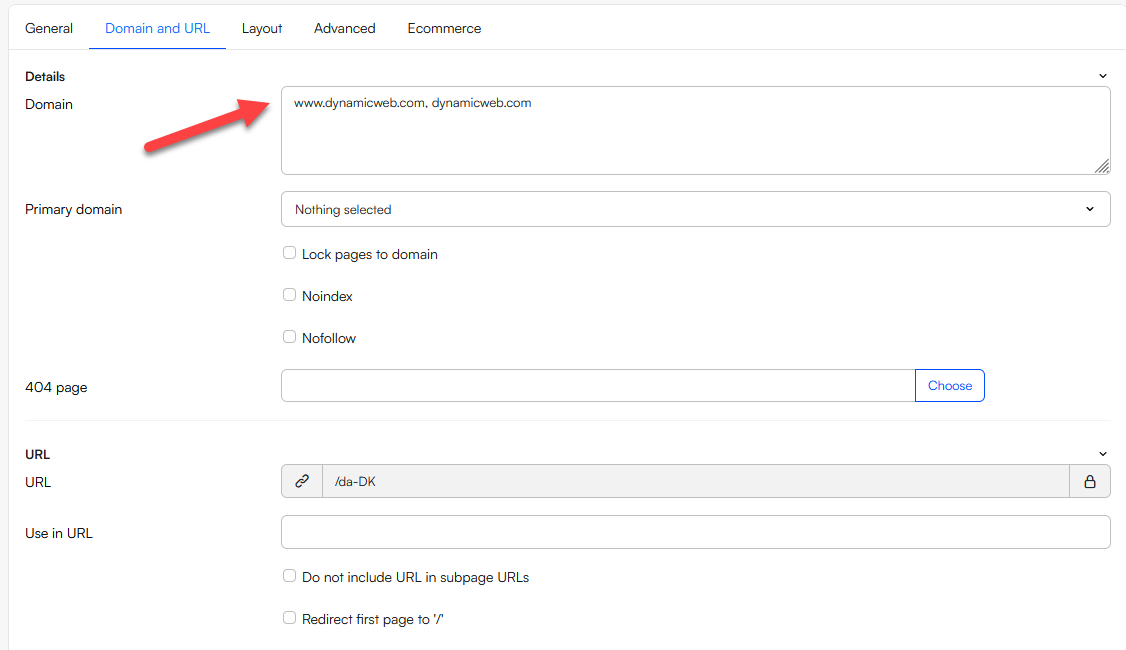
- Navigate to the Domain and URL tab and add the desired domain(s) to the list:
Azure
Domains for a DynamicWeb solution hosted in Azure are independent of the DynamicWeb backend an so you only need to configure domains in Azure and perhaps with your DNS provider.
- In Azure, open Settings > Custom domains
- In the Add custom domain box
- Select your domain provider
- Specify how to handle TLS/SSL
- Specify the type of TSL/SSL
- Enter the custom domain
- If you're using an external DNS provider, Azure will generate DNS records for you to create on the DNS server in order to point the domain to the web app running DynamicWeb