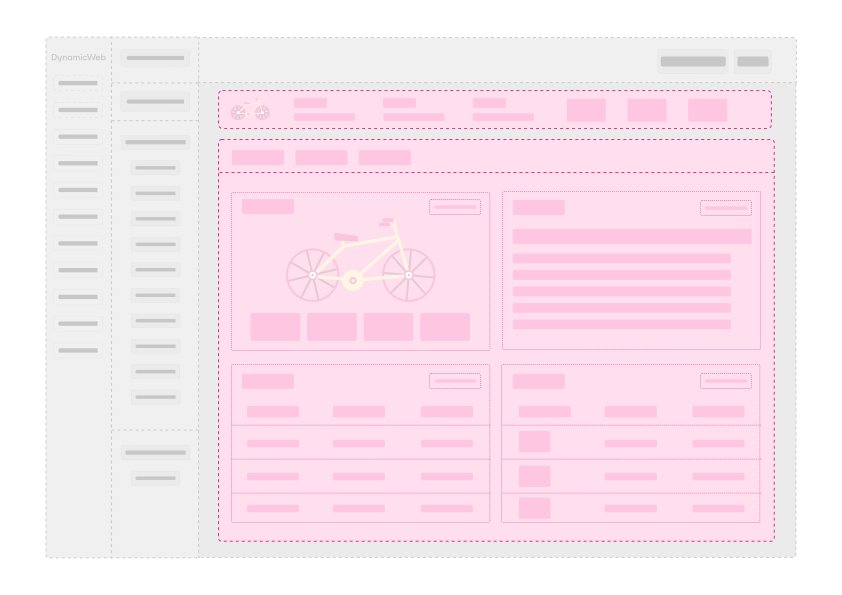
An overview screen shows a high-level summary of a single record — a product, a customer, a configuration entry, or any other entity. Rather than exposing every editable field, it presents key information as widgets arranged in a card layout. Each widget can link to a related list or edit screen via a View more or Manage button. An optional info bar at the top can display prominent key-value data.
When to build an overview screen
Build an overview screen when:
- You want a read-only summary of a record before a user drills into editing.
- Your entity has multiple related sub-lists (e.g., orders for a customer) and you want them surfaced as widgets rather than buried in an edit form.
- You need a landing page that aggregates data from several sources in one place.
For editing a record's own fields, use an edit screen. For browsing a collection of records, use a list screen.
Required overrides
Inherit from OverviewScreenBase<TModel> in Dynamicweb.CoreUI.Screens.
| Override | Purpose |
|---|---|
string GetScreenName() |
Title shown in the topbar |
void BuildOverviewScreen() |
Add widgets and components to the overview |
Adding widgets
Inside BuildOverviewScreen call AddComponent or AddWidget to place a component on the overview:
protected override void BuildOverviewScreen()
{
AddComponent(myComponent, heading: "Summary", width: Group.GroupWidth.Col_12);
}
The width parameter uses Group.GroupWidth values:
| Value | Grid columns |
|---|---|
Col_3 |
Quarter width |
Col_4 |
One third |
Col_6 |
Half width (default) |
Col_8 |
Two thirds |
Col_12 |
Full width |
Worked example
A complete overview screen for a hypothetical ServiceDataModel:
using System.Collections.Generic;
using Dynamicweb.CoreUI.Actions;
using Dynamicweb.CoreUI.Actions.Implementations;
using Dynamicweb.CoreUI.Displays.Information;
using Dynamicweb.CoreUI.Displays.Widgets;
using Dynamicweb.CoreUI.Icons;
using Dynamicweb.CoreUI.Layout;
using Dynamicweb.CoreUI.Screens;
public sealed class ServiceOverviewScreen : OverviewScreenBase<ServiceDataModel>
{
protected override string GetScreenName()
=> Model?.Name ?? "Service";
protected override void BuildOverviewScreen()
{
// Info bar at the top
SetInfobar(new InfoBar
{
Information = new Dictionary<string, InfoValue>
{
{ "Status", new InfoValue(Model?.Active ?? false) },
{ "Expires", new InfoValue(Model?.ExpiryDate) },
{ "Contact", new InfoValue(Model?.ContactEmail ?? "") },
}
});
// Key details card — full width
AddComponent(
new CardInfo { /* ... */ },
heading: "Details",
width: Group.GroupWidth.Col_12);
// Related items widget — half width each
AddComponent(
BuildRelatedLogsWidget(),
heading: "Recent logs",
width: Group.GroupWidth.Col_6);
AddComponent(
BuildSettingsWidget(),
heading: "Settings",
width: Group.GroupWidth.Col_6);
}
private Widget BuildRelatedLogsWidget()
{
return new Widget
{
Label = "Recent logs",
Component = new ListDisplay
{
ScreenType = typeof(ServiceLogListScreen),
Query = new ServiceLogListQuery { ServiceId = Model?.Id ?? 0 }
},
ContextMenu = new ContextMenu().WithActionNode(new ActionNode(
"View all logs",
Icon.List,
NavigateScreenAction.To<ServiceLogListScreen>()
.With(new ServiceLogListQuery { ServiceId = Model?.Id ?? 0 })))
};
}
private Widget BuildSettingsWidget()
{
return new Widget
{
Label = "Settings",
Component = new InfoCardDisplay
{
Value = new InfoCardDisplay.InfoCardValue
{
Description = Model?.Description ?? "",
AdditionalInfo = new Dictionary<InfoCardDisplay.InfoLabel, InfoValue>
{
{ new("Max retries"), new InfoValue(Model?.MaxRetries.ToString() ?? "") },
{ new("Timeout"), new InfoValue($"{Model?.TimeoutSeconds}s") },
}
}
},
ContextMenu = new ContextMenu().WithActionNode(
ActionBuilder.Edit<ServiceEditScreen>(
new ServiceByIdQuery { Id = Model?.Id ?? 0 }))
};
}
protected override IEnumerable<ActionGroup>? GetScreenActions() =>
[
new ActionGroup
{
Nodes =
[
ActionBuilder.Edit<ServiceEditScreen>(
new ServiceByIdQuery { Id = Model?.Id ?? 0 }),
new ActionNode("Run now", Icon.Play,
RunCommandAction.For(new ServiceRunCommand { Id = Model?.Id ?? 0 }))
]
}
];
}
Info bar
Call SetInfobar to display key values prominently above the widget grid. InfoValue accepts several types:
| Constructor argument | Rendered as |
|---|---|
string |
Plain text |
DateTime? |
Formatted date |
bool |
Checkmark or cross icon |
(string, ActionBase) |
Clickable text with an action |
SetInfobar(new InfoBar
{
Icon = Icon.Gear,
Information = new Dictionary<string, InfoValue>
{
{ "Active", new InfoValue(Model?.Active ?? false) },
{ "Created", new InfoValue(Model?.CreatedAt) },
{ "Owner", new InfoValue("Edit owner",
NavigateScreenAction.To<UserEditScreen>()
.With(new UserByIdQuery { Id = Model?.OwnerId ?? 0 })) },
}
});
Tabs on overview screens
Use the tabbed AddComponent overload to place widgets on named tabs:
AddComponent("Summary", mySummaryComponent, heading: "Key info");
AddComponent("Logs", myLogListDisplay, heading: "Recent activity");
If you never pass a tab name, all widgets appear on a single unnamed default tab.
Optional overrides
| Override | What it does |
|---|---|
IEnumerable<ActionGroup>? GetScreenActions() |
Add entries to the Actions context menu |
ActionBase? GetBackAction() |
Action for the Back button (requires ShowCloseAction = true) |
bool ShowCloseAction { get; set; } |
Set to true in the constructor to show a Back button |
public ServiceOverviewScreen()
{
ShowCloseAction = true;
}
protected override ActionBase? GetBackAction() =>
NavigateScreenAction.To<ServiceListScreen>()
.With(new ServiceListQuery());
Gotchas
SetInfobarmust be called insideBuildOverviewScreen, not in the constructor. Thelayoutfield is only initialized whenGetDefinitionInternalruns.- Widget width is controlled at the
AddComponentcall, not on the widget itself. Passwidththere, not on theWidgetobject. OverviewScreenBasehas no injector equivalent. To extend an overview screen from a 3rd-party assembly, useScreenInjector<T>withOnAfterto traverse and modify the rendered layout tree. See Screen injectors.- Discovery is automatic.
AddInManagerscans all loaded assemblies — no registration is needed.