Swift 2 consists of many moving parts, and in this article we will provide you with a rundown of all of them, so that you may better understand what they do and how to use them.
From 10.000 feet up, DynamicWeb Swift consists of:
| Component | What it is | Function |
|---|---|---|
| Design-folder | A collection of files (templates, js, css) | Controls how content created on the solution using Swift 2 is rendered in frontend. Every item type will have a dedicated template-file (.cshtml) and static content to match. |
| Item types | XML-based content type definitions | Defines the types of content - pages, paragraphs, etc. - which can be created and where they can be used. Also used to extend standard settings with Swift-specific settings used in design-files |
| Database | Standard DW10 database | Holds the pages, paragraphs, products and other objects and settings which constitute the default preconfigured Swift frontend |
So - that's the rundown in very broad strokes - but let's take a closer look, shall we?
Design
A DynamicWeb design - what you would maybe call a theme elsewhere - is a collection of files (templates, js, css) which control how content created inside the DynamicWeb 10 application is shown in frontend.
The following elements control the layout of a page in the design:
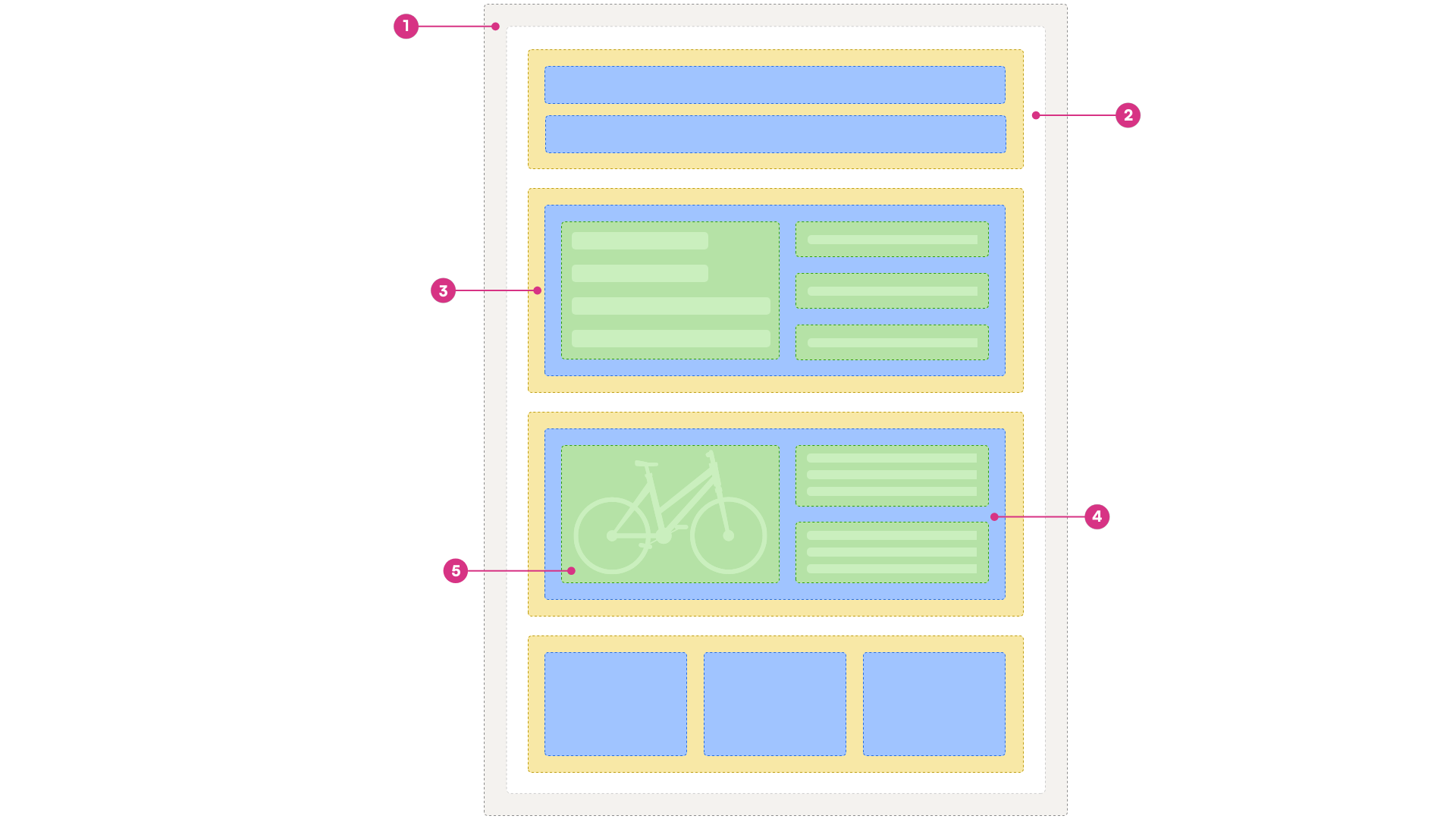
| # | Component | Use |
|---|---|---|
| 1 | Master template | The master template contains markup and other ressources shared across page types in a design, e.g. references to .NET libraries, links to static resources, etc. |
| 2 | Page type | The page type controls the overall function and layout of a page. Swift contains several page types – one for content pages, one for product lists, etc. |
| 3 | Row | Containers which allow an editor to create a content grid on a page, controlling the layout on the page type. Rows are divided into columns – slots where you can then add content from a paragraph type. |
| 4 | Paragraph type | Configurable, customizable content components which are placed in a column on a row. |
| 5 | Product component | A special kind of paragraph type which is exclusively used to construct product list and details |
Location of files
The Swift design is located under Files/Templates/Designs on disk...
/Files/
├── Images/
├── System/
├── Templates/
│   ├── CookieWarning/
│   ├── Designs/
│   │   ├── Swift-v2/ <----------- This folder
│   ├── Items/
...and can be browsed from the application backend via the Assets-area:

Without going into too much detail here are the highlights:
- The Assets folder contains all the css, js, and other external libraries used in the design
- The Grid folder contains the row-definitions and row templates used in the two content grids using in Swift; Email and Page
- The Navigation folder contains templates for the different navigations used in Swift, e.g. the top navigation, a breadcrumb, an off-canvas navigation, etc.
- The Paragraph folder contains templates for the columns you can add to the main content grid
- The UserManagement folder contains the templates which control profile related tasks; logging in and out, showing a user profile, creating a profile, managing addresses, etc.
In the root of the Swift-v2 folder you will find a number of page templates, which control the layout on different types of content pages. The most important of these are the Swift-v2_Master.cshtml and Swift-v2_Page.cshtml templates - the master template is referenced by (most) other layout templates and contains markup which can be shared across all page templates, and the Swift-v2_Page.cshtml template is the default page template used by the design.
Applying the Swift-design
The Swift-design is applied to a website by selecting the default page template - Swift-v2_Page.cshtml - in the Layout-tab of the website settings:
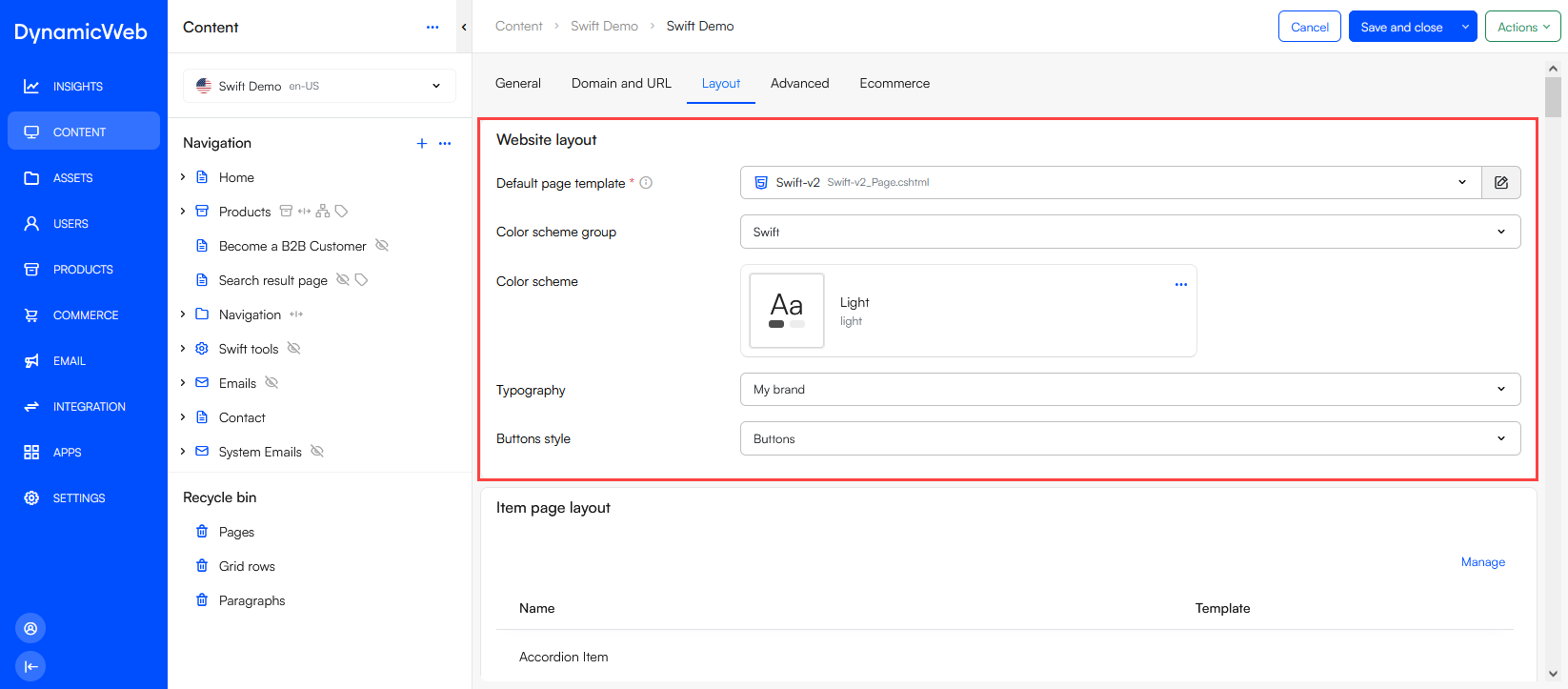
It is also here that you select the DynamicWeb 10 styles which are used by the design - specifically:
Item types
Item types are collections of fields which are attached to system objects - e.g. pages, paragraphs, websites - to extend or supplant the standard fields with the ones defined on the item type.
On Swift they are used to:
- Extend the standard website settings with custom Swift-specific settings used in the design
- Define the content model - the page types, paragraph types, and product components you can create, where you can create them, and so on
Item types are created under Settings > Areas > Content > Item types - and, once created, can be found in the System > Items folder in XML-format.
/Files/
├── Images/
├── System/
│   ├── Items/ <----------- This folder
├── Templates/
Custom settings
A couple of the Swift item types are used to extend the default DW10 settings:
- ItemType_Swift-v2_Master.xml contains Swift-specific website properties
- ItemType_Swift-v2_PageProperties.xml contains Swift-specific page properties
The Swift-specific website properties - which are used to tie many of the components of the Swift design together and configure integrations to e.g. Google Tag Manager and OpenGraph - are available from the General-tab of the website settings:
 They are applied to a design under the Advanced-tab of the website settings.

The custom page settings are applied in the same manner, but are available from the General-tab when editing page settings via the Visual Editor.
Content model
The other item types are all connected to the Swift Content Model - what types of content can be created, where it can be created, and so on. Some of the items are used to create specific page types, others are used to add content to the grid in the form of paragraphs types, and others again are used only to construct emails from.
You can read more about these item types in the linked documentation.
Database
Finally, Swift also consists of a database with pages, products, and other objects and settings created in DW10 - the content which constitutes the default frontend. You don't have to use the database, as the design files and item types which control the look and feel of the frontend are not stored in the database, but in many cases it's easier to start by modifying the default design than it is to create a website from scratch.